
Find B-roll by what's on screen.
You know the shot is somewhere in your archive — but pulling it out means scrubbing through hours of footage on the off-chance you'll recognize it. ClipCatalog runs AI tagging on every clip on your PC the first time you index a folder, then lets you stack a couple of AI tags — sunset + ocean, or crowd + concert — to pull every match from every shoot you've ever filmed. Seconds instead of hours.
No per-clip pricing. No cloud uploads. One $99 license to make every clip you own browseable by what's actually visible in it.
Library-wide, not per-video
Tools like OpusClip cut clips out of one video at a time. ClipCatalog goes the other direction — it indexes your whole back-catalog so you can pull shots that match a tag combination from across every shoot you've ever filmed.
Tag vocabulary, not free-text guessing
Tag search uses a discrete, browseable vocabulary you can actually drill into — so you know what's in your library before you query it. For the rare shots the vocabulary doesn't name, switch to natural-language search with Relaxed/Balanced/Strict strictness. Two retrieval modes, one local index.
Pay once, no per-clip fees, no cloud
Cloud DAMs and AI clip services bill per asset, per seat, per minute, or per month. ClipCatalog is a one-time $99 license — re-index a folder any time at no extra cost, and never ship your footage to a third party. Your tag index is yours, on disk, encrypted.
The 'I know I shot something like this' problem
Tag search flips B-roll work on its head: instead of starting with a 12-drive haystack and hoping to recognize the right shot mid-scrub, you start from a shortlist of clips the AI has already flagged as matching your filter. The same four-second coffee-cup cutaway that used to take an hour now lives one Match-All click away — because every clip is pre-tagged the moment it's indexed.
Without tag search
- Twelve drives of source footage, no consistent naming, no way to search visually
- Manual logging would take weeks and goes stale the moment the next shoot lands
- Cloud DAMs charge per asset, per seat, per month — and want your footage on their servers
- The shot you need is on the SSD you mailed back to the client
With ClipCatalog
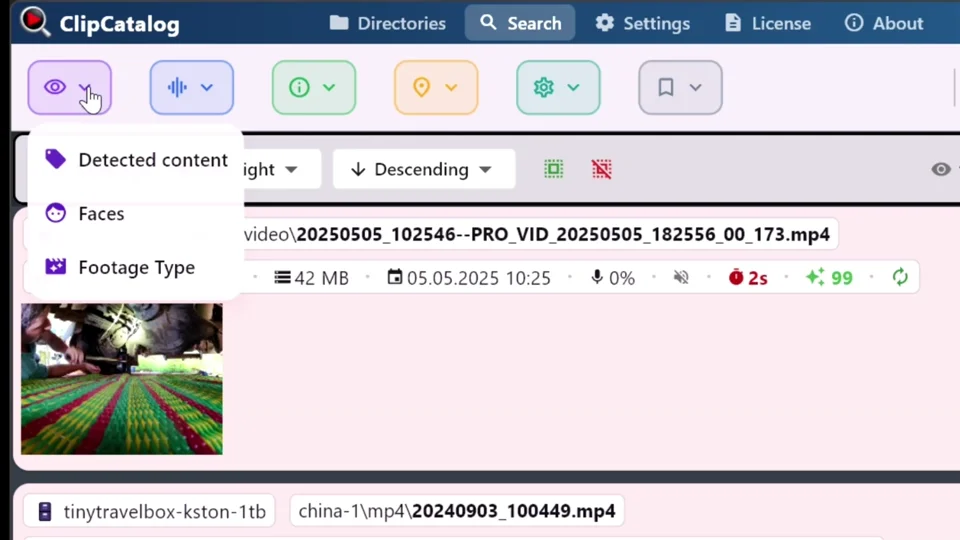
- Open the Tags filter, see the tag vocabulary the AI built from your own footage, and start from a shortlist
- Stack the right tags, hit Match-All, and a result strip of candidate shots appears in seconds — no scrubbing, no guessing
- Drag the clip you need straight into Premiere, DaVinci Resolve, or Vegas Pro from the result strip — files never leave your machine
- AI tagging runs on future shoots in the background, drives stay searchable even when unplugged, and no monthly bill ever shows up
How searching B-roll by visual content works
Three things have to be true for visual B-roll search to actually replace scrubbing: tags worth searching, library-wide coverage, and a query path that doesn't require remembering filenames. ClipCatalog handles all three locally.
AI tags →Point at your footage folders
Add one folder or several — internal drives, external SSDs, archive NAS. ClipCatalog scans for video files and queues each one for local AI tagging. Your folder structure stays untouched.
AI tagging runs locally on every clip
A vision model runs on your hardware — GPU when available, CPU fallback otherwise — and produces a structured tag set per clip: scenes, objects, actions. Nothing is uploaded. See the AI tagging feature page for how the tag vocabulary is generated and which model size to pick.
Pull B-roll by tag
Open the Tags filter, pick a tag like beach, or combine beach + sunset with Match-All to narrow further. For shots the tag vocabulary doesn't name, switch to natural-language search and type a free-text description — set strictness to Relaxed, Balanced, or Strict.
Example searches that become easy
Tags are discrete and enumerable, so you can browse what's actually in your library — not just guess at it. The Tags filter handles single-tag and multi-tag queries; combine tags with Match-All (AND) or Match-Any (OR). For shots that don't fit any tag in the vocabulary, the natural-language filter takes a free-text description.
Who searches B-roll by visual content?
Anyone who maintains a growing back-catalog of footage they keep dipping back into. A few real shapes:
Editors with multi-project archives
Three years of corporate, documentary, and brand work on rotating drives. Pull every interior office shot, every product close-up, every street establisher — without remembering which client paid for which shoot.
YouTubers needing reusable B-roll
Every cooking video, gym session, or city walk you've ever published is also raw cutaway material for the next one. Tag it once, reuse it forever — no per-clip subscription.
Filmmakers cataloging raw footage
A documentary feature with four hundred hours of source. Find every shot of the subject's hometown, every workshop interior, every transitional landscape — without per-tape manual logging.
Course creators pulling visual examples
Hundreds of recorded lessons plus screen-share and field footage. Find every clip that visually demonstrates a concept — a whiteboard, a city street, a piece of equipment — and drop it into the next module.
Brand-content teams reusing shoots
One product shoot becomes a year of social cutdowns. Find every clip of the new bottle, the lifestyle b-roll, the hero close-up — without re-watching the whole take.
Stock-shooters maintaining a personal archive
A backlog of raw self-shot footage you slowly mine for portfolio pieces. Describe what you are after, like silhouettes, empty streets or views from above, and decide what's worth finishing.
What to expect from B-roll visual search
ClipCatalog's tagging pipeline is designed to be practical and honest. Here's what's true before you start.
Speed depends on your hardware
A capable GPU makes initial indexing fast; CPU-only is slower but works. Either way, it's a one-time cost per clip: once the library is indexed, tag searches return their first results in seconds.
Windows only for now
ClipCatalog is currently available for Windows 10 and 11. A GPU helps but isn't required — the app picks the faster option for your hardware.
Why local-first matters for B-roll archives
Unreleased footage is some of the most sensitive material a creator handles. Client deliverables under embargo. Unreleased product shots. Footage of people who haven't signed releases. A cloud DAM that uploads every clip for tagging is asking you to trust their access controls — and their billing department's continued goodwill — forever.
ClipCatalog tags clips on your hardware. The video stays on the drive. Tags live in a local SQLite database on your machine. Nothing leaves until you choose to share it.
If you're comparing local-first video tools side by side, see the privacy-first video management roundup for how ClipCatalog stacks up on AI tagging, semantic search, and library-wide retrieval.
Searching B-roll by visual content — FAQ
Does this upload my footage anywhere?
No. Tagging runs entirely on your machine using a bundled local vision model. Once the model is on disk, no network is needed for indexing or search.
How is this different from OpusClip or similar clip-extraction tools?
OpusClip and similar tools turn one long video into shorter clips. ClipCatalog goes the other direction — it indexes your whole library so you can pull matching B-roll from across every shoot you've ever filmed.
What's the difference between tag search and natural-language search?
Tag search uses a discrete, enumerable vocabulary — you pick from the tags the AI detected, combine them with Match-All / Match-Any, and get exact matches. Natural-language search takes a free-text phrase and ranks clips by semantic similarity with three strictness levels: Relaxed, Balanced, or Strict. Both run locally; use whichever fits the shape you're after.
Can I narrow results further once I have a tag-search shortlist?
Yes. Layer tags with face filters, transcript filters, footage-type filters (dialogue / voiceover / scenic), date range, camera, resolution, and so on. Each filter you add cuts the result list down.
Does the free trial include AI tagging?
Yes — up to 500 videos or 10 hours of footage, whichever comes first, with full access to all features including tag search, face detection and grouping, and natural-language search. No account or credit card required.
Does it work on Mac or Linux?
ClipCatalog is currently available for Windows only (Windows 10 and 11). Mac and Linux support is not on the near-term roadmap.
Combine tag search with everything else
Tag search is most powerful when you stack it with other filters. Each layer cuts the result list down so you're not sifting through hundreds of near-matches.
AI tags
The detected-content filter in depth: how tags are generated, browsing the vocabulary, Match-All / Match-Any logic, and the difference from natural-language search.
Video search
The full video-search surface — visual, audio, person, metadata, and technical filters in one query.
Find a person in video
Layer tag search with face search — every clip that visually matches a tag combination AND contains a specific person.
External drives
Tag search works across external drives. Tags stay searchable even when the drive is disconnected.
Relevant comparisons
If you are evaluating this workflow against other tools, start with these side-by-side pages.
Related problem-centered guides
Search a TB-scale video library
Once a B-roll archive crosses into multi-TB territory, tag search alone stops being enough. Combine it with face, transcript, and metadata filters — and save the combinations as presets.
Organize footage across drives and NAS
B-roll search only works when the catalog actually spans every drive — the companion guide for unifying internal SSDs, externals, and NAS into one searchable library.
Search videos by spoken words
Find every moment a word, name, or phrase was spoken across your library — Whisper transcription runs locally, no per-minute fees.
Find a person in your video library
Face search across folders, drives, and years of footage — the companion problem to AI tag search.
Footage library for filmmakers and editors
The end-to-end editor workflow — ingest, search, review, drag into the timeline — for projects spanning months and terabytes.
YouTube footage manager
Reuse every cooking, gym, or city-walk clip you've ever published as raw cutaway material for the next video.
Try ClipCatalog free — up to 500 videos
No account required. Your footage stays on your computer.
License terms and installer availability