
You remember the word. ClipCatalog finds the moment.
Type a few words someone said in one of your videos — and the player jumps straight to the second they were spoken. Interviews, lectures, livestreams, family videos: every audio track in your archive becomes searchable like a text document.
Transcription runs locally with Whisper, on your own hardware. No uploads, no per-minute fees, no cloud accounts — a single $99 license for unlimited transcription hours.
The "I know someone said it" problem
You remember a word, a name, or a couple of distinctive words from a quote — but not which file. Without searchable transcripts, the only option is scrubbing. With ClipCatalog, you type what you remember and matching clips surface in seconds.
Without transcript search
- You remember someone said something important, but not which file
- Scrubbing through hours of footage to find one quote
- Cloud transcription services charge per minute and require uploads
With ClipCatalog
- Type the word and get every video that contains it, with the exact timestamp
- Click a result, jump straight to the second the words were spoken
- Transcription runs in the background while you work — no uploads, no waits
How searching videos by spoken words works
Three things have to be true for spoken-word search to feel like Ctrl+F across your video library: accurate transcription, library-wide indexing, and a fast query path back to the exact moment. ClipCatalog handles all three locally.
Transcript search →Point at a folder
Add one folder or several. ClipCatalog scans for video files and queues each one for local transcription. Your folder structure stays untouched.
Local Whisper does the work
ClipCatalog bundles whisper.cpp and runs it on your hardware — Vulkan GPU when available, CPU fallback otherwise. Nothing is uploaded.
Search by speech
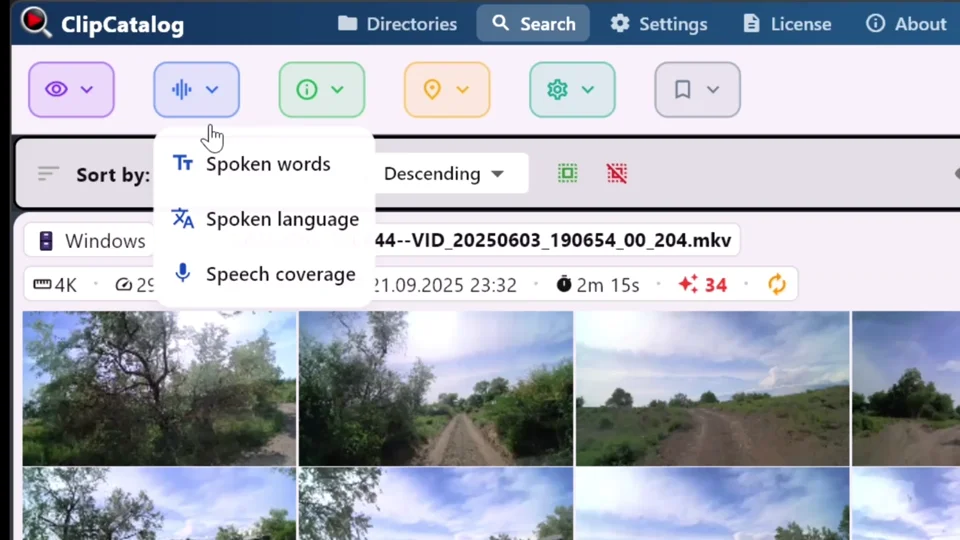
Open the transcript filter, type a word like closing, or combine closing + remarks and require both words to narrow further. Click a result to jump straight to the moment those words were spoken.
Example searches that become easy
Once your library is indexed, finding a specific spoken moment is as fast as typing one word. The transcript search filter handles word-level lookup; combine multiple words and require all of them to narrow results, or accept any of them to broaden.
Who searches video by spoken words?
Anyone with a back-catalog of recorded speech that has never been indexed. A few real shapes:
Journalists with interview archives
Eighty hours of source interviews going back three years. ClipCatalog transcribes them locally; search a quote you half-remember and jump to it. Source material never leaves the laptop.
Podcasters with video episodes
Every time a guest mentioned a competitor, every callback to an earlier episode, every joke you might reuse as a short. Search across every episode at once.
Lecturers and course creators
When students ask "where did you cover X?", answer with a timestamp instead of "somewhere in week 4."
Legal teams with deposition recordings
Search depositions by exact phrase — recordings never leave the firm's machines, so client material doesn't touch a third-party transcription service.
Documentary filmmakers
Comb three years of interview B-roll for every clip mentioning a specific person, place, or theme — without paying per minute or waiting on cloud round-trips.
Family historians
Older relatives told you stories you wrote down badly. The video has the real version. Find "when grandpa talked about the boat" without watching forty hours.
What to expect from spoken-word video search
ClipCatalog's transcript pipeline is designed to be practical and honest. Here's what's true before you start.
Multi-language transcription
Whisper handles dozens of languages, auto-detected per clip — no manual configuration. See the FAQ below for the full list of supported languages.
Windows 10/11, GPU optional
ClipCatalog runs on Windows 10 and 11. A capable GPU makes transcription fast; CPU-only is slower but still works. Either way, it's a one-time cost — once your archive is indexed, searches are instant.
Search even when drives are unplugged
Once a folder is indexed, the transcripts stay on your PC. You can search clips on external drives even when the drive is disconnected — reconnect only to play the actual file.
Export to SRT or TXT
Drop a finished transcript into your editor as SRT subtitles, or export plain text to publish alongside the clip.
Why local-first matters for spoken content
Spoken-word recordings are some of the most sensitive content on a drive. Interviews under embargo. Depositions. Therapy sessions. Family stories. A transcription service that uploads them is asking you to trust their infrastructure — and to keep trusting it after the data is theirs.
ClipCatalog runs Whisper on your hardware. The video stays on the drive. The transcript stays in a local SQLite database on your machine. Nothing leaves until you choose to share it.
If you compare local-first video tools side-by-side, see the privacy-first video management roundup for how ClipCatalog stacks up on offline transcription and library-wide search.
Searching videos by spoken words — FAQ
Does this upload my videos anywhere?
No. Transcription runs entirely on your machine using a bundled local Whisper model. Once the model is downloaded on first run, no network is needed.
Which languages are supported?
Dozens — English, German, French, Spanish, Portuguese, Russian, Arabic, Japanese, Korean, Mandarin, and many more. ClipCatalog auto-detects the spoken language per clip — no manual configuration needed.
How accurate is it compared to Otter, Rev, or Trint?
ClipCatalog uses Whisper, the same model family several commercial services are built on — specifically the large-v3-turbo model, which is the current accuracy/speed sweet spot in the Whisper lineup. Accuracy is comparable to commercial cloud services running the same model family.
Can I search across multiple videos at once?
Yes — that's the point. Cloud transcription tools usually work per-file. ClipCatalog indexes folders and lets you query the whole library at once.
Does it work on external drives?
Yes. Drives are tracked; you can still search transcripts when a drive is unplugged. Results show as unavailable until you reconnect the drive.
How fast is transcription?
ClipCatalog ships a single Whisper model (large-v3-turbo) — speed depends on your hardware. On a modern GPU transcription typically runs many times faster than real-time.
Can I export transcripts as subtitles?
Yes — every transcript can be exported as SRT subtitles or plain text per video. Drop them into your editor or publish alongside the clip.
Does the free trial include transcription?
Yes — up to 500 videos or 10 hours of footage, whichever comes first, with full access to all features including transcript search and face recognition. No account or credit card required.
What about videos with poor audio?
Whisper handles background noise and accents better than older speech-to-text systems but isn't magic. Heavily distorted or low-volume audio produces less-accurate transcripts.
Does it work on Mac or Linux?
ClipCatalog is currently available for Windows only (Windows 10 and 11). Mac and Linux support is not on the near-term roadmap.
Combine transcript search with everything else
Spoken-word search is most powerful when you layer it on other filters. Each layer cuts the result list down so you're not sifting through false positives.
Transcript search
The transcript-search feature in depth: filter syntax, All/Any matching, speech-coverage filter, and export options.
Find a person in video
Combine transcript search with face search — every clip where a specific person said a specific thing.
AI tags
Layer transcript search with detected scenes and objects — find clips where someone is talking about something while it's on screen.
External drives
Spoken-word search works across external drives. Transcripts stay searchable even when the drive is disconnected.
Relevant comparisons
If you are evaluating this workflow against other tools, start with these side-by-side pages.
Related problem-centered guides
Search a TB-scale video library
When the transcript index sits inside a multi-TB archive, layered filters and saved presets become the real unlock. The companion guide for retrieval at scale.
Find B-roll by what's on screen
When the word you remember isn't a quote, switch from transcript to AI tags — auto-generated, library-wide, no manual labeling.
Organize footage across drives and NAS
Transcripts only matter once the catalog actually spans every drive — the companion guide for unifying the storage layer.
Find a person in your video library
Face search across folders, drives, and years of footage — the companion problem to spoken-word search.
Browse all ClipCatalog use cases
Problem-centered guides and audience workflows for finding things in your local video library.
Try ClipCatalog free — up to 500 videos
No account required. Your footage stays on your computer.
License terms and installer availability