
Search a TB-scale video library — locally, in seconds.
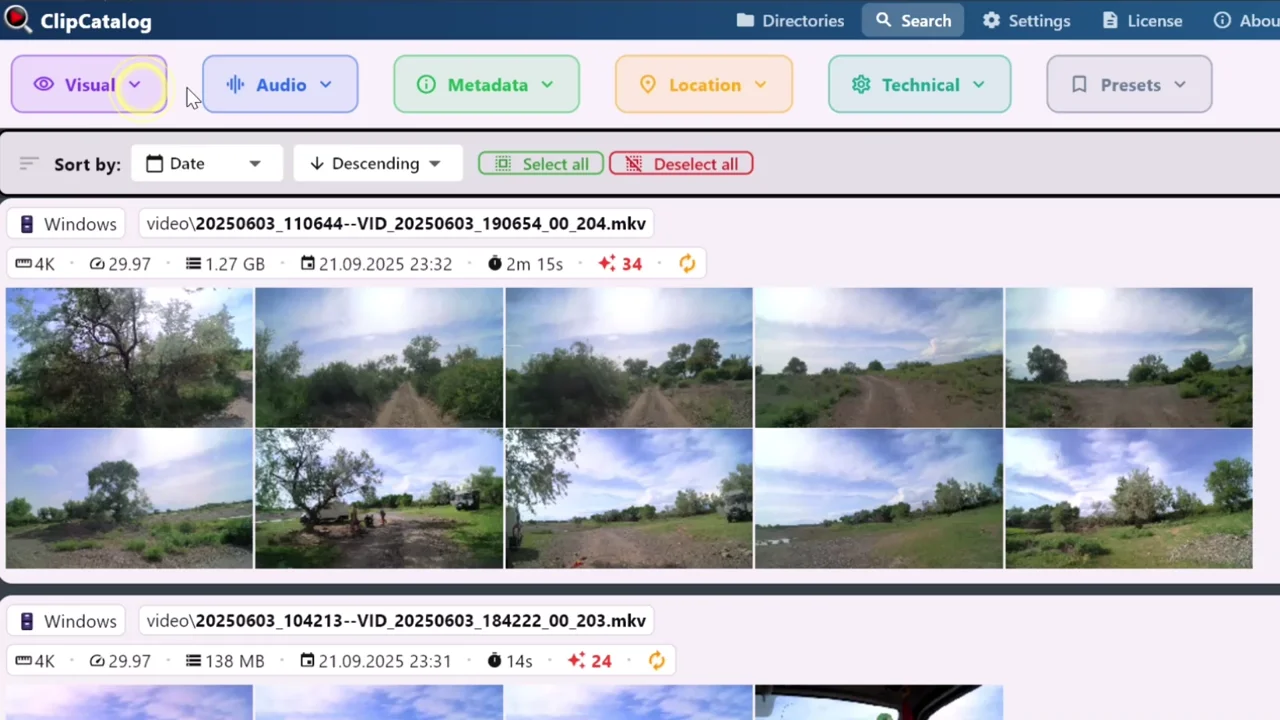
Once your archive is indexed, ClipCatalog combines tag search, spoken-word search, natural-language description search, face filters, and metadata filters into a single query path across the whole library. Drop thousands of clips down to dozens in a few clicks.
No per-minute pricing. No subscriptions. A single $99 license to make every video you own searchable across every drive.
The "I know it's in there somewhere" problem
Past a few terabytes, even good folder structure stops being enough. You know the shot exists, but not on which drive, in which trip folder, in which interview, in which take. Without library-wide search, you scroll. With ClipCatalog, you query — and the right clip surfaces in seconds.
Without library-wide search
- You know the shot exists, but not on which drive or in which year's folder
- Cloud SaaS pricing scales with library size — exactly when you need search the most
- Single-purpose tools index either tags, or transcripts, or faces — not all of them together
With ClipCatalog
- One search bar covers every folder, every drive, and every year of footage
- Combine a tag, a spoken word, a face, and a date range in one query
- Saved presets turn recurring multi-filter queries into one-click recalls
How library-wide video search works
Three things have to be true at TB scale: every clip must be reachable from one search, every retrieval mode must run against the same index, and the index must survive drive reorganizations. ClipCatalog handles all three locally.
Video search →Point at every folder
Add internal drives, external SSDs, NAS shares, and archive disks. ClipCatalog tracks each one by storage volume so the catalog survives drive moves, renames, and detach/reattach cycles. Subfolders can be excluded when only part of a directory should be indexed.
Local AI builds the index
Thumbnail extraction, AI tagging, Whisper transcription, face detection, and natural-language embeddings all run on your hardware — DirectML or Vulkan when available, CPU fallback otherwise. The first pass is a one-time cost; after that, every search hits a local index.
Search by stacking filters
Combine tag, transcript, face, footage-type, and metadata filters in a single query. Each filter trims the result set further — a 10,000-clip library narrows to a handful in seconds. Save any combination you'll run again as a preset; the next search is one click away.
Library-wide searches that finally become easy
Six searches that demonstrate what library-wide retrieval looks like in practice — from a single AI tag to a saved preset that combines four filters at once. Each example assumes the index is already built; from there, the query is the easy part.
Who searches a TB-scale video library?
Six shapes of real archives where library-wide search pays off the moment you stop scrolling and start querying.
Broadcast news archive with decade-spanning indexed content
Roughly 40 TB, 80 000 clips, four newsroom edit suites pulling material every day. When a story breaks, the question is "what do we already have on this person, this place, this incident?" A face filter + a single-word transcript search + a date-range filter answers it across ten years of coverage in seconds.
Stock-footage library with rights-cleared catalog spanning decades
Hundreds of thousands of clips, every one tagged for what's on screen. Buyers come with very specific briefs ("slow-motion aerial of a coastline at golden hour"). A natural-language description search at Strict strictness plus a scenic footage-type filter narrows hundreds of thousands of clips to a license-able shortlist in one query.
Legal e-discovery across deposition and body-cam footage
Twenty-five terabytes of recordings across discovery: depositions, body-cam pulls, neighbourhood-camera dumps. Opposing counsel asks a question; the team needs every clip mentioning a specific term — fast, and without uploading sealed material to a third party. Single-word transcript search across the lot, then narrow by date range and speaker face.
Sports analytics across multi-season game and training libraries
Five seasons of full-game multi-camera captures plus daily training footage adds up to tens of terabytes. The analyst needs "every counter-attack started by player X in matches we lost" — a face filter + a tag-search for the action + a metadata filter for losses narrows years of tape to a focused study reel in one query.
University media lab and scientific imaging archive spanning a decade
Eighty terabytes of experiment recordings: behavioural trials, microscope captures, fieldwork, time-lapse rigs. The next paper needs comparable footage from older studies — a natural-language description search at Balanced strictness plus a date-range filter surfaces every comparable run across the decade, without a graduate student spending two weeks digging through external drives.
Post-production archival vault for completed client work
Eight years of finished projects archived for the contractually required retention window — well past 100 TB. The producer comes back asking for "the lifestyle reel from the spring 2024 cosmetics campaign": a saved preset combining client tag + project date range + dialogue-free footage-type returns the right reel in seconds, even though most of the archive lives on cold drives.
What to expect at TB scale
Large libraries put pressure on every step of an indexing pipeline. ClipCatalog is built around the trade-offs that actually matter at TB scale — here's the honest version.
The first index is the biggest cost
Plan the first pass overnight or across a weekend on a multi-TB library. After it completes, incremental syncs only process the new content. Pause and resume as needed — progress is preserved.
Hardware controls put speed in your hands
Pick the GPU used for content analysis, the GPU used for Whisper transcription, and the device used for face detection independently. Run the built-in benchmark and ClipCatalog suggests the fastest setup for your machine.
Latency stays workable past 100 000 clips
The index is built on a local vector database and an encrypted SQLite catalog tuned for fast lookups. Expect a single-tag or single-word query to return its first results in seconds on a 20 000-clip library, and to stay responsive as the library doubles.
Combined filters keep result lists workable
A 10,000-clip library doesn't have to give you 10,000 results. Stack tag, transcript, face, footage-type, and metadata filters together — each one trims the set further, so the handful you actually want surfaces in seconds.
Four retrieval modes, one library
Tag search uses an enumerable AI vocabulary; spoken-word search lets you find single words in transcripts with Match-All/Match-Any; natural-language search ranks clips by free-text descriptions with Relaxed/Balanced/Strict strictness; face search filters by people clustered from detected faces. Use whichever mode fits the question.
Windows only for now
ClipCatalog runs on Windows 10 and 11. The app picks the fastest hardware path it can — DirectML, Vulkan, or CPU — but Mac and Linux builds are not on the near-term roadmap.
What "TB scale" actually looks like
Concrete order-of-magnitude figures on representative hardware (a recent Vulkan-class GPU, NVMe-backed catalog drive). Your numbers will shift with codec mix, model size, and storage speed — these are the shape to plan around, not a hard SLA.
Representative test library
≈24 TB of source video, ≈3 000 hours, spread across three internal drives and one NAS share. The figures below are an order-of-magnitude planning model for a library of that shape — your real numbers will shift with codec mix, hardware, and the AI stages you enable.
First result latency
A single-tag query against the full 20 000-clip index returns first results in 2-5 seconds on the representative rig. Stacked filters add a fraction of a second per layer; the slowest part is usually the natural-language vector lookup.
Catalog footprint on disk
Thumbnails, AI tags, transcripts, face data, and semantic vectors all add storage on top of your source video. The Settings → Storage Usage screen breaks the live total down by category in MB — measure your actual footprint after the first index pass rather than working from an estimate.
First-pass indexing time
Plan multi-TB libraries around overnight or weekend background work for the first pass — indexing time depends heavily on codec mix, GPU class, and how many AI stages you enable. The pipeline is resume-friendly, so it survives reboots and drive swaps.
Incremental sync cost
After the first pass, only new or changed clips run through the AI pipeline. The existing index is never rebuilt. A daily sync on a working library typically reaches "caught up" within minutes, even when the underlying archive sits at TB scale.
The economics of searching a 10 TB archive
Cloud transcription services typically bill in the range of $0.005-$0.024 per minute of audio. Across a multi-TB archive that's hundreds of hours of source, transcribing even once runs into the high three- to four-figure range — and that's before storage tier fees, per-user search seats, or egress (cloud egress runs $0.05-$0.09 per GB, which is another $500-$900 if you ever want a 10 TB copy back). The bill grows with the library; the math gets worse the longer you stay.
ClipCatalog ingests on the drives you already own, indexes locally with the GPU you already have, and stores everything in an encrypted SQLite database on your machine. $99 one-time. No bandwidth, no egress, no recurring subscription. A 50 TB library and a 5 TB library cost the same to license; the dominant cost is the storage hardware you already own.
Comparing local-first tools for large archives? See the privacy-first video management roundup for how ClipCatalog stacks up on TB-scale ingestion, library-wide search, and offline workflows.
Searching a large video library — FAQ
How large a library can ClipCatalog handle?
It is designed for multi-terabyte archives spread across multiple folders, drives, and volumes. The catalog database, vector index, and queue are built to scale; the practical ceiling on a modern PC is mostly storage space for thumbnails and embeddings, not a hard video count.
How long does the first indexing pass take on a TB-scale library?
It depends heavily on hardware, codec mix, and how many AI stages you enable. A multi-TB library typically benefits from running the first pass overnight or across a weekend on a GPU-equipped PC. Indexing is fully resumable, so you can pause and resume.
Will queries stay fast as the library grows?
Yes — that's the part the architecture is designed around. Tag and transcript lookups use indexed columns in the local SQLite catalog; semantic and face queries use a local vector index. Both are designed to stay fast as the library grows, so a 50 000-clip library is only marginally slower than a 5 000-clip one for the same query shape.
Can I save filter combinations so I don't have to rebuild them?
Yes — saved search presets are a first-class feature. Bundle a tag-search, a transcript-word filter, a face filter, and a date range into one named preset, then run it again with a single click. Presets stay sensible even when the library grows over time.
Can I really combine tag, transcript, face, and metadata filters in one search?
Yes. Filters from the Visual, Audio, Metadata, Location, and Technical categories all apply to the same result list. Each one shaves off matches that don't meet that condition, so layered filters cut a five-figure result list down to a workable handful very quickly.
Features that pay off most as the library scales
Three capabilities matter disproportionately at scale: saved presets that turn recurring queries into one click, footage-type classification that separates dialogue from voiceover from scenic before you even apply other filters, and a unified search bar that stacks tag, transcript, face, and metadata into a single query.
Video search
Saved presets and the unified search interface where tag, transcript, face, and metadata filters compose into one query — the workflow surface where library-wide filtering actually happens.
AI tags
The auto-generated tag vocabulary is designed to stay fast as the library grows — search-by-tag on a 100 000-clip library should feel similar to a 10 000-clip one.
Transcript search
Indexed columns in the local SQLite catalog keep single-word transcript lookups fast across hundreds of thousands of clips. Match-All/Match-Any across multiple words composes the same way.
Face recognition
Person clusters survive library growth: new clips of the same person get attached to the existing cluster, so finding everything with a recurring face stays a one-click operation no matter how big the library gets.
Relevant comparisons
If you are evaluating this workflow against other tools, start with these side-by-side pages.
Related problem-centered guides
Find B-roll by what's on screen
AI tags with Match-All / Match-Any combinations — the natural complement to library-wide combined search.
Organize footage across drives and NAS
Once an archive crosses TB-scale, footage almost always lives on multiple drives and NAS shares. The companion guide for unifying the storage layer.
Search videos by spoken words
Single-word transcript search across a local Whisper-indexed archive — the per-word complement to library-wide combined search.
Find a person in your video library
Face search across folders, drives, and years of footage — the per-person companion to library-wide combined search.
Try ClipCatalog free — up to 500 videos
No account required. Your footage stays on your computer.
License terms and installer availability