
ClipCatalog vs Daminion
A careful comparison for buyers deciding between ClipCatalog as a video-first Windows retrieval tool and Daminion as a broader digital asset management platform for mixed media, permissions, web access, and deployment choice.
Key official vendor sources reviewed for this page
The links above highlight the main public sources used for this comparison. Product details can change, so recheck pricing, plan limits, and feature scope on the vendor's live site before you buy.
- Free trial
- 500 videos / 10 hours of footage
- License terms
- 2 activations + 5 years of free updates
- Licensing
- Annual or lifetime
- AI tagging
- From USD 3 per 1,000 images
- Hosting
- Server costs stay under your control
The public site does not show a base list price.
Detailed feature comparison
This table focuses on differences that materially affect a buyer choosing between a video-first retrieval tool and a broader DAM platform.
| Capability | ClipCatalog | Daminion |
|---|---|---|
| Primary orientation | AI-powered Windows desktop video cataloging and retrieval for large local libraries. | Multi-user digital asset management for photos, videos, documents, and design files. |
| Typical buyer | Solo creators, editors, archivists, and small teams focused on finding the right clip quickly. | Teams that need shared metadata, permissions, version control, and internal or external sharing across mixed media. |
| Operating system and access | Windows desktop application. | Windows desktop client plus browser access across Windows, macOS, Linux, iOS, and Android. |
| Deployment and storage | Local-first desktop app indexing folders, drives, and archives directly on the user machine. | Self-hosted, cloud, or hybrid deployment, usually layered on existing NAS, Windows Server, or in-place storage. |
| AI dependency qualifiers | Local-first analysis with explicit face-processing controls and local face-data deletion. | AI scope depends on feature: some image tagging needs internet and a Google Vision key; audio and video transcription uses OpenAI Whisper with a user API key. |
| Visual AI for video | Yes. AI tagging and AI tag search are core video search surfaces. | Not clearly specified for video. Public materials are clearer about AI auto-tagging for images than for video. |
| Transcript and spoken-word search | Yes. Transcription and spoken-word search are core. | Yes. Daminion 10.5 offers transcription for audio and video plus searchable transcripts and summaries. |
| Semantic video search | Yes. Free-text semantic video search with strictness controls and relevance sorting. | A directly comparable free-text video-semantic workflow was not publicly specified; search is stronger around metadata, full text, and transcripts. |
| Face recognition | Yes. Face grouping, person filters, and finding more videos with the same person are part of the workflow. | Current public materials describe face recognition as image-focused, desktop-only, and not available for video. |
| Structured metadata and saved search | Saved search presets plus combined filtering across transcripts, people, metadata, path, volume, and technical video fields. | Strong area. Advanced Search supports saved searches, boolean logic, metadata fields, ratings, formats, file size, and other structured filters. |
| Folders, NAS, and archive handling | Path, directory, and volume filters plus external-drive awareness and moved-folder relinking. | Strong for in-place indexing on NAS and existing folder hierarchies, but equivalent rotating-drive warnings or moved-folder relinking were not publicly specified. |
| Review and collaboration | Desktop review and playback focused on retrieval. | Stronger for permissions, web review, comments, shared collections, check-in/check-out, and version history. |
| Transcript export | Yes. Transcripts can be copied or exported as TXT or SRT. | Not clearly specified in the reviewed materials. |
| Integrations and admin controls | Focused on search, transcript export, and file handoff. | Broader DAM stack with Active Directory or Entra ID, single sign-on, Adobe and Microsoft integrations, API access, and admin controls. |
Daminion notes summarize public product information reviewed for this comparison. Quote pricing, AI-service dependencies, and deployment details should be rechecked on live Daminion pages before purchase.
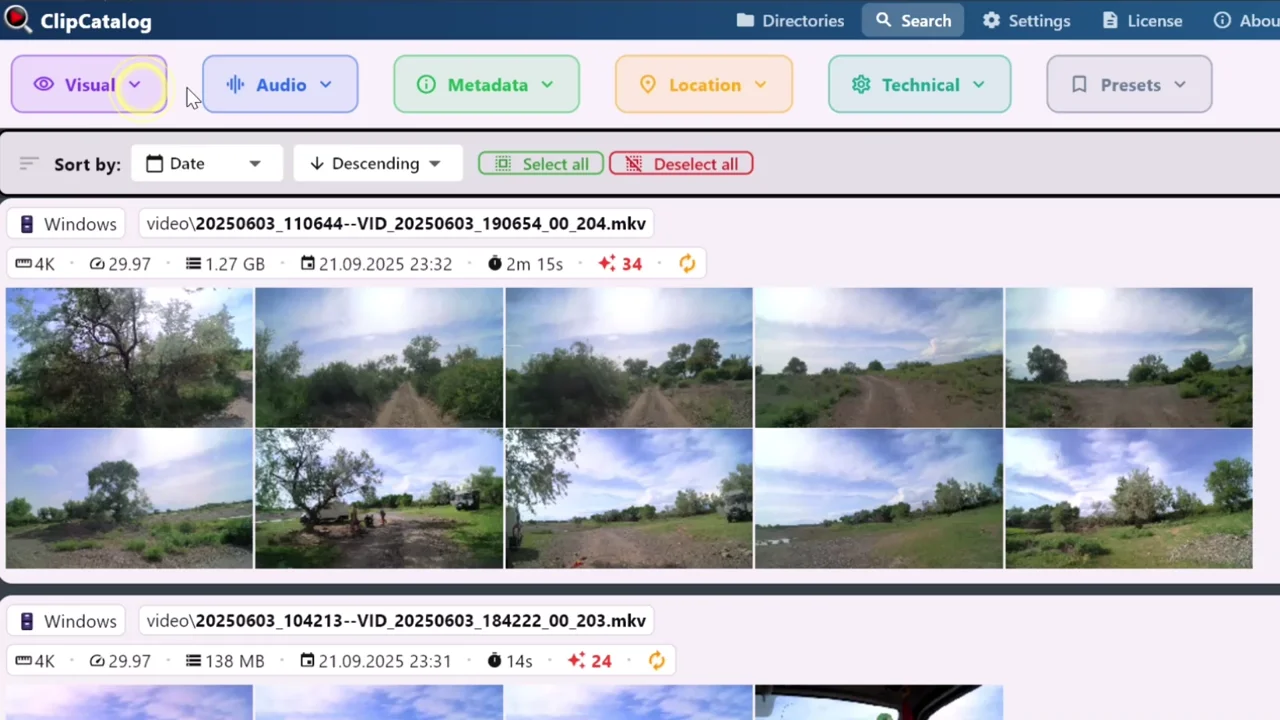
Search a local video library by content, not only metadata
ClipCatalog starts from retrieval across a local archive, with visual, transcript, and semantic search on one Windows PC.
Semantic clip search vs metadata-first DAM search
ClipCatalog is built around finding the right shot quickly. It combines semantic video search, transcript search, person discovery, technical filters, highlight ranking, and archive-aware browsing.
Daminion points in a different direction: strong search inside a broader DAM model built around metadata, permissions, collections, version control, and many file types beyond video.
Permissions and sharing are clearer Daminion strengths
Daminion is more explicit about role-based permissions, shared collections, web comments, check-in/check-out, version history, and browser-facing review workflows.
ClipCatalog stays focused on local desktop retrieval rather than approval chains or client-facing web portals.
Both support transcript search, but with different tradeoffs
ClipCatalog treats transcript search as a core local video-retrieval surface and supports transcript export to TXT and SRT.
Daminion documentation says transcription uses OpenAI Whisper with a user-supplied API key and pay-as-you-go pricing, so cost and privacy assumptions differ.
Stable NAS libraries vs rotating archive drives
Daminion looks especially well suited to organizations with a stable shared library on NAS, Windows Server, or other managed storage where metadata and permissions matter.
ClipCatalog is stronger when archives are messy, portable, or editor-owned, thanks to disconnected-drive awareness, volume filters, missing-folder warnings, and moved-folder relinking.
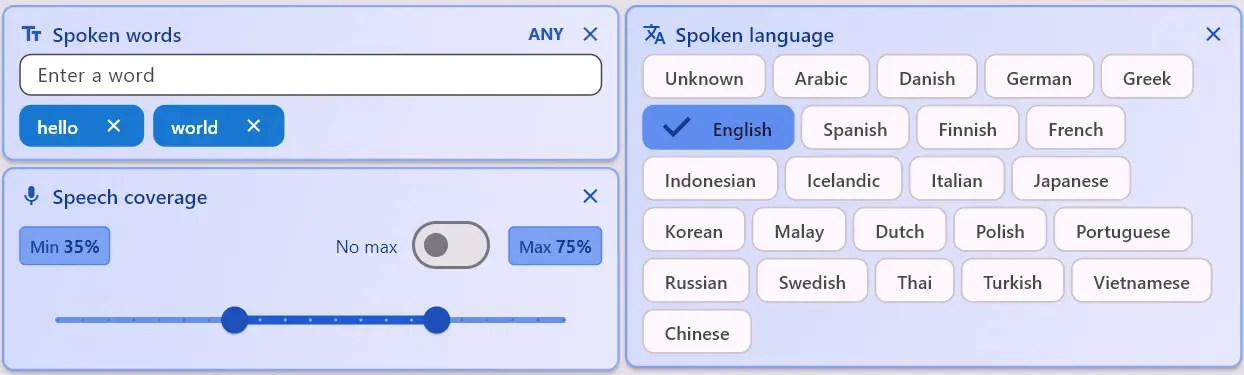
Transcript filters for words, language, and speech coverage
ClipCatalog can narrow results by what was said, which language was detected, and how much of a clip contains speech.
Where ClipCatalog stands out
These are the ClipCatalog strengths that matter most in a Daminion comparison.
ClipCatalog is built around description-based video search, not only metadata or exact tags.
ClipCatalog combines AI tags, transcript terms, people, metadata, path, volume, technical video filters, footage-type filters, and highlight ranking in one workflow.
ClipCatalog offers face grouping, person filters, a direct workflow to find more videos with the same person, and local controls around face processing.
Volume tracking, disconnected-drive handling, and moved-folder relinking are unusually useful when footage lives across external SSDs and renamed folders.
Where Daminion may be the better choice
These are the clearest situations where Daminion may be the better fit.
Daminion is more clearly built for permissions, shared collections, check-in/check-out, version history, approvals, and broader organizational control.
If you manage photos, PDFs, Office files, design assets, and video together, Daminion is usually the better match.
On-prem, cloud, or hybrid options plus directory services, single sign-on, Adobe tools, Microsoft tools, and API access make Daminion broader operationally.
Frequently asked questions
Yes, if your core problem is video retrieval rather than full digital asset management administration. ClipCatalog is more video-specific; Daminion is broader for mixed media, permissions, and governance.
ClipCatalog is usually the closer fit because it is built around video search, transcript search, person discovery in video, and archive-aware folder handling.
Yes. Daminion more clearly supports role-based permissions, shared collections, approval workflows, version control, and web access.
Yes. Daminion 10.5 materials say transcription covers audio and video and uses OpenAI Whisper with a user-supplied API key.
No. Current public FAQ and documentation describe face recognition as image-focused and not available for video.
Daminion is usually the closer match if you manage photos, PDFs, Office files, design assets, and video together.
Comparison note
This comparison uses public product information and is meant to help buyers evaluate fit, not imply affiliation, endorsement, or hands-on testing. Daminion and ClipCatalog are trademarks of their respective owners.
Relevant comparisons
If you are evaluating this workflow against other tools, start with these side-by-side pages.
See if ClipCatalog fits your video archive
Download the Windows trial, index a real folder, and compare how quickly you can find spoken words, people, and visual scenes across your own footage.