
ClipCatalog vs Peakto
A careful comparison for buyers choosing between ClipCatalog's Windows-first video retrieval and Peakto's broader macOS media manager.
Key official vendor sources reviewed for this page
The links above highlight the main public sources used for this comparison. Product details can change, so recheck pricing, plan limits, and feature scope on the vendor's live site before you buy.
- Free trial
- 500 videos / 10 hours of footage
- Full library access
- An email unlocks 14 days, once per installation or email
- License terms
- 2 activations + 5 years of free updates
- Professional
- $45/month
- Annual
- From $12 / $35 per month
- 2-year
- From $10 / $25 per month
- Enterprise
- Custom quote
Annual and 2-year plans include a 7-day trial.
Detailed feature comparison
This table focuses on the areas that most change the buying decision between these two products.
| Capability | ClipCatalog | Peakto |
|---|---|---|
| Primary product orientation | AI-powered Windows desktop video cataloging, indexing, and retrieval for large video libraries. | macOS media manager that centralizes photos, videos, folders, catalogs, and some editor projects. |
| Operating system | Windows desktop application. | Native Mac application for macOS 12+ with browser-based remote access to the library. |
| Media focus | Video-first: search, review, transcripts, faces, archive handling, and technical filtering. | Broader media management across photos and videos, with compatibility across folders, catalogs, and some editing environments. |
| Privacy and local processing | Local-first workflow with explicit face-processing controls and local face-data deletion. | Positioned around local AI analysis and browser access without uploading media to a cloud service. |
| Natural-language video search | Yes. Semantic video search with free-text descriptions, strictness controls, and relevance sorting. | Yes. Prompt-based video frame search and natural-language search for scenes and passages. |
| Transcript and dialogue search | Yes. Core workflow with transcript viewing and export. | Yes. Peakto can generate transcripts, search by dialogue, and highlight matching passages. |
| Face workflows for video | Yes. Face detection, grouping, person filters, and same-person discovery. | Current public materials focus face clustering on photos; video face search is described as coming soon. |
| External drives and archive handling | Strong support for external volumes, disconnected-drive warnings, unavailable directories, and moved-folder relinking. | Centralizes media from NAS, SSDs, and drives, and keeps previews available when originals are offline. |
| Browser access and collaboration | Focused on local desktop retrieval rather than browser review. | Offers web access; collaboration, guest sharing, and collaborator roles vary by plan. |
| Pre-editing and handoff | Focused on search, review, transcript export, and external file access. | Markets subclips, markers, bins, and handoff into video editing software, though exact plugin support should be verified. |
Peakto notes summarize public product information reviewed for this comparison. Where Peakto's materials were unclear, the table says so directly.
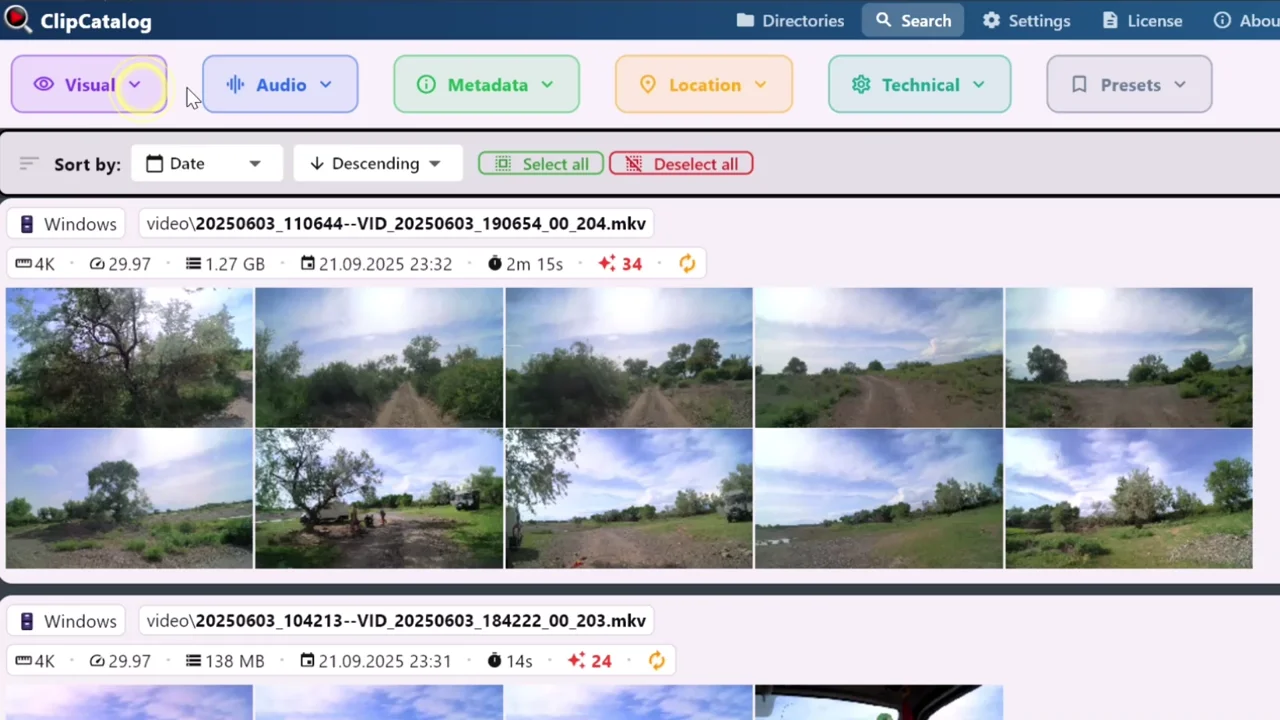
Search a Windows video archive from one place
ClipCatalog focuses on deep retrieval across large video libraries instead of broader mixed-media organization.
Video retrieval depth vs broader media management
ClipCatalog is defined as a searchable video library and retrieval system. That shows up in transcript search, person search, technical filters, and archive-aware behavior.
Peakto also supports video search, but its product definition is broader and closer to a mixed-media manager for Mac-based creative libraries.
Windows archive workflows vs Mac-native consolidation
ClipCatalog is explicit about disconnected drives, unavailable folders, volume tracking, and moved-folder relinking.
Peakto emphasizes centralizing SSDs, drives, NAS, and creative catalogs while keeping previews available even when the original source is offline.
Clip-search depth vs browser access and sharing
ClipCatalog is oriented toward narrowing a large video corpus quickly with semantic, transcript, face, path, volume, and technical filters together.
Peakto puts more emphasis on reaching content through a browser, plus collaboration and guest sharing on higher tiers.
Editing preparation
Peakto may be the stronger fit if you want your asset manager to participate in pre-editing through subclips, markers, bins, and edit-software handoff.
ClipCatalog is stronger on search, validation, retrieval, and transcript export than on direct edit-suite integration.
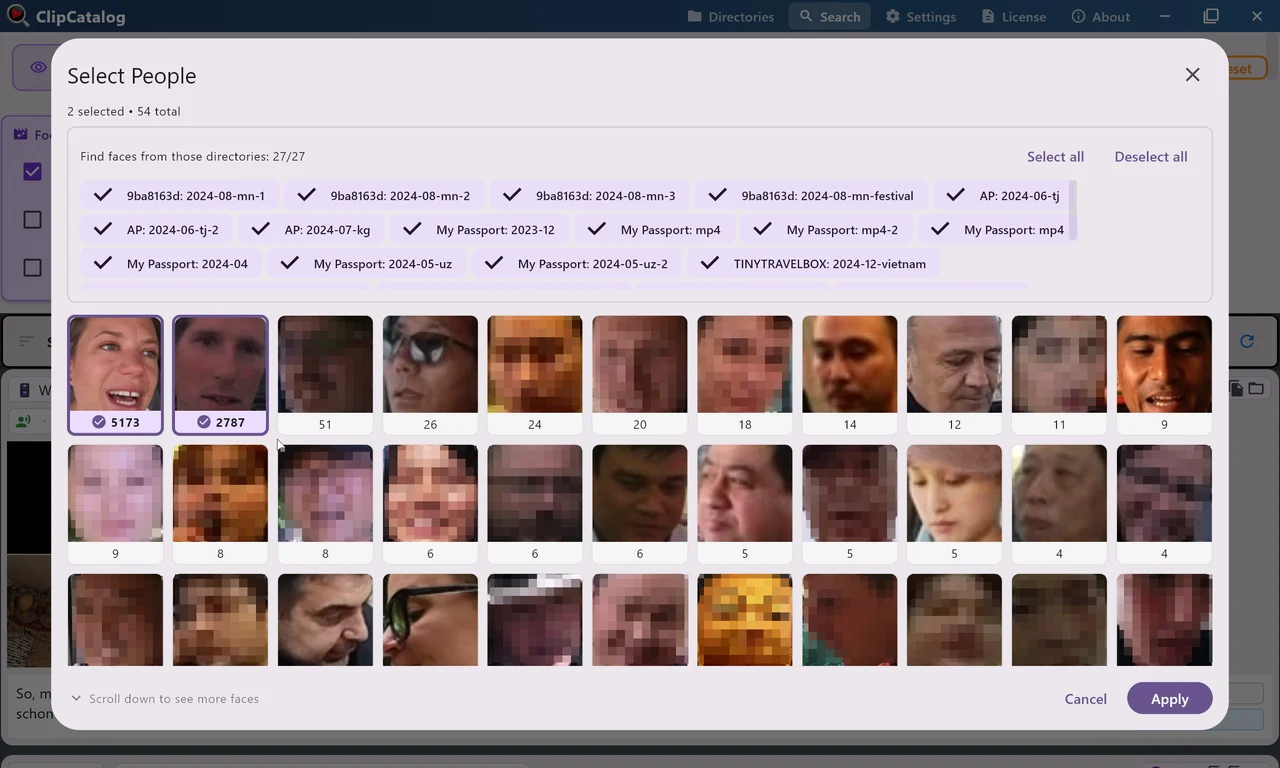
Turn recurring faces into a reusable video search
ClipCatalog groups people across your library so you can filter to the same person again, which is still a differentiator in this comparison.
Where ClipCatalog stands out
These are the ClipCatalog strengths that matter most in a Peakto comparison.
ClipCatalog combines semantic search, transcript search, person search, metadata, technical filters, and storage-aware filters in one workflow.
ClipCatalog already offers video face detection, grouping, person filters, and same-person discovery.
Volume tracking, disconnected-drive handling, and relocated-folder relinking matter when archives rotate across drives.
Transcripts can be viewed inline, copied, and exported as TXT or SRT for captioning, research, or editing preparation.
Where Peakto may be the better choice
These are the clearest cases where Peakto may be the better fit.
Peakto is a native Mac product and may feel more natural if your whole team is Mac-based.
Peakto is broader than a pure video-search tool and centralizes photos, videos, folders, NAS, and some creative catalogs.
Peakto offers remote browser access and more collaboration-oriented positioning than ClipCatalog.
Peakto goes further into subclips, markers, bins, and handoff into editing software, though exact plan support should be checked.
Frequently asked questions
Yes, especially if your workflow is Windows-based and your main problem is finding the right video inside a large local archive.
ClipCatalog. Peakto's native application is for macOS, while ClipCatalog is positioned as a Windows desktop product.
Both care about local storage, but ClipCatalog goes further on disconnected drives, volume-aware filtering, unavailable folders, and moved-folder relinking.
Yes. Peakto can generate transcripts, search by dialogue, and highlight matching passages.
Current public materials still focus face tagging on photos, and Peakto's own videographer page describes video face search as coming soon.
Peakto. Its plans position browser access, collaboration roles, and guest sharing much more directly than ClipCatalog does.
Comparison note
This comparison uses public product information to help buyers evaluate fit, not imply affiliation, endorsement, or hands-on testing. Peakto and ClipCatalog are trademarks of their respective owners.
Relevant comparisons
If you are evaluating this workflow against other tools, start with these side-by-side pages.
See if ClipCatalog fits your video archive
Download the Windows trial, index a real folder, and compare how quickly you can find spoken words, people, and visual scenes in your own archive.
License terms and installer availability