
Everything you need to search your footage
ClipCatalog turns folders of footage into a fast, searchable library — with AI tags, transcript search, face recognition, and production metadata filters. All local, no cloud uploads.
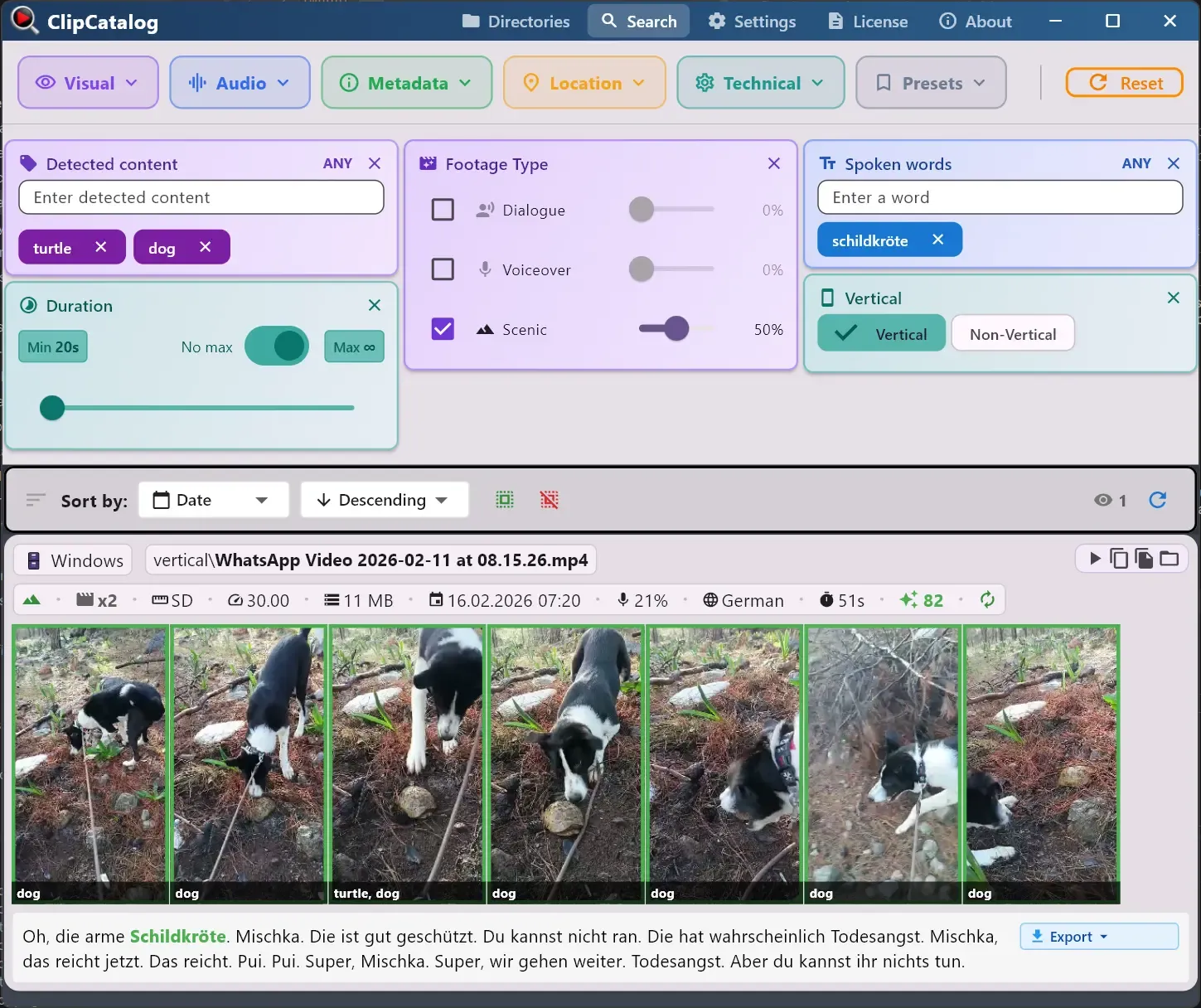
Video search for local folders
Index your drives into a fast, searchable library on Windows — no cloud uploads. Combine AI tags, transcripts, face recognition, and production metadata to find any clip in seconds.
Explore video searchSearch your footage
Search by what’s on screen, what was said, or who appears — three dimensions that go way beyond file names.
Natural-language search
Describe the shot you want in plain language, adjust strictness, and sort by semantic relevance.
Learn moreAI Video Tagging
Automatically detect scenes, objects, and actions so you can search by what’s on screen.
Learn moreTranscript search
Search by what was said in your footage and jump straight to the moment.
Learn moreFace recognition
Find every appearance of a person across your library in one click.
Learn moreBuilt for real workflows
Handle big libraries, external drives, and GPU-accelerated processing — all while keeping your footage completely private.
Common tasks
Step-by-step guides for the most common video search tasks.
Find a person in your videos
Walk through the face-search workflow, from a single clip to person filters across your whole library.
Learn moreFind B-roll by what's on screen
Walk through pulling matching B-roll from your whole library with auto-generated tags, Match-All / Match-Any combinations, and natural-language fallback.
Learn moreOrganize footage across drives and NAS
How to unify internal SSDs, external drives, and NAS shares into one searchable catalog — and search even when a drive is unplugged.
Learn moreSearch a TB-scale video library
Combine tag, transcript, face, and metadata filters to narrow multi-terabyte archives down to the right clips in seconds.
Learn moreNeed a side-by-side comparison?
Browse buyer-focused comparison pages that explain where ClipCatalog overlaps with other tools, where it differs, and which workflows each product may suit best.
Also useful: the best privacy-first video management software for local storage roundup for buyers comparing several local-first options.
How it works
Three steps to a searchable library — no manual labeling required.
Add folders
Point ClipCatalog at any folder on your PC or external drive.
Index locally
ClipCatalog generates thumbnails, AI tags, transcripts, and face data — all on your machine.
Search everything
Combine AI tags, transcript words, faces, and metadata filters to find any clip in seconds.
Try ClipCatalog free — up to 500 videos
No account required. Your footage stays on your computer.
License terms and installer availability