
ClipCatalog vs Frame.io
ClipCatalog and Frame.io overlap more than many buyers expect, but they still start from different jobs: ClipCatalog helps you find footage inside large local libraries, while Frame.io helps teams move cloud projects through review and delivery.
Key official vendor sources reviewed for this page
The links above highlight the main public sources used for this comparison. Product details can change, so recheck pricing, plan limits, and feature scope on the vendor's live site before you buy.
- Free trial
- 500 videos / 10 hours of footage
- License terms
- 2 activations + 5 years of free updates
- Pro
- $15/member/month + tax
- Team
- $25/member/month + tax
- Enterprise
- Custom quote
Annual discounts also exist.
Detailed feature comparison
This table focuses on the capabilities that most change the buying decision between a local retrieval tool and a cloud review platform.
| Capability | ClipCatalog | Frame.io |
|---|---|---|
| Primary orientation | AI-powered Windows desktop catalog for large local video libraries. | Cloud creative workflow platform for review, approvals, sharing, and Camera to Cloud. |
| Access model | Windows desktop application. | Browser-first desktop workflow with iPhone, iPad, Apple TV, Premiere Pro, and Transfer apps. |
| Storage model | Local-first indexing of folders, drives, and archives on your own machine. | Cloud storage by default, with Enterprise Storage Connect options for customer-managed object storage. |
| Transcript search and export | Built-in speech transcription, spoken-word search, and TXT or SRT export. | Searchable transcripts, captions, and TXT, SRT, or VTT export with role and project qualifiers. |
| Semantic search | Free-text semantic video search with strictness controls and relevance sorting. | Natural-language and semantic search across transcripts, comments, and some visual media, with plan qualifiers. |
| Face recognition | Face detection, grouping, and person-based discovery are core workflows. | No current public face-recognition search for finding the same person across videos. |
| Review and approvals | Focused on desktop retrieval and review, not approval chains. | A major strength: frame-accurate comments, shares, versions, approvals, and secure review links. |
| Best-fit workflow | Deep search across large local archives and external drives. | Active productions, stakeholder review, secure delivery, and Adobe-centered collaboration. |
Frame.io feature access varies by plan, permissions, and some beta qualifiers, so buyers should confirm current live documentation before purchasing.
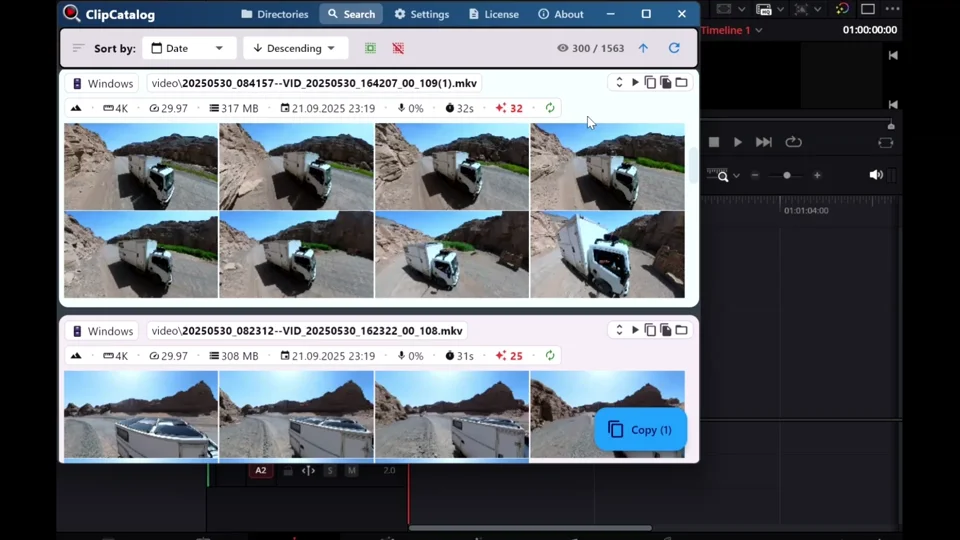
Send found clips straight into the edit
ClipCatalog helps editors go from retrieval to timeline handoff quickly, which is a different job from Frame.io’s browser review and approvals.
This is no longer just search versus review
Frame.io now offers stronger search than many buyers still assume, including transcript search, comment search, and some semantic capabilities.
The real question is whether you need search inside an active cloud workspace or deep retrieval across local archives you already own.
ClipCatalog goes deeper on archive retrieval
ClipCatalog combines semantic descriptions, spoken words, people, metadata, path filters, and technical video filters in one Windows workflow.
That matters when the hard part is finding the right clip across years of local footage.
Frame.io is stronger when collaboration is the bottleneck
Frame.io is much more complete for browser review, approvals, client sharing, watermarking, and production coordination.
If multiple stakeholders need to comment, approve, and receive media securely, Frame.io is usually the clearer fit.
Adobe workflow fit can outweigh search depth
Frame.io benefits from strong Adobe positioning, Camera to Cloud workflows, and broader cloud coordination.
ClipCatalog differentiates in the opposite direction: local-first control, archive resilience, and person-based video discovery.
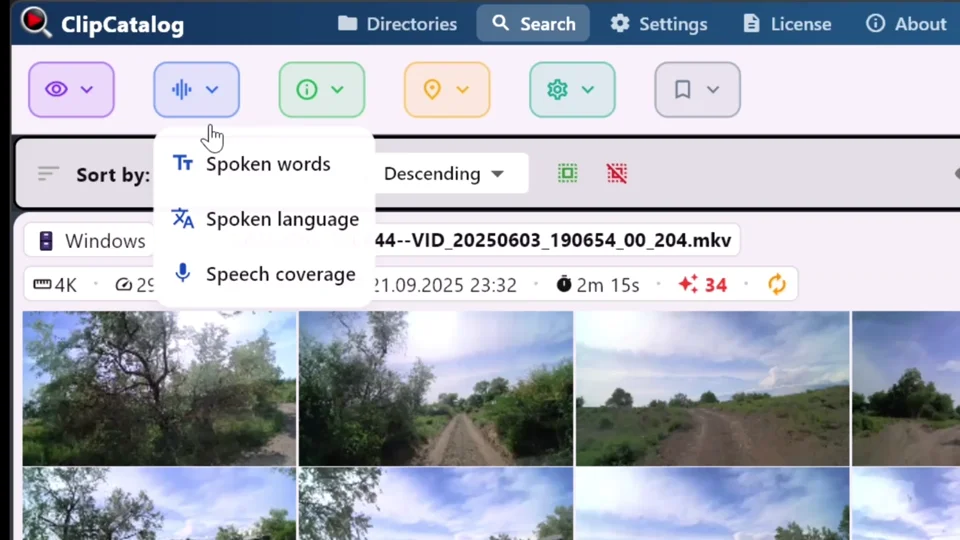
Search spoken words across local archives
ClipCatalog can pull interview lines and exact phrases from indexed footage without moving the archive into a cloud review workspace.
Where ClipCatalog stands out
These ClipCatalog strengths matter most in a Frame.io comparison.
Index the folders and drives you already own without moving the archive into a cloud workspace first.
Search spoken words, semantic descriptions, faces, metadata, paths, volumes, and technical video traits in one place.
Face grouping and person filters help you find more clips with the same person, a workflow Frame.io does not currently describe.
Volume tracking, missing-folder warnings, and moved-folder relinking are unusually useful for changing archive storage.
Where Frame.io may be the better choice
These are the clearest cases where Frame.io may be the better fit.
Frame.io is built for feedback loops with clients, producers, and internal teams.
If the bottleneck starts on set, Frame.io is much closer to that workflow than ClipCatalog.
Passphrases, expirations, watermarking, SSO, DRM, and enterprise controls make Frame.io stronger for governed sharing.
Premiere-centered collaboration and broader Adobe connections can matter more than deeper archive retrieval.
Frequently asked questions
Yes, when your main problem is finding footage inside large local video libraries rather than moving cloud projects through review and approvals.
ClipCatalog is usually the closer fit because it is explicit about external drives, volume-aware filtering, and moved-folder relinking.
Yes. Frame.io offers searchable transcripts, captions, and TXT, SRT, or VTT export, with role and project qualifiers.
No current public materials say it can. Frame.io says this is not currently supported.
Frame.io. Review links, comments, approvals, sharing controls, and enterprise security are central strengths.
Comparison note
This comparison is based on public product information and is intended to help buyers judge fit, not imply affiliation or hands-on testing.
Relevant comparisons
If you are evaluating this workflow against other tools, start with these side-by-side pages.
See if ClipCatalog fits your video archive
Download the Windows trial and compare how quickly you can find spoken words, people, and scenes across a real local archive.