
ClipCatalog vs Axle AI
A careful comparison for buyers choosing between a ClipCatalog-style Windows desktop retrieval tool and Axle AI as a broader media asset management platform for shared storage, browser review, and private deployments.
Key official vendor sources reviewed for this page
The links above highlight the main public sources used for this comparison. Product details can change, so recheck pricing, plan limits, and feature scope on the vendor's live site before you buy.
- Free trial
- 500 videos / 10 hours of footage
- Full library access
- An email unlocks 14 days, once per installation or email
- License terms
- 2 activations + 5 years of free updates
- Media asset management
- From USD 2,995
- Axle AI Tags
- From USD 200/month
- Extra costs
- Private deployments and AI add-ons
Public pricing depends on package and deployment model.
Detailed feature comparison
This table highlights differences that meaningfully affect a buying decision. Axle AI spans multiple packages, so package-specific caveats matter.
| Capability | ClipCatalog | Axle AI |
|---|---|---|
| Primary orientation | AI-powered Windows desktop video cataloging and retrieval for large local libraries. | Media asset management and AI search platform for shared-storage video workflows. |
| Packaging and access | Single Windows desktop app that indexes folders and archives directly on the user machine. | Browser-oriented platform with on-prem, private-cloud, cloud, and package-dependent deployment choices. |
| Typical buyer | Solo creators, editors, archivists, and small teams focused on finding the right clip fast. | Media teams, broadcasters, post houses, and organizations managing centralized shared libraries. |
| Storage orientation | Built for local folders, external drives, archive volumes, and moved-folder recovery. | Built for centralized storage at larger scale, including NAS, SAN, object storage, and LTO-related workflows. |
| Privacy and AI processing | Local-first analysis with explicit face-processing controls and local face-data deletion. | Privacy depends on deployment; on-prem and private-cloud packages are positioned as self-contained AI. |
| AI tag search | Yes. AI tagging and AI tag search are core video search surfaces. | Yes. Public materials describe scene understanding, tagging, OCR, object, and logo recognition. |
| Transcript and spoken-word search | Yes. Transcription and spoken-word search are core. | Yes. Speech-to-text and searchable spoken content are available, though scope varies by package. |
| Semantic search | Yes. Free-text semantic video search with strictness controls and relevance sorting. | Yes. Public materials describe semantic, vector, and contextual search, but not equivalent strictness controls. |
| Face recognition | Yes. Face grouping, person filters, and a direct workflow to find more videos with the same person. | Yes, with qualifiers. Public materials mention celebrity or trainable face recognition, depending on package. |
| Folder and archive handling | Path, directory, and volume filters plus disconnected-drive handling and moved-folder relinking. | Strong centralized storage story, but comparable path filters or moved-folder relinking were not publicly specified. |
| Review and collaboration | Desktop search and playback focused on retrieval, not browser approvals. | Stronger for shared browser review, proxy playback, comments, approvals, permissions, and collaboration. |
| Integrations and automation | Focused on search, transcript export, and file handoff. | Stronger here: APIs, Premiere panels, automation, archive integrations, and partner workflows. |
| Video-specific retrieval depth | Technical video filters, footage-type filters, highlight ranking, and TXT or SRT transcript export. | AI search is clear, but equivalent video-specific filters, ranking tools, or transcript export were not publicly specified. |
Axle AI notes summarize public product information reviewed for this comparison. Deployment model, pricing, user counts, and exact AI scope should be rechecked on live Axle AI materials before purchase.
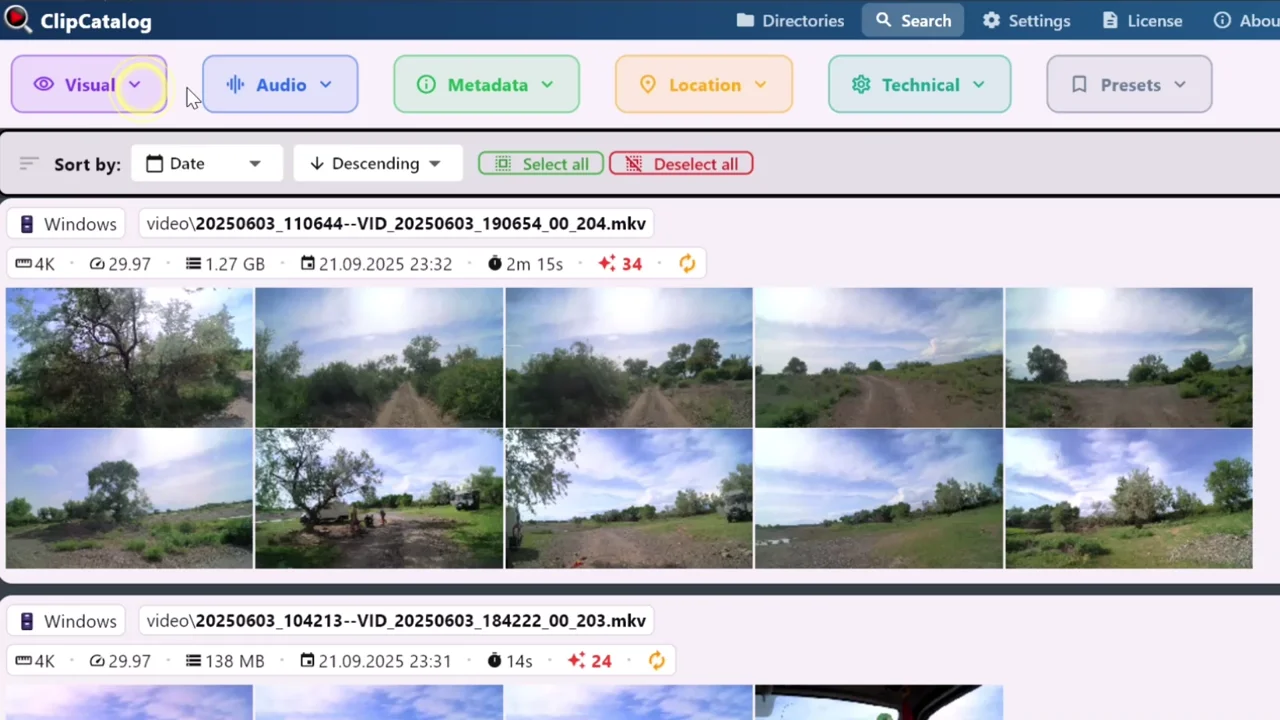
Search a local video library without building a shared stack
ClipCatalog indexes folders and archives directly on the Windows PC you already use instead of assuming a browser-based shared-storage deployment.
Shared media stack vs local desktop retrieval
ClipCatalog is built around finding the right shot quickly inside a local video archive. It combines semantic search, transcript search, person discovery, technical filters, path filters, and transcript export in one Windows workflow.
Axle AI points to a broader job: shared media management around centralized storage, browser access, permissions, approvals, and organizational reuse.
Both care about private AI, but differently
ClipCatalog uses a local-first desktop model with explicit face-processing controls and local face-data deletion.
Axle AI often positions on-prem and private-cloud deployments as self-contained AI, bringing that privacy story into a multi-user media asset management environment.
Centralized storage vs rotating archive drives
Axle AI looks stronger when media already lives on NAS, SAN, object storage, LTO-connected archives, or private cloud.
ClipCatalog is stronger when archives live across external SSDs, backup drives, and renamed folders, where volume tracking and relinking matter every day.
Semantic search on both, but different retrieval depth
Axle AI clearly offers semantic search, transcription, OCR, object recognition, and related AI features across packages.
ClipCatalog stands out in how those signals combine with person discovery, path and volume filters, footage-type filters, highlight ranking, and transcript export inside one retrieval-first workflow.
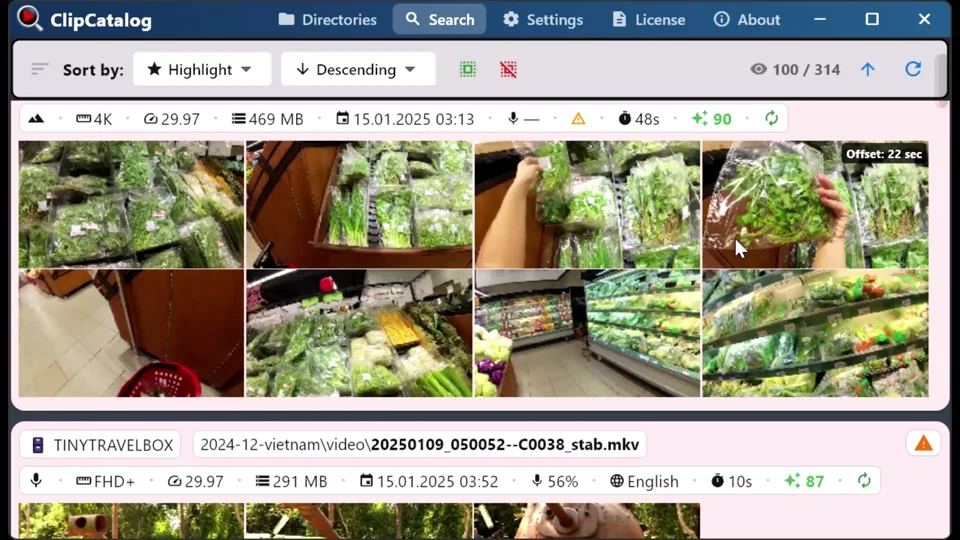
Keep archive context searchable on external drives
ClipCatalog is built for SSDs, backup drives, and renamed folders, where volume tracking and relinking matter more than centralized storage administration. You still need to reconnect the drive or relink the folder to open the original files again.
Where ClipCatalog stands out
These are the ClipCatalog strengths that matter most in an Axle AI comparison.
ClipCatalog combines semantic search, transcripts, faces, metadata, path and volume filters, technical filters, and footage-type filters in one Windows desktop workflow.
Face grouping, person filters, and a direct workflow for finding more videos with the same person are more explicit than Axle AI public product descriptions.
Volume tracking, disconnected-drive handling, and moved-folder relinking are especially useful when archives live across portable drives.
ClipCatalog treats transcripts as reusable working assets with copy, TXT export, and SRT export.
Where Axle AI may be the better choice
These are the clearest situations where Axle AI may be the better fit.
Axle AI is more clearly designed for multi-user workflows across centralized storage, browser access, review, and reuse.
Axle AI is much more explicit about large centralized environments and storage integrations.
Browser approvals, granular permissions, Premiere integration, APIs, and workflow automation are stronger Axle AI areas.
Frequently asked questions
ClipCatalog is a Windows desktop app for AI-powered local video retrieval; Axle AI is a media-asset-management platform built around shared storage and browser review for teams. ClipCatalog wins on speed-to-find for individual users with large local archives; Axle AI wins on team workflows with NAS/SAN/cloud storage.
Yes — ClipCatalog is a Windows-only AI video retrieval app focused exclusively on local folders and external drives. It offers semantic search, face recognition, and transcript search without the team-collaboration overhead of an MAM platform. The free trial never expires and covers up to 500 videos or 10 hours of footage. Enter an email on the license screen to unlock 14 days of full library access, once per installation or email address. The newsletter opt-in is separate and optional.
Yes, if your main need is fast desktop video retrieval rather than full shared media asset management. ClipCatalog fits Windows users with large local archives, while Axle AI fits broader team workflows.
Axle AI is the clearer fit for NAS, SAN, object storage, LTO, and private-cloud environments.
ClipCatalog is usually closer because it is explicit about disconnected drives, volume-aware filters, and moved-folder relinking.
Yes. Public materials describe semantic or contextual search, transcription, searchable spoken content, and related AI analysis, though exact scope varies by package.
Not always. Axle AI positions on-prem and private-cloud offerings as self-contained, but buyers should confirm the exact hosting and data flow for their package.
Axle AI. Its platform is more clearly built for shared browser review, proxy workflows, permissions, comments, and approvals.
Comparison note
This comparison uses public product information and is meant to help buyers evaluate fit, not imply affiliation, endorsement, or hands-on testing. Axle AI and ClipCatalog are trademarks of their respective owners.
Relevant comparisons
If you are evaluating this workflow against other tools, start with these side-by-side pages.
See if ClipCatalog fits your video archive
Download the Windows trial, index a real folder, and compare how quickly you can find spoken words, people, visual scenes, and archive-specific clips in your own footage.
License terms and installer availability