
Organize and search video footage across external hard drives — even when they're unplugged
If your footage lives on a rotating cast of external SSDs, HDDs, SD cards, and project-dump drives, the real time sink isn't editing — it's remembering where the clip is. You're not disorganized; you just can't search what isn't plugged in.
ClipCatalog is an external hard drive video organizer that catalogs your footage once, then lets you search, filter, and shortlist from the catalog while drives are unplugged. Reconnect only when you need the original file.
Looking for a step-by-step walkthrough? See how to organize footage across drives and NAS →
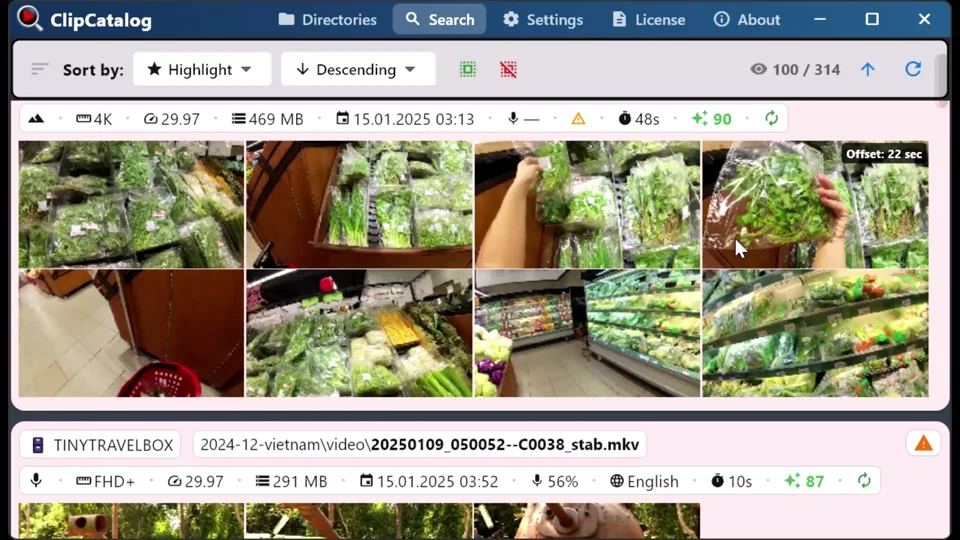
ClipCatalog remembers what's on each drive so you can search and shortlist clips even when the drive is in a drawer — then reconnect when it's time to pull files.
Keep a consistent, searchable view across multiple volumes instead of juggling nested folders, inconsistent naming, and guessing which drive holds which shoot.
Your catalog stays on your PC. ClipCatalog is built to work with your storage setup — no cloud uploads, which matters when drives contain client work, unreleased projects, or personal footage.
How offline drive cataloging works
The idea is simple: scan once, search later — even when the drive isn't connected. ClipCatalog builds a local catalog of your folders, and you search the catalog rather than the drive itself.
Plug in an external drive, SSD, or SD card and point ClipCatalog at the folders where your footage lives. No reorganizing required — your existing folder structure stays as-is.
ClipCatalog indexes your clips and stores filenames, paths, metadata, and thumbnails in a local catalog. The first scan of a big archive can take a while depending on how much footage and drive speed, but after that you're searching a fast local index.
Once cataloged, that drive's footage is searchable from your catalog — whether the drive is connected or not. When you need the original file, reconnect the drive and ClipCatalog picks it up.
Filenames, paths, technical metadata, and thumbnails — enough context to recognize the right clip even when the original media isn't currently available. When AI features are enabled, the catalog also includes AI tags and searchable transcripts, so you can find clips by what's in the shot or what was said — across every drive you've ever cataloged.
Real-world workflows
The real benefit of an external hard drive video organizer isn't "storage management" — it's momentum. Because automatic video tagging runs once at index time, you keep searching, filtering, and making decisions while the drive is unplugged.
Find a person across archive drives →You're on a laptop away from your desk. You remember a moment from an old shoot and want to confirm you already have the shot. With an offline-aware catalog, you find it now and only grab the drive later.
You're mid-edit and need a cutaway from last year. Instead of guessing which archive drive holds it, search the same way you always do, see which volume it lives on, and pull exactly that drive off the shelf.
Even if you're not the person who has the drive today, you can search, identify the exact clips, and tell a teammate "these clips are on the archive drive" — instead of "please check that 2022 folder."
The value isn't only "finding" — it's not breaking your flow. You can keep making decisions and confirming coverage while you're away from the storage, then reconnect when it matters.
You copied your cards into dated folders years ago and forgot what's where. Catalog those folders and they become part of your searchable video library — no need to open every drive and guess by folder names.
What to expect
External drives can show up differently over time — new mount point, different drive letter. ClipCatalog identifies volumes by stable IDs and stores volume-relative paths, so your library doesn't break when paths shift.
Browsing and searching the catalog works when drives are unplugged. Opening or copying the original file requires reconnecting the drive. That sounds obvious, but it's worth being clear about.
ClipCatalog doesn't reorganize, move, or rename your files. You point it at the folders where your footage already lives. The goal is a searchable catalog, not a new storage scheme.
An offline catalog is only as current as its last sync. If you add new footage to an external drive, rescan that folder when the drive is connected again and the catalog updates.
The first time you index a big archive, it can take a while depending on how much footage and how fast the drive is. Once cataloged, you're doing fast searches against your local index rather than browsing folders.
Add folders from NAS shares and network drives — via UNC paths (\\server\share) on Windows, or by mapped network drive letter. The primary path is SMB/CIFS, which Windows mounts natively; other protocols (NFS, AFP, WebDAV, SSHFS) work if a third-party Windows client exposes them as a drive letter. Network volumes get a dedicated icon, NAS-specific disconnect messages, and decoupled async detection that never delays your local or USB drives.
Over years, folder names drift — "final_final2", projects get duplicated, and SD card dumps are inconsistent. A searchable video archive gives you a consistent view of everything you've indexed, regardless of how perfect the folders are.
When a tracked folder is moved or renamed, ClipCatalog can auto-detect where it went and offer to update the catalog reference — so you don't lose your index or have to re-process. Your thumbnails, AI tags, and transcripts carry over to the new location.
Frequently asked questions
Yes. ClipCatalog builds a local catalog from your folders when the drive is connected. After that, you search the catalog — not the drive — so results appear even when the drive is unplugged.
You can still see metadata and thumbnails in the catalog. To open or copy the original file, reconnect the drive — ClipCatalog will pick it up again.
No. You point ClipCatalog at the folders where your footage already lives. The goal is to find and select, not force a new storage scheme.
Same idea — if you copied your SD cards into dated folders and forgot what's where, catalog those folders and they become searchable like any other volume.
Yes. NAS shares are first-class — add them via a UNC path (\\server\share) or a mapped network drive letter. NAS volumes get a distinct network icon, their own reconnection logic, and never block detection of your local drives if the NAS is slow or offline.
ClipCatalog identifies volumes by stable IDs and stores volume-relative paths, so your library doesn't break when a drive letter changes or a mount point moves.
An offline catalog is only as current as its last sync. When you connect the drive and add new footage, rescan that folder and the catalog updates.
No. Your catalog stays on your PC. ClipCatalog is local-first and does not upload your videos or catalog data to a cloud service.
Even more powerful together
Once your offline-friendly catalog exists, it becomes much easier to use search features like AI tags or transcripts to locate clips across your whole archive — not just the drive that happens to be plugged in today.
Search by what's in the shot — "beach", "interview", "car" — across every drive you've cataloged.
Find clips by what was said — even if the drive with that interview is sitting on a shelf.
Find every appearance of a person across years of footage and multiple archive drives.
Layer date, folder, resolution, frame rate, and duration filters to narrow down large archives fast.
Relevant comparisons
If you are evaluating this workflow against other tools, start with these side-by-side pages.
Best for
- Filmmakers & editors with a shelf of archive drives and TB-scale footage.
- YouTubers & vloggers who reuse b-roll across projects and shoot days.
- Family & travel archivists with years of footage scattered across drives and SD card dumps.
- Small teams who need a shared understanding of "what's on which drive" without plugging everything in.
- Anyone with old SD card dumps copied into dated folders and no idea what's where.
Try it with one drive
The best way to see if this works for your setup: catalog a single external drive or SD card dump, unplug it, and try searching for clips you know are on there.
Try ClipCatalog free — up to 500 videos
No account required. Your footage stays on your computer.
License terms and installer availability