
ClipCatalog vs Apple Photos
A factual comparison for users evaluating ClipCatalog as a cross-drive AI video search tool and Apple Photos as the built-in photo and video library on Apple devices, including Apple Intelligence features available on supported hardware since iOS 18.1 and macOS Sequoia 15.1.
Key official vendor sources reviewed for this page
The links above highlight the main public sources used for this comparison. Product details can change, so recheck pricing, plan limits, and feature scope on the vendor's live site before you buy.
- Free trial
- 500 videos / 10 hours of footage
- Full library access
- An email unlocks 14 days, once per installation or email
- License terms
- 2 activations + 5 years of free updates
- Apple Photos app
- Free
- iCloud+ 50 GB
- USD 0.99/month
- iCloud+ 200 GB
- USD 2.99/month
- iCloud+ 2 TB
- USD 9.99/month
- iCloud+ 6 TB
- USD 29.99/month
- iCloud+ 12 TB
- USD 59.99/month
Apple Intelligence requires compatible hardware, software, language, and region. iCloud+ U.S. prices checked in September 2026. Cloud storage is optional; local Photos libraries do not require an iCloud+ plan.
Detailed feature comparison
This table focuses on the differences most relevant to users deciding between a built-in Apple library and a dedicated cross-drive video search tool.
| Capability | ClipCatalog | Apple Photos |
|---|---|---|
| Primary orientation | Windows desktop AI video search tool that indexes video across local folders, external drives, and NAS volumes. | Built-in photo and video library for Apple devices (iOS, iPadOS, macOS) with on-device AI indexing within its own library. |
| Typical user | Users with large video collections spread across multiple drives, folders, or storage devices who need to find specific clips by visual content, spoken words, or people. | Apple device users who capture and store photos and video within the Apple Photos library and want them organized and searchable automatically. |
| Library scope | Indexes video from any folder, external drive, or NAS the user points it to. Files remain in place, no import required. | Searches media cataloged in Photos. On Mac, imported files can remain outside the library as referenced files. Apple advises against placing the library itself on network storage. |
| Natural-language video search | Yes. Semantic search with adjustable strictness levels (relaxed, balanced, strict) and relevance sorting. | Natural-language and video-moment search requires compatible Apple Intelligence hardware, software, language, and region. See Apple’s current eligibility list. |
| Face recognition | Yes. Face detection, grouping, person filters, and a workflow to find more videos with the same person across all indexed drives and folders. | Yes. On-device face recognition with cross-device label sync via iCloud Photos. Also recognizes pets (cats and dogs). Searches faces only within the Photos library. |
| Transcript and speech search | Yes. Local transcription via whisper.cpp with spoken-word search across the entire library. Supports transcript export to TXT and SRT. | Apple’s Photos search guides reviewed in September 2026 document descriptions and video moments, but not searching video dialogue or transcripts. |
| Footage-type classification | Yes. Classifies footage as dialogue-heavy, voiceover-heavy, or scenic, with adjustable filter thresholds. | Apple documents on-device scene and audio classification in Photos. A user-facing dialogue-heavy, voiceover-heavy, or scenic filter like ClipCatalog’s is not documented in the reviewed guides. |
| Highlight scoring | Yes. Assigns highlight scores based on visual, motion, speech, face, peak, sustained, coverage, and variance factors. | Photos curates Memories and memory movies. A per-video highlight score is not documented in the reviewed guides. |
| Saved search presets | Yes. Users can save and reuse search and filter combinations. | Smart Albums on macOS allow rule-based photo and video filtering. Smart Albums cannot be created or viewed on iPhone or iPad. |
| 360° and action-camera video | Recognizes equirectangular projections and native 360° file formats, with optional processing controls. | Apple documents supported 180°/360° playback on Vision Pro through Files and Quick Look, explicitly recommending Files rather than Photos. Final Cut Pro has a separate 360° editing workflow. |
| External drive and NAS support | Core feature. Volume tracking, disconnected-drive awareness, missing-folder warnings, moved-folder relinking, and NAS support via mapped network drives and UNC paths. | A Photos library can be stored on a directly-connected external drive (APFS or Mac OS Extended format required). NAS storage for Photos libraries is not supported. Referenced files are possible on macOS but not supported with iCloud Photos. |
| Platform | Windows. | Photos is available on Apple platforms including iOS, iPadOS, macOS, and visionOS. On Windows, iCloud Photos can be viewed in File Explorer and Microsoft Photos; this is a different interface from Apple Photos. |
| Large library support | Designed for large local video collections. Libraries of 10 TB or more are stored on the user’s own drives at no recurring cost. | iCloud Photos can sync large libraries, but storage is subscription-based. Apple’s largest iCloud+ plan (12 TB) costs USD 59.99/month. Keeping 10+ TB of video in iCloud would cost over USD 700 per year in storage fees alone. |
| Privacy model | Fully local. All AI processing runs on the user’s machine. No cloud dependency for indexing or search. | Primarily on-device. Face recognition and basic indexing run locally. Enhanced Visual Search uses homomorphic encryption. Apple Intelligence may use Private Cloud Compute for complex requests. |
| Pricing | Perpetual license with a free trial. | Free, included with Apple devices. iCloud+ storage plans start at USD 0.99/month for additional cloud storage. |
Apple Photos information reflects publicly documented features as of iOS 27 / macOS 27 Golden Gate. Apple Intelligence features require compatible hardware and software versions. Features may change with future Apple updates.
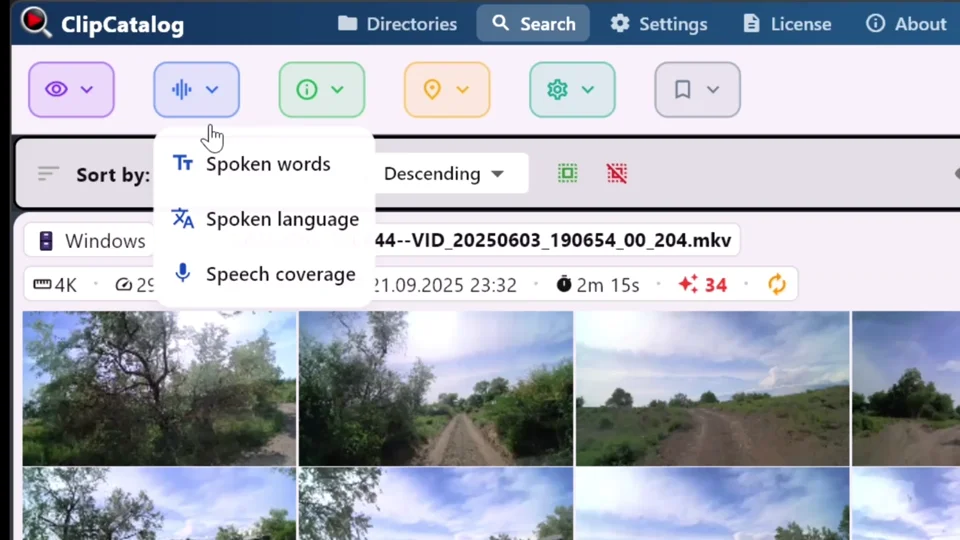
Search spoken words across indexed video
ClipCatalog transcribes video audio locally and searches the resulting text across indexed folders and drives.
Library scope is the core difference
Apple Photos indexes and searches only media inside its own library. This works well for users who capture video on their iPhone or iPad and let iCloud Photos sync everything across devices. For these users, Apple Photos provides a seamless, zero-configuration experience.
ClipCatalog takes a different approach: it indexes video files wherever they live, in user-specified folders, on external SSDs, USB drives, or NAS volumes. Files stay in their original locations and do not need to be imported into a proprietary library. This matters for users with video from camcorders, DSLRs, drones, footage from other family members, or any video that was never imported into Apple Photos.
Both offer AI-powered search, with different scope and requirements
With Apple Intelligence on compatible devices, Apple Photos supports natural-language video search and can locate specific moments within videos. This is a capable feature for media already cataloged in Photos; availability depends on hardware, software, language, and region.
ClipCatalog also offers natural-language semantic search with adjustable strictness levels. The key difference is scope: ClipCatalog searches across all indexed folders and drives, while Apple Photos searches only within its own library. For users whose video collection extends beyond the Photos library, this scope difference determines which tool can find the footage.
Searching spoken words across a video library
ClipCatalog transcribes video audio locally using whisper.cpp and makes spoken words searchable across the entire indexed library. This is useful for finding interviews, lectures, vlogs, or any video where what was said matters as much as what was shown. Transcripts can also be exported as plain text or SRT subtitle files.
Apple’s Photos search guides reviewed in September 2026 document descriptions and video moments, but not searching video dialogue or transcripts.
Large libraries: local storage vs cloud subscription
Video collections grow quickly. A few years of family footage, drone clips, and camera recordings can easily reach 10 TB or more. ClipCatalog indexes these files on the user’s own drives, internal, external, or NAS, with no recurring storage cost. The one-time license covers the software regardless of library size.
Apple Photos can sync libraries to iCloud, but storage is subscription-based. Apple’s iCloud+ plans top out at 12 TB for USD 59.99/month (USD 719.88/year). For users with 10+ TB of video, this represents a significant ongoing cost. Users who keep their video on local drives and do not need iCloud sync avoid this expense entirely.
Platform and ecosystem trade-offs
Apple Photos integrates iCloud Photos sync, Shared Libraries, iMessage sharing, AirDrop, and automatic Memories. These are convenient for everyday viewing and sharing inside the Apple ecosystem. Windows users can access iCloud Photos through File Explorer and Microsoft Photos.
ClipCatalog is a Windows desktop application designed for users who manage video on Windows PCs, often with footage from multiple camera sources stored across local and external drives. Users who work primarily in the Apple ecosystem and keep all video in the Photos library may find Apple Photos sufficient, while users with video outside that ecosystem or on Windows need a different tool.
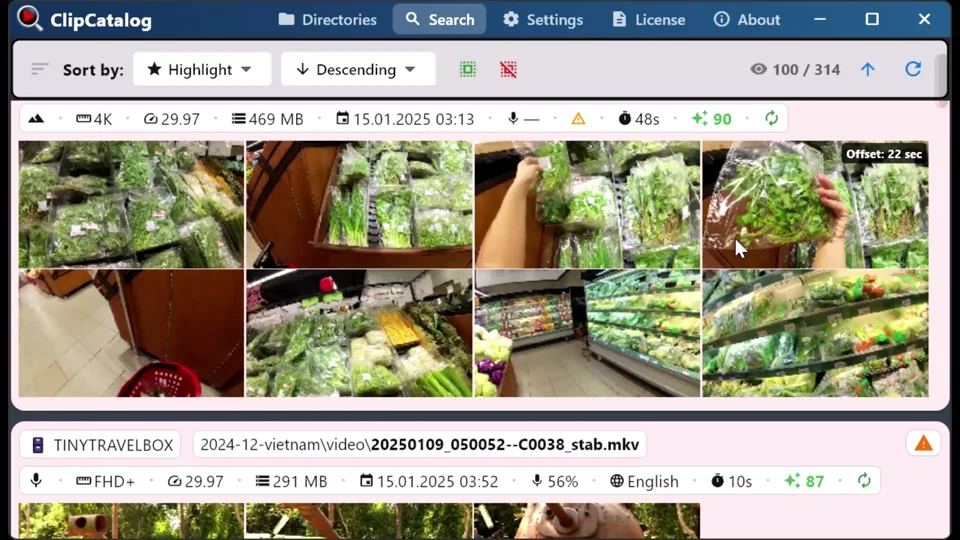
Search across indexed folders and drives
ClipCatalog searches indexed video folders, external drives and NAS volumes together.
Where ClipCatalog stands out
These ClipCatalog capabilities are useful for video stored across folders and drives.
ClipCatalog indexes video in any folder the user adds, local drives, external SSDs, USB drives, and NAS volumes. Files stay in their original locations with no import step. Apple Photos can only search media inside its own library.
ClipCatalog provides local transcription and spoken-word search across the indexed library. Transcripts can be exported as TXT or SRT.
ClipCatalog classifies video clips by content structure, dialogue-heavy, voiceover-heavy, or scenic, and assigns highlight scores for discovery. These features help users surface the most relevant footage from large collections.
ClipCatalog handles libraries of 10 TB or more on the user’s own drives at no recurring cost. Syncing the same amount of video through iCloud would require Apple’s 12 TB plan at USD 59.99/month, over USD 700 per year.
Where Apple Photos may be the better choice
These are situations where Apple Photos is the more practical choice.
If all your video is captured on Apple devices and synced through iCloud Photos, Apple Photos already indexes and searches it at no extra cost, with no additional software to install or configure.
Apple Photos is free and included with every Apple device. For users who do not need to search beyond the Photos library, this eliminates the need for any additional purchase.
iCloud Photos sync, Shared Libraries, iMessage sharing, AirDrop, and automatic Memories are tightly integrated features. Users who rely on these workflows benefit from staying within the Apple ecosystem.
Apple Photos syncs named face labels across all devices signed into the same Apple ID via iCloud Photos, including recognition of pets. If cross-device face label sync is important, Apple Photos handles this automatically.
Frequently asked questions
Photos on Mac can use a library on a directly connected external drive and can reference files left outside the library after import. It searches media cataloged in Photos rather than arbitrary folders. Apple advises against storing the library itself on network storage.
Apple’s Photos search guides reviewed in September 2026 document descriptions and video moments, but not searching video dialogue or transcripts. ClipCatalog provides local transcription and spoken-word search across the indexed library.
ClipCatalog is currently a Windows desktop application. Users who work primarily on Apple devices and keep all video inside the Apple Photos library may find that Apple Photos covers their video search needs.
Apple currently lists iPhone 15 Pro/Pro Max, iPhone 16 models or later and iPhone Air; iPad mini (A17 Pro) and iPads with M1 or later; Macs with M1 or later and MacBook Neo (A18 Pro); and Apple Vision Pro. Availability also depends on software, language, region, and feature.
Both tools offer face detection and grouping. Apple Photos syncs face labels across Apple devices via iCloud and also recognizes pets. ClipCatalog offers face grouping, person filters, and a workflow to find more videos with the same person across the entire indexed library, including videos on external drives and NAS.
Yes. Apple Photos and ClipCatalog serve different scopes. Apple Photos handles media within the Apple ecosystem. ClipCatalog handles video that lives outside that ecosystem, on external drives, NAS volumes, or Windows machines. Users with video in both places could use each tool for its respective scope.
Comparison note
This comparison uses publicly available Apple documentation and support pages. Apple Photos features described here reflect iOS 27 / macOS 27 Golden Gate capabilities as documented by Apple. Apple Intelligence availability depends on device hardware and software version. Apple, Apple Photos, Apple Intelligence, iCloud, iPhone, iPad, Mac, and macOS are trademarks of Apple Inc. ClipCatalog is not affiliated with or endorsed by Apple Inc.
Relevant comparisons
If you are evaluating this workflow against other tools, start with these side-by-side pages.
See if ClipCatalog fits your video archive
Download the free trial, point it at a folder of video from any source, and try searching visual content, spoken words, and people across your indexed folders and drives.
License terms and installer availability