
ClipCatalog vs Fast Video Cataloger
A careful comparison for buyers deciding between ClipCatalog, an AI-first video retrieval tool, and Fast Video Cataloger, a keyword-and-thumbnail cataloging system with scripting that added local AI tagging in version 10.
Key official vendor sources reviewed for this page
The links above highlight the main public sources used for this comparison. Product details can change, so recheck pricing, plan limits, and feature scope on the vendor's live site before you buy.
- Free trial
- 500 videos / 10 hours of footage
- Full library access
- An email unlocks 14 days, once per installation or email
- License terms
- 2 activations + 5 years of free updates
- Monthly
- USD 9.90
- Yearly
- USD 97
- Perpetual
- USD 197, 1 year of updates
- Trial
- 30 days free
- Money-back guarantee
- 30 days
Prices from public materials. 10% volume discount on orders of more than 10 licenses.
Detailed feature comparison
This table focuses on differences that materially affect a buyer choosing between an AI-driven video retrieval tool and a keyword-first cataloging system.
| Capability | ClipCatalog | Fast Video Cataloger |
|---|---|---|
| Primary orientation | AI-powered Windows desktop video retrieval for large local libraries. | Keyword-and-thumbnail-first video cataloging for Windows with scripting extensibility and, since version 10, local AI tagging. |
| Typical buyer | Solo creators, editors, archivists, and small teams focused on finding the right clip quickly using AI search. | Solo creators, editors, and teams who prefer manual keyword organization and thumbnail browsing across video collections. |
| Search model | Semantic natural-language video search with strictness controls, relevance sorting, and combined filtering across visual content, transcripts, people, and metadata. | Keyword, metadata, and transcript search with scene-level filtering. Faces, scenes, and objects detected by AI are added as keywords. Since version 10.3, natural-language requests run through an external AI assistant such as Claude, connected via the Model Context Protocol (MCP). |
| Face recognition | Yes. Face grouping, person filters, and a workflow to find more videos with the same person are part of the core feature set. | Yes, since version 10. The app learns a person from a handful of photos, then detects and tags that person across the library. Processing runs locally. |
| Visual AI for video | Yes. AI tagging with local ONNX models on your GPU or CPU is a core search capability. | Yes, since version 10. Local scene classification and object detection add keywords automatically, with an adjustable confidence threshold. Version 10.3 adds trained tags taught from about ten example thumbnails. |
| Transcript and spoken-word search | Yes. Local transcription via whisper.cpp with spoken-word search across the entire library. | Yes. Since version 10, English speech-to-text is built in and runs locally, with no plugin needed. Transcripts are searchable across the catalog, and SRT import is supported. |
| Keyword and metadata management | Metadata filters, path filters, volume filters, and footage-type classification. Manual keyword tagging is not the primary workflow. | Strong area. Hierarchical parent keywords, scene-level keyword tagging, custom metadata fields, XMP import, and auto-keywording from file paths. |
| Server and team sharing | Desktop-focused retrieval tool without integrated server sharing. | Integrated server for sharing catalogs locally or over the internet, with user accounts and access rights. Since version 10, teammates can browse, search, and tag from a web browser. |
| Extensibility and scripting | Focused on search, transcript export, and file handoff. No public scripting API. | C# scripting with a documented API, sample scripts, and custom action bindings, plus a REST API and, since version 10.3, an MCP connector for AI assistants. |
| NLE integration | Drag-and-drop and copy-paste file handoff to external editors. No direct NLE plugin integration. | Drag-and-drop file handoff and playlist export in FCP7 XML format, which can be imported into editors like DaVinci Resolve. |
| External drive and archive handling | Volume tracking, disconnected-drive awareness, missing-folder warnings, and moved-folder relinking are core features. | Supports archiving videos to secondary storage and searching metadata when drives are disconnected. |
| Video player | Integrated player with timeline navigation and scene thumbnails. | Integrated player with scene navigation. MPV player integration was added in version 9.2. |
| Catalog security | Database encryption via SQLCipher with OS-level key storage. | AES 256-bit video masking and password-protected catalogs. When migrating from version 9 to 10, remove the catalog password in version 9 and set it again after importing into version 10. |
| Pricing model | Perpetual license with a free trial. | Monthly subscription from USD 9.90, yearly from USD 97, or perpetual license at USD 197 with one year of updates. Free 30-day trial and a 30-day money-back guarantee. |
Fast Video Cataloger notes summarize public product information reviewed for this comparison, including the version 10 AI features. Prices, AI features, and server features should be rechecked on live Fast Video Cataloger pages before purchase.
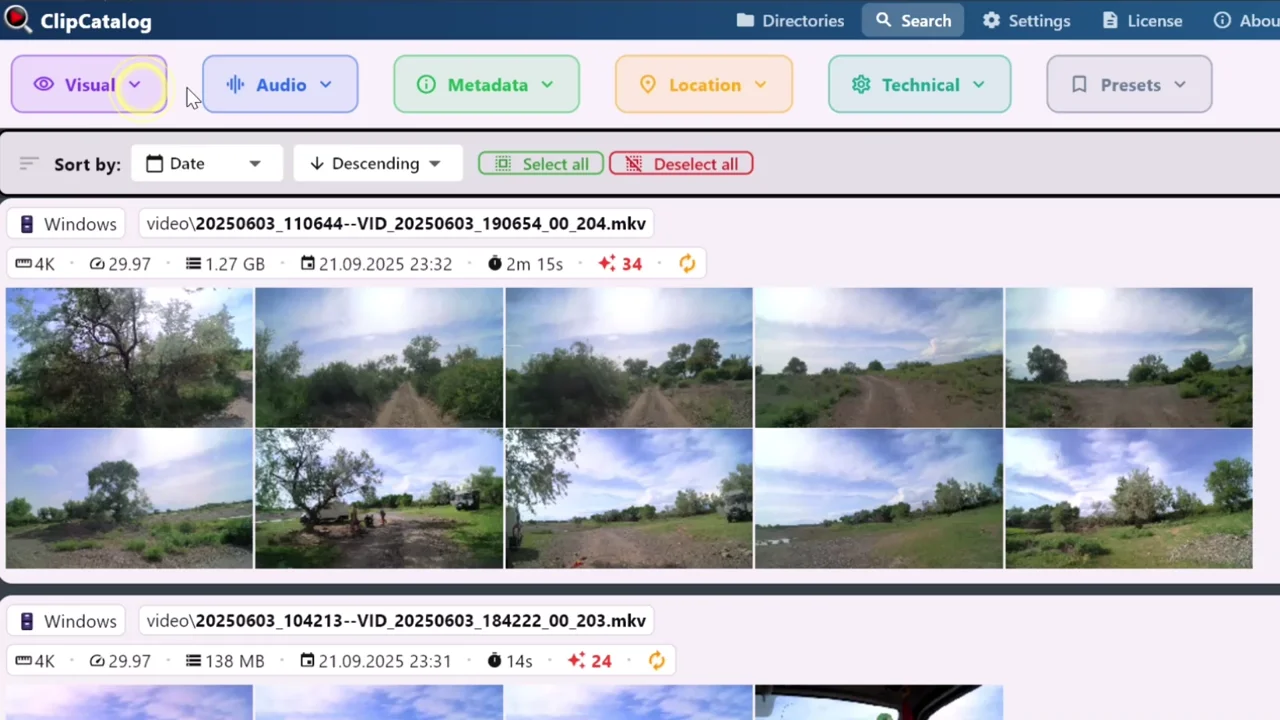
Semantic search across a local video library
ClipCatalog combines visual search, transcript search, and face recognition to find clips by content rather than relying on manually assigned keywords.
AI retrieval vs keyword-first cataloging
ClipCatalog is built around the idea that users should be able to describe what they are looking for in natural language and get relevant results from a large video library. Semantic video search, face recognition, and AI tagging all run locally without requiring manual keyword assignment.
Fast Video Cataloger takes a different approach: thumbnail walls give a fast visual overview of each video, and keyword tagging at the scene level builds a searchable index over time. Since version 10, local face recognition and scene and object detection feed that same keyword index automatically. This model gives users direct control over how content is classified, especially when combined with hierarchical parent keywords and C# scripting for bulk operations.
Both support transcript search with different approaches
ClipCatalog treats transcript search as a core local retrieval surface. Transcription uses whisper.cpp running locally on the user machine, with no external API dependency, and covers many spoken languages, not only English.
Fast Video Cataloger added a transcript window in version 9, and version 10 builds speech-to-text into the app itself. It runs locally with no plugin and is limited to English-language footage. SRT import is also supported.
Natural-language search: built in vs through an AI assistant
ClipCatalog answers natural-language queries itself. Text and image embeddings are computed on the local machine, and a typed description is matched against the local index without an external AI service.
Fast Video Cataloger 10.3 takes a different route. It connects the catalog to an AI assistant such as Claude through the Model Context Protocol (MCP); the assistant searches videos, scenes, transcripts, and people, can look at scene thumbnails, and can add keywords or gather clips into bins. Access goes through the Fast Video Cataloger server on the user machine, with keys that can be limited to read-only; the assistant itself is a separate product the user chooses and sets up.
Team workflows and scripting extensibility
Fast Video Cataloger offers integrated server support for sharing catalogs across a team, with user permissions and role-based access. Its C# scripting API with sample scripts is a distinctive strength for buyers who want to automate classification, export, or integration with other tools.
ClipCatalog is focused on desktop retrieval and does not currently offer server-based catalog sharing or a public scripting API. It prioritizes depth in AI search over breadth in workflow automation.
Archive drives and disconnected storage
Both tools support searching metadata when external drives are disconnected, which matters for users with footage spread across portable SSDs and backup drives.
ClipCatalog adds volume tracking, missing-folder warnings, and moved-folder relinking as part of its core external-drive workflow. Fast Video Cataloger supports archiving videos to secondary storage media and filtering archived content, and the vendor says its integrated file organizer keeps the catalog in sync as files move. Whether folders moved outside the app are relinked was not publicly specified.
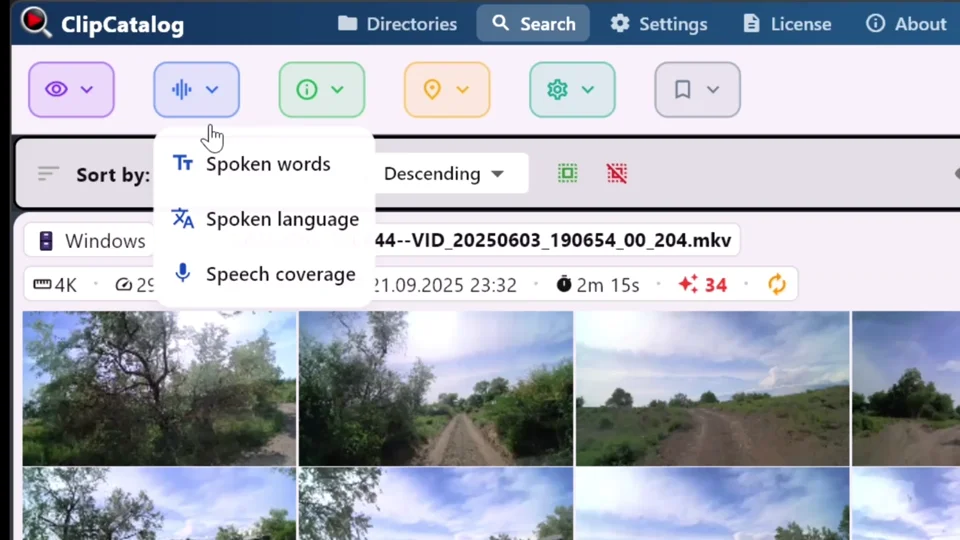
Search spoken words across indexed video
ClipCatalog transcribes video audio locally and searches the resulting text across indexed folders and drives.
Where ClipCatalog stands out
These are the ClipCatalog strengths that matter most in a Fast Video Cataloger comparison.
ClipCatalog is built around description-based video search. Users can search by describing what they are looking for rather than relying on pre-assigned keywords.
ClipCatalog detects faces in video and groups them into people automatically, without reference photos, then offers person filters and a direct workflow to find more videos with the same person. Fast Video Cataloger 10 also recognizes faces; its public materials describe teaching each person from a handful of photos.
AI tagging, face detection, text and image embeddings, transcription, and natural-language search all run on the local machine using ONNX and whisper.cpp. No external AI assistant, cloud API key, or per-use cost is involved.
Volume tracking, disconnected-drive handling, missing-folder warnings, and moved-folder relinking are built into the core workflow for users with footage on rotating external SSDs.
Where Fast Video Cataloger may be the better choice
These are the clearest situations where Fast Video Cataloger may be the better fit.
Fast Video Cataloger offers a documented C# scripting API with sample scripts for bulk classification, export, and integration with other tools. ClipCatalog does not expose a public scripting interface.
Fast Video Cataloger has integrated server support for sharing catalogs locally or over the internet, with user roles and access controls. ClipCatalog is focused on desktop retrieval.
Fast Video Cataloger is designed around scene-level keyword tagging, hierarchical parent keywords, XMP import, and thumbnail-based browsing. This model gives full control over how content is classified.
Fast Video Cataloger 10.3 adds trained tags: pick about ten example thumbnails and the app learns to find that subject, and correcting a wrong match refines the tag. ClipCatalog does not offer user-trained tags; it relies on its built-in AI tags and free-text search.
Fast Video Cataloger offers a monthly subscription starting at USD 9.90 and a perpetual license at USD 197 with one year of updates. Buyers can choose a subscription instead of committing to a perpetual license.
Frequently asked questions
ClipCatalog combines built-in visual search by description with transcript and person filters. Fast Video Cataloger combines keyword hierarchies and C# scripting with local AI tags for faces, scenes and objects. Both provide local analysis; an external AI assistant connected to Fast Video Cataloger has its own data handling.
ClipCatalog is an AI-first alternative on Windows. Fast Video Cataloger 10 adds local AI that turns faces, scenes, and objects into keywords and hands natural-language requests to an external AI assistant; ClipCatalog builds visual search by description alongside transcript and person filters directly into the app. The free trial never expires, capped at 500 videos or 10 hours of footage. If your library is larger, enter an email on the license screen to unlock 14 days of full library access, once per installation or email address; the newsletter opt-in stays optional.
Yes, if your core problem is finding specific clips by describing them rather than cataloging videos with keywords and thumbnails. ClipCatalog is stronger in built-in natural-language search, automatic face grouping, and transcription beyond English. Fast Video Cataloger is stronger in keyword workflows, scripting extensibility, trained tags, and team catalog sharing.
Both tools serve local Windows video libraries. Choose ClipCatalog for visual search by description combined with spoken-word and person filters. Choose Fast Video Cataloger for keyword hierarchies, thumbnail browsing, local AI tagging and scripting control.
Yes, since version 10. Fast Video Cataloger learns a person from a handful of photos, then detects and tags that person across the library, with local processing. ClipCatalog groups detected faces into people automatically and offers person filters and a workflow to find more videos with the same person.
Yes. Since version 10, Fast Video Cataloger includes built-in English speech-to-text that runs locally with no plugin, and transcripts are searchable across the catalog. SRT import is also supported.
Yes. Fast Video Cataloger offers integrated server support for sharing catalogs locally or over the internet, with user permissions and role-based access controls. ClipCatalog is focused on single-user desktop retrieval.
Fast Video Cataloger offers a monthly subscription from USD 9.90, a yearly option at USD 97, or a perpetual license at USD 197 that includes one year of updates, and backs purchases with a 30-day money-back guarantee. ClipCatalog offers a perpetual license. Both offer free trials. Current prices should be verified on each product page before purchase.
Comparison note
This comparison uses public product information and is meant to help buyers evaluate fit, not imply affiliation, endorsement, or hands-on testing. Fast Video Cataloger and ClipCatalog are trademarks of their respective owners.
Relevant comparisons
If you are evaluating this workflow against other tools, start with these side-by-side pages.
See if ClipCatalog fits your video archive
Download the Windows trial, index a real folder, and compare how quickly you can find visual scenes, spoken words, and people across your own footage.
License terms and installer availability