
ClipCatalog vs Kyno
ClipCatalog and Kyno both work close to local media, but they remove different bottlenecks. ClipCatalog turns large video folders into a searchable AI-powered library, while Kyno focuses on browse-first utility work around footage already on disk.
Key official vendor sources reviewed for this page
The links above highlight the main public sources used for this comparison. Product details can change, so recheck pricing, plan limits, and feature scope on the vendor's live site before you buy.
- Free trial
- 500 videos / 10 hours of footage
- License terms
- 2 activations + 5 years of free updates
- Premium
- EUR 349
- Updates
- 1 year included
- License
- Personal use on 2 computers
Detailed feature comparison
This table highlights the differences that matter most when choosing between a searchable AI video library and an ingest-free media workflow tool.
| Capability | ClipCatalog | Kyno |
|---|---|---|
| Primary orientation | AI-powered Windows desktop catalog for large local video libraries. | Ingest-free media management and workflow tool for preview, backup, logging, transcoding, and organization. |
| Platform model | Windows desktop application. | Windows and macOS desktop application with no public browser or mobile client. |
| Library model | Indexes selected folders into a persistent searchable local catalog. | Explicitly ingest-free; Kyno says it does not maintain a global searchable library of everything it has seen. |
| AI search depth | Visual search, spoken-word search, semantic search, and face-based discovery are core workflows. | Public materials describe search and filtering, but not comparable AI visual, transcript, semantic, or person search. |
| Logging and metadata work | Focused on retrieval, transcript viewing, export, and review. | Strong for tags, ratings, markers, subclips, metadata presets, reports, and Excel shot lists. |
| Backup and offload | Not built as a verified camera-card backup tool. | Verified backup, checksum verification, Media Hash Lists, and multi-destination offload are key strengths. |
| Transcoding and delivery prep | Not a full transcode or rewrap engine. | Batch transcode, rewrap, audio extraction, burn-ins, LUT workflows, and delivery prep are major features. |
| Best-fit workflow | Long-term searchable video library on local storage. | Immediate browse, prep, logging, and handoff around footage already on disk. |
Kyno documentation reviewed for this comparison did not publicly specify some AI search capabilities, so those rows stay conservative instead of guessing.
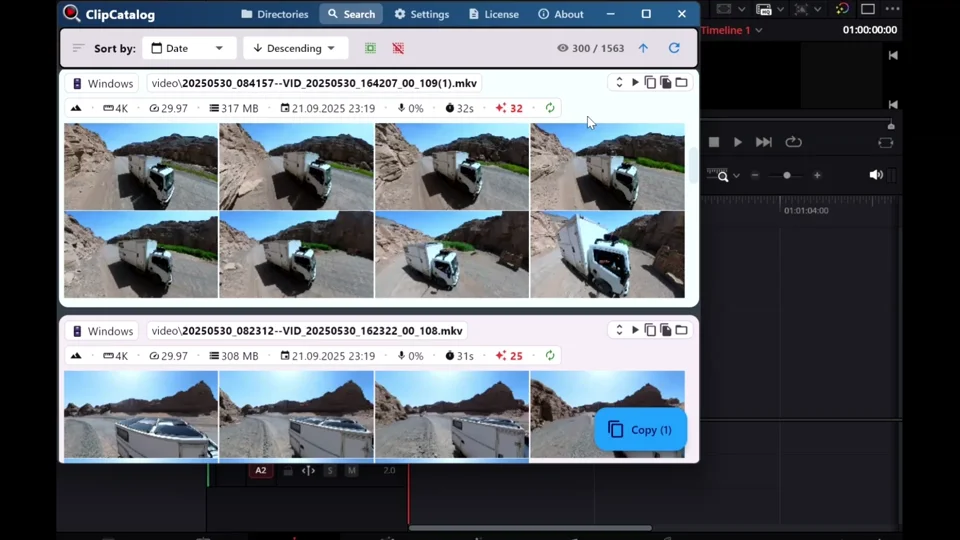
Drag clips into your editor after search
ClipCatalog is built to retrieve the right clip first and hand it off fast rather than centering the workflow on browse-first prep tools.
Persistent video library versus ingest-free utility
ClipCatalog builds a lasting searchable catalog across the folders you choose, which is useful when the archive is large and historical.
Kyno is intentionally lighter-weight: work with media where it already lives instead of building a persistent global library.
Finding footage versus preparing footage
ClipCatalog is stronger when the hardest job is discovery across many hours of local video.
Kyno is stronger when the hardest job is backup, logging, transcoding, and getting media ready for editorial handoff.
Both work near local storage, but in different ways
Kyno is good for removable media, shared storage, and immediate browse-first workflows.
ClipCatalog is more explicit about archive resilience over time, including moved folders, disconnected drives, and persistent search.
Mac support and editorial utility can outweigh AI search
Kyno has an obvious advantage for mixed macOS and Windows teams and for workflows built around direct editorial prep.
ClipCatalog is the more focused choice when searchable archive retrieval matters more than ingest and handoff tooling.
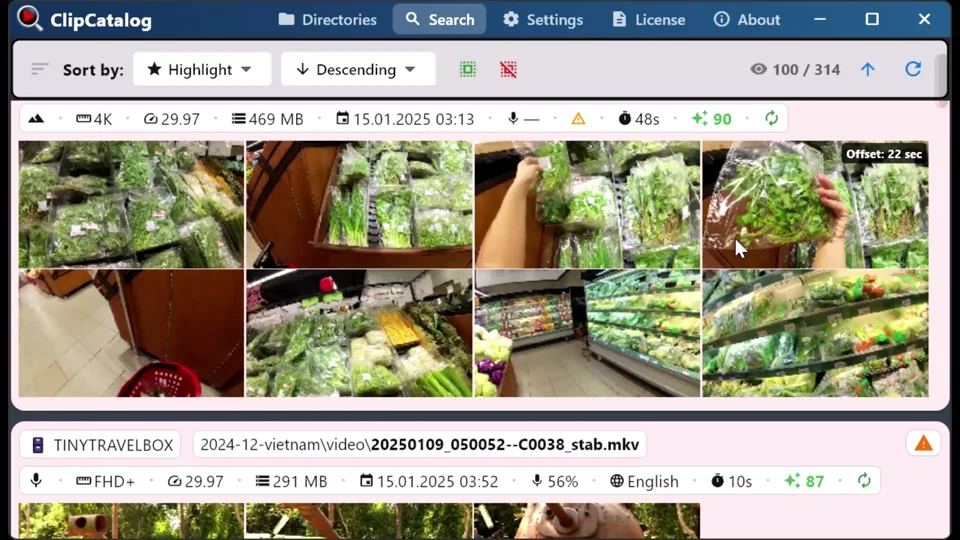
Search across rotating archive drives and moved folders
ClipCatalog keeps archive context searchable across rotating archive drives and moved folders, but you still need to reconnect the drive or relink the folder to open the original files again.
Where ClipCatalog stands out
These ClipCatalog strengths matter most in a Kyno comparison.
ClipCatalog is built as a searchable video catalog rather than a browse-first utility.
Face grouping and person filters help you find more clips with the same person, which Kyno does not publicly describe.
Speech transcription, spoken-word search, and TXT or SRT export make transcripts reusable beyond the app.
Disconnected-drive handling, missing-folder warnings, and moved-folder relinking help keep archive context searchable as storage changes over time, even though opening the original files still requires reconnecting the drive or relinking the folder.
Where Kyno may be the better choice
These are the clearest cases where Kyno may be the better fit.
Kyno is designed for direct work against files on cards, drives, and shared storage without first building a persistent library.
Camera-media backup, checksums, Media Hash Lists, and multi-destination offload are much closer to Kyno than ClipCatalog.
Kyno is more complete for rewrapping, conversions, burn-ins, LUT handling, and delivery preparation.
Kyno supports macOS and Windows and connects more directly to Premiere Pro, Final Cut Pro, Resolve, and Avid workflows.
Frequently asked questions
Yes, when your main problem is finding footage inside a large local archive instead of browsing, backing up, logging, and preparing media.
ClipCatalog is better aligned because it offers visual search, spoken-word search, semantic search, face-based discovery, and persistent library indexing.
Kyno. That is one of its clearest strengths.
Not in the reviewed public materials.
Kyno, because it has a current macOS desktop application while ClipCatalog is Windows-focused.
Comparison note
This comparison uses public product information to help buyers judge fit and does not imply affiliation or hands-on testing.
Relevant comparisons
If you are evaluating this workflow against other tools, start with these side-by-side pages.
See if ClipCatalog fits your video archive
Download the Windows trial and compare whether an AI-searchable video library fits your workflow better than an ingest-free utility tool.