
Run Whisper on Windows with a free app
Written by Andreas, maker of ClipCatalog. Facts checked on November 5, 2026. Sources
Whisper is OpenAI's open speech-recognition model. Free desktop apps such as Buzz and Vibe run it on an ordinary Windows PC, so your recordings never have to leave your computer. For a whole video library, ClipCatalog transcribes the videos in your folders and lets you search what was said.
What's the easiest way to run Whisper on Windows?
Install a free desktop app such as Buzz or Vibe. Both offer a Windows installer, so you don't need Python or a command line. Download a Whisper model in the app; after that, it transcribes on your PC without internet. A graphics card makes it faster, but you don't need one.
Get started
Free tools for a few files
Three free, open-source programs run Whisper on Windows. Others exist; these three were among those named most often when we asked AI assistants which Windows tool can transcribe all your video files offline and let you search what was said (October 2026).
| Program | What it is | Runs on | License and price | Exports |
|---|---|---|---|---|
| Buzz | Desktop app | Windows, macOS, Linux | Open source (MIT), free | TXT, SRT, VTT |
| Vibe | Desktop app | Windows, macOS, Linux | Open source (MIT), free | SRT, VTT, TXT, HTML, PDF, JSON, DOCX |
| whisper.cpp | Command-line program and library | Windows, macOS, Linux and more | Open source (MIT), free | TXT, SRT, VTT and more |
| ClipCatalog | Catalog app for a video library | Windows 10 and 11 | Paid, US$99 one-time; free trial | TXT, SRT |
Buzz
Buzz's own page lists transcription of audio and video files, live transcription from a microphone, speaker identification, a watch folder that transcribes new files, and a transcript viewer with search.
Vibe
Vibe's own page lists batch transcription of several files, translation into English, speaker identification, transcription from a microphone or system audio, and GPU support for NVIDIA, AMD and Intel.
whisper.cpp
A C/C++ version of Whisper that other programs build on; ClipCatalog runs it too. You use it from the command line, and its documentation shows converting recordings to WAV with FFmpeg first.
When a free tool is the better choice
- You transcribe a handful of recordings now and then.
- Your recordings are audio files, such as podcasts or voice memos. ClipCatalog transcribes the sound of video files only.
- You need a translation into English, speaker labels or transcription from a microphone. Buzz's and Vibe's pages list these; ClipCatalog has none of them.
- You use a Mac or Linux. ClipCatalog runs on Windows only.
When you want a whole library transcribed and searchable
With hundreds or thousands of videos across folders and drives, transcribing is the easy part. Keeping track is harder: which files are done, where each transcript is, and which clip has the sentence you remember. ClipCatalog does that bookkeeping on your PC.
Add folders once
Add your folders and drives, and ClipCatalog transcribes the sound of every video in them. Videos you add later are transcribed on the next sync. You can turn transcription off for any folder.
Search everything that was said
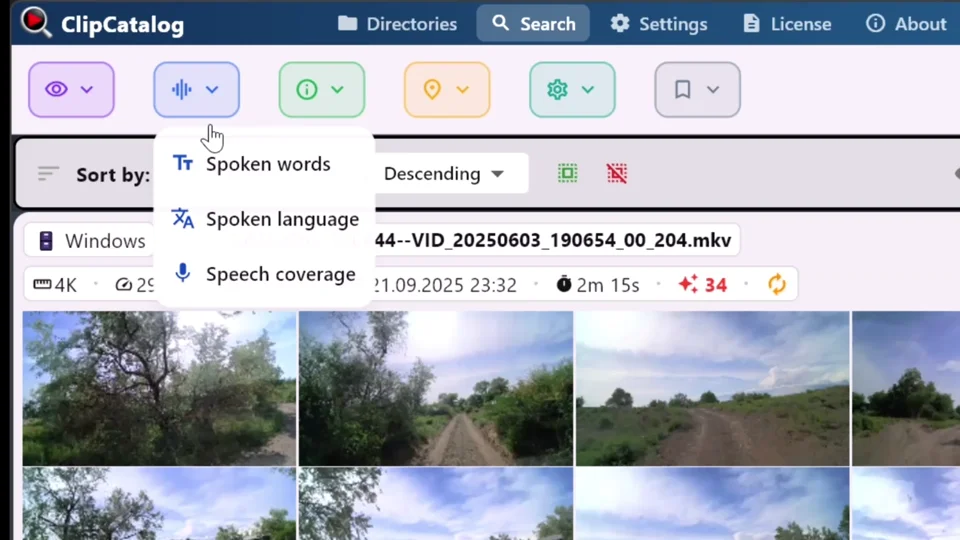
Type a few words or a phrase and see every clip where they were said, highlighted in its transcript. Add more words and choose whether all or any must appear.
Combine it with what you see
Narrow spoken-word results by people, AI tags, a scene description, dates, cameras or folders.
Language detected per video
ClipCatalog detects the spoken language of each video and lets you filter by it. A transcript that is likely just background noise is not saved.
Subtitles and text
Export any transcript as SRT subtitles or plain text, or copy it.
Your graphics card, if you have one
Transcription runs on a Vulkan-capable graphics card and falls back to the processor. A built-in test picks the faster device.
Frequently asked questions
Does Whisper work without internet?
Yes. All the programs on this page run Whisper on your PC. Each needs a Whisper model, which you download first; after that, transcription needs no internet. ClipCatalog downloads its AI models on first start and checks its license online from time to time.
Do I need a graphics card?
No. Whisper also runs on the processor, just more slowly. ClipCatalog uses a graphics card from NVIDIA, AMD or Intel when one is available and falls back to the processor.
Which languages does Whisper understand?
Many. It works best on clear speech; heavy accents, background noise or several people talking at once lower accuracy. ClipCatalog detects each video's language automatically.
How long does transcription take?
It depends on your PC, above all its graphics card, on the Whisper model and on how much footage you have. ClipCatalog shows the time left for each step while it works.
Can ClipCatalog transcribe MP3 or WAV files?
No. ClipCatalog catalogs video files and transcribes their sound. For audio-only files, use a free tool such as Buzz or Vibe.
Which Whisper engine does ClipCatalog use?
whisper.cpp, the open-source C/C++ version of Whisper, bundled with the app.
Can I try ClipCatalog for free?
Yes. The free trial never expires and covers up to 500 videos or 10 hours of footage. A license is a one-time purchase of USD 99.
Sources
The makers' own pages used for the facts on this page
Free tools change often. Check each maker's page for current features before you choose.
Related guides
Transcript search
Search the spoken words in every video you have, combined with faces, AI tags and other filters.
Search videos by spoken words
Find the exact moment something was said across your whole library. Offline Whisper transcription, no uploads, no per-minute fees.
Organize footage across drives and NAS
Internal SSDs, external drives, NAS shares — one library catalogs them all. Search clips even when a drive is unplugged.
Search a TB-scale video library
Past a few terabytes, scrolling stops working. Combine tag, transcript, face, and metadata filters into one query and drop thousands of clips down to dozens — across every drive, with no per-minute fees.
Try ClipCatalog free — up to 500 videos
No account required. Your footage stays on your computer.