
Catalog and search your 360° video, native files included
ClipCatalog catalogs native 360° files from Insta360 (.insv), GoPro (.360) and DJI (.osv) cameras, plus stitched equirectangular video from any camera, on your PC. They sit in the same catalog as the rest of your footage, searchable by what is on screen, what is said and who appears, with no export or stitching first.
What .insv, .360 and .osv files are
- .insv, .360 and .osv are the camera makers' own 360° formats: what the camera records before you export a flat, stitched video. To watch, reframe or export them, you usually need the camera maker's free desktop app.
- Stitched (equirectangular) 360° video is the flat 2:1 picture that 360° software exports, usually as .mp4. Any camera's stitched video works.
- ClipCatalog does not play, stitch or convert native 360° files. It catalogs them and makes them searchable.
What ClipCatalog does with 360° video
Recognized by type and metadata
Native .insv, .360 and .osv files are recognized by their file type. Stitched clips are recognized by their 360° metadata or by a combination of clues, such as a 2:1 frame and known 360° software. Each 360° result carries a badge that names its kind.
Flat views for the AI
For each moment it samples, ClipCatalog turns the 360° picture into ordinary flat views: three views around the horizon for stitched video, and front and back views for most native files. AI tags, visual search and face detection work on these views. A native file in a layout ClipCatalog doesn't know is still cataloged, and its AI then works on the raw camera picture, which is more distorted.
Spoken words too
Transcripts come from the sound, so spoken-word search works on 360° clips like on any other video.
One recording, one result
A recording the camera saved as one file per lens, or split into chapter files, shows up as one video.
A 360° filter
Pick Any 360° to see all of it, one native format (Insta360 .insv, GoPro .360 or DJI .osv), Stitched 360° for stitched video from any camera, or No 360° to hide it. Camera brand, camera name and recording date filters work as for any other clip.
Your choice for heavy files
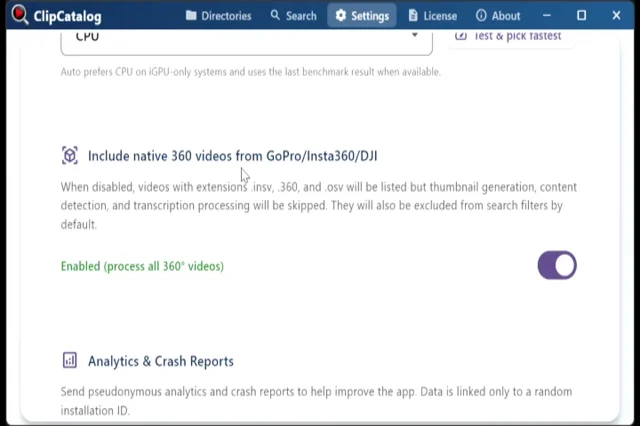
Native 360° files are analyzed by default. Turn the setting off and they stay listed in your catalog but are no longer analyzed or shown in search. Stitched clips are always analyzed.
What to expect
No 360° viewer
ClipCatalog has no 360° player, pan or reframe. Stitched clips play as a flat 2:1 picture. Native files open in your default app with Open Externally.
Faces
In 360° clips, faces are mostly found only when someone is close to the camera, such as the person holding a selfie stick.
Long clips
In a long 360° clip, ClipCatalog samples fewer moments than in a flat clip of the same length, because each moment takes several views.
Video only
360° photos and the small .lrv preview files some cameras write next to each video are not cataloged.
Processing
Native 360° files take more work than flat clips. How long depends on your PC, above all its graphics card; the app shows each step's time left.
Tip: a stitched master searches best
If you already export stitched .mp4 masters, point ClipCatalog at them: three views per moment give the most complete coverage. You don't have to, though: native files are searchable straight away.
Frequently asked questions
What is an .insv file?
Insta360's own 360° video format, as the camera records it. To view or export it as a flat video, use the camera maker's desktop app. ClipCatalog catalogs .insv files as they are, alongside GoPro .360, DJI .osv and stitched equirectangular video from any camera.
Can ClipCatalog convert .insv, .360 or .osv files to .mp4?
No. Export a stitched .mp4 with the camera maker's app if you need one. ClipCatalog catalogs both the native files and the exports.
Can I watch 360° video in ClipCatalog?
Stitched clips play as a flat 2:1 picture, without panning. Native files open in your default app.
Which cameras work?
Any camera that records .insv, .360 or .osv files, or stitched equirectangular video. ClipCatalog goes by file type and 360° metadata, not by a list of camera models.
Do I have to stitch my footage first?
No. Native files are analyzed as they are.
Is my footage uploaded?
No. Everything runs on your PC.
Can I try it for free?
Yes. The free trial never expires and covers up to 500 videos or 10 hours of footage. A license is a one-time purchase of USD 99.
Related guides
360° and action-camera video support
How each 360° format is turned into views, and what the 360° filter shows.
Organize footage across drives and NAS
Internal SSDs, external drives, NAS shares — one library catalogs them all. Search clips even when a drive is unplugged.
Family video organizer
How families and travelers keep footage from phones, action cams, drones and 360° cameras in one searchable catalog.
About
ClipCatalog began with a travel archive of more than 10 TB, filmed with a drone, a 360° camera, an action camera and phones.
Try ClipCatalog free — up to 500 videos
No account required. Your footage stays on your computer.