
ClipCatalog 0.19.0 — A clearer view of your library, faster transcription, and a free trial extension
Version 0.19.0 brings a redesigned sync screen, faster Whisper transcription, parallel 4K thumbnails, per-stage GPU control, and a 14-day free trial extension.
ClipCatalog 0.19.0 is out today. This is the first post on the blog, and there’s no better place to start than with what’s new in the app you (hopefully) already use to find your videos.
Indexing a video library is the slow, unglamorous part of any catalog tool. The release notes for 0.19.0 are long, but they all point at the same thing: making that first pass over your footage clearer to watch, faster to finish, and less likely to surprise you halfway through.
Three things stand out.
A clearer view of what’s actually happening
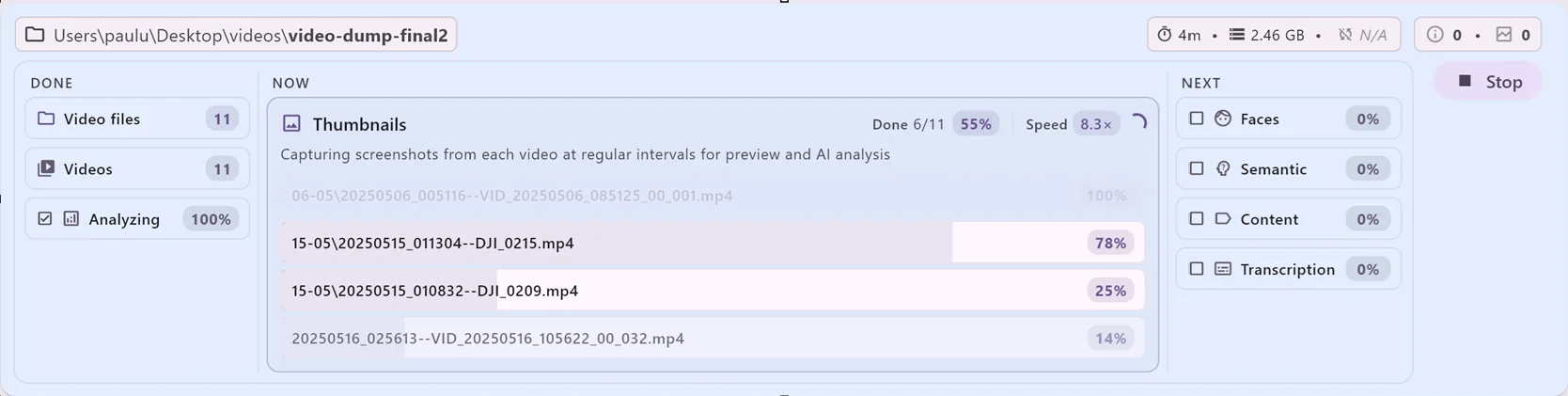
The sync screen is the one you stare at the longest, and it just got a lot more honest. Instead of a single progress bar that creeps upward without context, you now see three columns — Done, Now, and Next — and inside the Now column, the files actually being processed at this moment.
Each stage shows its own percentage. You get a real-time processing speed (the 8.3× you can see in the screenshot above is “indexing 8.3 seconds of video per real-world second”). The ETA at the top of the screen is based on the speed you’re actually getting on your machine, not a flat per-file estimate.
If you’ve ever wondered “is this thing stuck?” — that question should be much easier to answer now. Either the speed number is moving, or it isn’t.
Faster, smarter processing
Three changes compound here:
- A new Whisper transcription model. ClipCatalog now uses the
q8quantization of Whisper instead of the previousq5quantization. On CPU it’s about 5× faster, mostly because the new quantization aligns much better with OpenBLAS. On GPU it’s only marginally slower than before, but the transcription quality is noticeably better — especially for noisy speech, accents, and several non-English languages. The model is around 850 MB and downloads automatically the first time you launch 0.19.0; the old one is removed to free disk space. - Parallel thumbnail decoding. For 4K and lower-resolution videos, ClipCatalog now runs multiple full-decode paths in parallel during thumbnail extraction. On videos without enough keyframes — the kind that used to bottleneck the thumbnail stage — this is a meaningful speedup with no quality loss.
- Smarter default GPU choice for transcription. On systems with both an integrated and a discrete GPU, ClipCatalog now defaults to the integrated GPU for transcription where it makes sense. Counter-intuitive but true: recent integrated GPUs run Whisper a lot faster than the same generation’s discrete cards, because the bottleneck is memory bandwidth, not compute. You can still pick whichever GPU you prefer.
That last point is part of a bigger change: per-stage GPU overrides. Tagging, face detection, transcription, and visual search can each be assigned to a different GPU. If your laptop has an iGPU plus a dGPU, you can let one stage run on each in parallel, instead of bouncing every workload through the same card. The benchmark dialog has been reworked to show per-workload speed pills and a preview of which presets the app would apply.
More resilient indexing — fewer reasons to start over
A few quieter improvements that matter once you have a 10 TB library:
- Whisper-server crash recovery. If the transcription sidecar dies mid-job, the in-flight videos are no longer lost. The retry controller now picks them up and reuses the WAV files it had already extracted.
- 360 video thumbnails for 10-bit HEVC. DJI Osmo 360 and Insta360 cameras shooting in HEVC Main 10 used to fail thumbnail generation. They work now.
- FFmpeg hardware acceleration after upgrades. If you’d ever disabled GPU acceleration on an older version, that setting is no longer carried forward in a way that silently keeps FFmpeg on CPU after upgrading.
- No more silent license downgrades. Paid licenses used to get reclassified as “trial” if your license token expired while you were offline. They now stay paid; the renewal happens the next time the app gets internet.
- Smoother in-app updates. The installer waits for a running ClipCatalog instance to close before copying files, instead of racing it.
- Cleaner CPU-fallback messaging. When the visual sidecar can’t reach a GPU, it now actually falls back to CPU (this was a regression). The warning text distinguishes “running in hybrid CPU/GPU mode” from “fully fell back to CPU” so you can tell the difference at a glance.
A trial that respects what you’ve already done
If you’re using the free trial, the license screen looks different now. Instead of a generic countdown, it leads with what you’ve actually accomplished — how many of your videos are indexed, how much footage is still waiting, and where you are inside the trial.
There’s also a new option on that screen: a one-time 14-day free trial extension. Enter your email and you get an extra two weeks to finish indexing your library before deciding whether the app is worth buying. No credit card, no account, no auto-charge. Just an email so we can send you a free 14-day license.
The redesign is meant to make the choice fair. ClipCatalog isn’t useful until your library is indexed, and indexing a serious library can take more than the original trial window — especially on slower hardware or with NAS drives. The extension exists so the trial reflects whether the app works for you, not whether you happened to point it at a small folder.
Get the update
If you’re already on Windows with ClipCatalog installed, the in-app update prompt should appear within a day. Otherwise, download 0.19.0 directly. The full list of changes lives in the changelog.
That’s it for the first post. The next ones will be less about ClipCatalog’s release notes and more about video management itself — how to organize a multi-terabyte archive, how to keep external drives sane, how to find a clip you only half-remember. If that sounds useful, the RSS feed is the easiest way to follow along.