ClipCatalog logo ClipCatalog
JA
All comparisons Comparison page

ClipCatalog vs Kyno

A careful comparison for buyers deciding between a Kyno alternative for searchable video archives and a cross-platform workflow tool for browse-first review, offload, transcoding, and post prep.

This page is based on current ClipCatalog product materials and Kyno public materials reviewed on March 17, 2026, including Kyno home, features, pricing, product-comparison, integrations, FAQ, download, versions, Signiant notice, and 1.9 release pages.
レビュー済み このページは2026年3月17日にClipCatalog編集チームが確認しました。

このページで確認した主要な公式ベンダー情報

上のリンクは、この比較で使用した主な公開情報を示しています。製品の詳細は変更される場合があるため、購入前に価格、プラン上限、機能範囲をベンダーの公式サイトで再確認してください。

Detailed feature comparison

This table focuses on the differences that most materially change a buying decision between a searchable AI video library and an ingest-free media workflow tool. Where Kyno's current public materials do not specify a capability, the row says so directly instead of guessing.

ClipCatalog and Kyno comparison table
Capability ClipCatalog Kyno
Primary product orientation AI-powered Windows desktop video cataloging, indexing, and retrieval for large local video libraries. According to current public materials, an ingest-free media management and workflow application for video professionals who need to preview, back up, log, transcode, rename, and organize media on local or shared storage.
Operating system and client model Windows desktop application. macOS and Windows desktop application. Kyno's current download page lists version 1.9.0 for macOS 13 or later and Windows 10 or later (64-bit), while some FAQ content still references older minimums. Public materials reviewed for this page do not describe browser or mobile clients.
Library model and ingest requirements Users choose folders and volumes to index into a persistent local catalog with thumbnails, AI analysis, and library-wide search. Kyno is explicitly positioned as ingest-free. Its public FAQ says there is no concept of "inside" or "outside" of Kyno and no global search of all content Kyno has ever seen.
Typical buyer and workflow Solo creators, editors, archivists, and small teams whose main problem is finding the right footage quickly inside large local archives. DITs, assistant editors, editors, production teams, and video professionals who need direct-drive browsing, verified backup, metadata logging, subclips, transcoding, and handoff into editing systems.
Search by detected visual content Yes. Visual content detection is a core search surface for video. Current public materials describe search, drilldown, and media-aware filtering, but do not publicly specify AI-detected visual labels, object recognition, or scene understanding.
Spoken-word and transcript search Yes. Speech transcription and spoken-word search are core search surfaces. Not publicly specified in the reviewed Kyno materials.
Natural-language / semantic video search Yes. Semantic video search is built around free-text descriptions plus strictness controls and relevance sorting. Not publicly specified in the reviewed Kyno materials.
Face detection and person-based discovery Yes. Face detection, face grouping, person filters, and a direct workflow for finding more videos with the same person are documented. Not publicly specified in the reviewed Kyno materials.
Metadata logging, markers, and shot lists Current materials focus on search, transcript viewing, export, and retrieval workflows rather than marker logging or Excel shot-list production. A clear Kyno strength. Public materials describe tags, ratings, descriptive metadata, markers, subclips, metadata presets, reports, and Excel shotlist or export workflows.
Technical filters and format support Resolution, frame rate, duration, file type, audio presence, orientation, and 360-degree filters are part of the current feature set. Public materials describe media-aware filters such as frame rate and resolution plus broad playback and conversion support for pro formats. Some pro-format playback, transcode, or container-write support is edition-dependent, including RED RAW, Panasonic P2, MXF, and DNx workflows.
Verified backup and offloading Current product materials emphasize indexing, synchronization, and archive review rather than verified camera-card backup workflows. Yes. Public materials describe verified backup of camera media or folders, checksum verification, Media Hash Lists, and up to four destinations in Premium.
Transcoding, rewrapping, and delivery prep Current product materials emphasize search, review, transcript export, and external file access rather than a full transcode or rewrap engine. A major part of the product. Public materials describe batch transcoding, rewrapping, audio extraction, burn-in timecode, LUT application, denoise, and delivery workflows; some advanced options are Premium-only.
Editing-system integrations Current product materials emphasize in-app review plus external-open or open-in-folder actions rather than deep NLE integration. Official integrations are publicly documented for Final Cut Pro, Premiere Pro, DaVinci Resolve, and Avid Media Composer, with different handoff methods by app: send-to workflows for Final Cut Pro, Premiere Pro, and Resolve, plus ALE export and marker-transfer workflows for Avid.
External drives, removable media, and shared storage Current materials explicitly emphasize external drives, volume-aware filtering, disconnected-drive states, and archive-friendly browsing. Also strong, but in a different way. Public materials describe browsing any drive or SD card without ingest, working on shared storage such as NAS or SAN, removable-drive bookmarks that reconnect automatically, and a shared cache in Premium.
Handling moved or renamed media Explicitly documented. ClipCatalog can warn on missing folders, detect likely relocated folders, and migrate indexed references to a new path. Kyno's public FAQ says moving or renaming files outside Kyno can disconnect metadata. Public materials also describe a "Find Lost Metadata" recovery workflow rather than ClipCatalog-style folder relinking.
360-degree and action-camera workflows Yes. Current product materials describe 360-degree filtering and awareness of formats from cameras such as Insta360, GoPro, and DJI. Kyno public materials mention drones, GoPro, and long-take subclip workflows, but 360-degree detection or filtering is not publicly specified.
Pricing model One-time license per person with 2 activations and lifetime updates included, plus a trial limited to 500 videos or 10 hours. Kyno's current pricing page lists no-subscription licenses starting at EUR 159 for Standard and EUR 349 for Premium, each including one year of updates. Public materials also list personal licenses for two computers used by one person, plus renewals, team bundles, and education pricing.

Kyno notes summarize official public materials reviewed on March 17, 2026. Kyno's current download page and some FAQ entries do not fully match on OS minimums, so this page follows the current download page where the live materials differ.

Persistent AI video library vs ingest-free workflow utility

This is the biggest difference in the comparison. ClipCatalog is built to index selected folders and volumes into a searchable video library with AI analysis layered on top. That model is useful when your archive is large, historical, and hard to search manually.

Kyno starts from a different promise: work directly with media where it already lives. Its official FAQ explicitly says there is no concept of content being "inside" Kyno and no global search of everything it has ever seen. That makes Kyno lighter-weight for immediate drive-based work, but it is not the same kind of library-first retrieval product.

Finding footage vs preparing footage

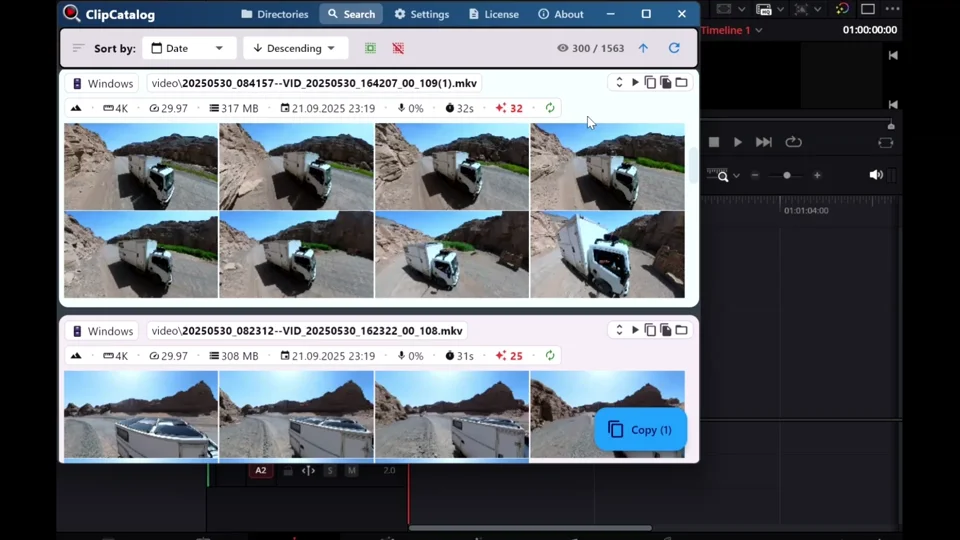
ClipCatalog looks more aligned where the hard part is discovery. Its current product materials emphasize semantic search, spoken-word search, person discovery, highlight ranking, footage-type filters, and video-specific narrowing across large local collections.

Kyno looks more aligned where the hard part is utility work around media itself. Verified backup, markers, subclips, batch rename, codec conversion, rewrapping, LUT handling, and NLE handoff are all central to Kyno's official positioning. If that is the daily pain point, Kyno may be the closer fit even if ClipCatalog is deeper on AI retrieval.

Both work close to drives, but archive behavior is different

Kyno's public materials are strong on removable media, SD cards, external drives, and shared NAS or SAN storage. The workflow is immediate: browse, screen, log, back up, and prepare footage where it sits, with removable-drive bookmarks and Premium shared-cache options for teams.

ClipCatalog looks more aligned when the question becomes archive resilience over time. Current materials explicitly cover disconnected drives, missing-folder warnings, volume-aware filtering, and relinking when folders move. If your archive is constantly being reorganized and you still need it searchable, that distinction matters.

Mac flexibility and editorial handoff can outweigh search depth

Kyno has an obvious platform advantage for mixed Mac and Windows environments. Its current public materials also put much more emphasis on sending clips and metadata into Final Cut Pro, Premiere Pro, Resolve, and Avid, which can be decisive in editorial teams.

ClipCatalog goes in the opposite direction: Windows-first, video-search-first, and archive-search-first. Buyers should decide whether their time loss comes more from not finding footage quickly enough or from not having enough ingest, prep, and handoff tooling around that footage.

Where ClipCatalog stands out

These are the ClipCatalog strengths that look most relevant in a Kyno comparison, based on current product materials rather than broad marketing claims.

Persistent AI search across one video library

ClipCatalog is built as a searchable video catalog rather than an ingest-free utility. Current product materials combine visual analysis, semantic descriptions, spoken words, people, metadata, path, volume, and technical filters inside one library-first workflow.

Person-based discovery in video

ClipCatalog documents face detection, face grouping, person filters, and a direct workflow for finding more videos with the same person. Comparable face-based video discovery is not publicly specified in Kyno's current materials.

Transcript search and transcript export

Current ClipCatalog materials describe speech transcription, spoken-word search, inline transcript viewing, and transcript export to TXT or SRT. Kyno's reviewed public materials do not currently describe a comparable transcript-search workflow.

Archive resilience when folders move

ClipCatalog is explicit about disconnected volumes, missing-folder warnings, and moved-folder relinking. That matters when archive drives get renamed, unplugged, or reorganized over time.

Video-specific ranking and uncommon filters

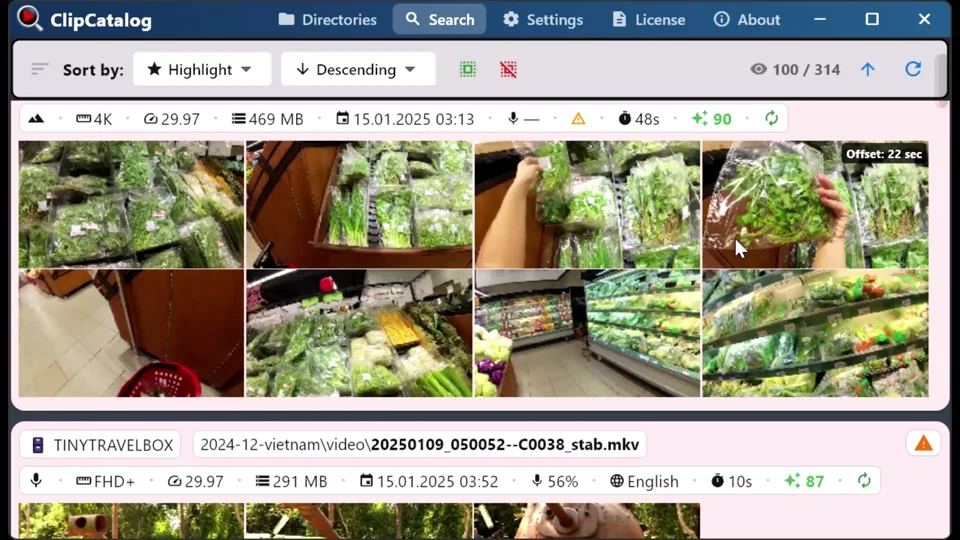
Highlight-based ranking, dialogue or voiceover or scenic filters, 360-degree awareness, and broad technical filtering give ClipCatalog a retrieval depth that is meaningfully different from Kyno's publicly described browse, log, and transcode workflow.

Where Kyno may be the better choice

A fair comparison should also say where Kyno appears better aligned to the job. Based on current public materials, these are the clearest cases.

You need ingest-free browsing and workflow utility

Kyno is more explicit about working directly against files on a drive or card without first building a persistent library. If you want to plug in media and start screening, logging, or preparing it immediately, Kyno may be the closer fit.

Verified backup and offload are part of the job

This is one of Kyno's clearest strengths. Public materials describe verified camera backup, checksum verification, Media Hash Lists, and multi-destination offload in Premium. That is a different job from ClipCatalog's search-oriented cataloging.

Transcoding, rewrapping, and codec handling matter daily

Kyno's public materials put much more emphasis on transcoding, rewrapping, burn-ins, LUT workflows, audio extraction, and professional format coverage. If your main bottleneck is preparing media rather than finding it, Kyno may be the better choice.

You want direct NLE handoff and production logging

Markers, subclips, Excel shot lists, metadata delivery, and documented integrations with Final Cut Pro, Premiere Pro, Resolve, and Avid make Kyno more production-oriented when edit prep and handoff are central requirements, though Avid workflows are documented more through ALE and marker transfer than direct send-to handoff.

Mac support or shared-storage utility is important

Kyno runs on both macOS and Windows and publicly positions itself for shared-storage workflows. If your team is Mac-based or needs one cross-platform utility around shared NAS or SAN storage, Kyno may fit more naturally.

Frequently asked questions

Is ClipCatalog a good alternative to Kyno?

It can be, but mainly if your main problem is finding footage inside a large local video archive. ClipCatalog is the more search-and-discovery-focused fit. Kyno may fit better when ingest-free browsing, verified backup, logging, transcoding, and NLE handoff matter more than AI search depth.

Which tool is better for AI-powered video search across a large archive?

Based on the current materials reviewed here, ClipCatalog appears better aligned to that job. ClipCatalog publicly documents visual search, spoken-word search, semantic search, face-based discovery, and technical filtering. Kyno's reviewed public materials do not currently describe comparable AI search surfaces.

Which tool is better for ingest-free browsing and verified camera backup?

Kyno. Current official materials make that one of its clearest strengths, with browse-without-ingest, verified backup, checksum verification, and Media Hash List support.

Does Kyno offer transcript or spoken-word search?

That was not publicly specified in the current official Kyno materials reviewed for this page. Kyno publicly describes search, filtering, metadata, markers, subclips, backup, and transcoding, but transcript search was not described in the reviewed materials.

Which tool is stronger for transcoding and sending clips to Premiere Pro, Final Cut Pro, Resolve, or Avid?

Kyno, based on current public materials. Its official site describes transcoding, rewrapping, metadata delivery, and documented integrations with those editing systems, with Avid handled more through ALE and marker-transfer workflows than direct send-to handoff. ClipCatalog's current materials are more focused on search, review, and retrieval.

Which product makes more sense for Mac users?

Kyno. Its current download page lists a native macOS version, while ClipCatalog is positioned as a Windows desktop application.

Can ClipCatalog work with external SSDs and moved folders?

Yes. Current ClipCatalog product materials describe external-drive awareness, disconnected-volume handling, volume filters, missing-folder warnings, and moved-folder relinking.

Which tool is better for a long-term searchable local video library?

Based on current product materials, ClipCatalog may be the closer fit. Its current product materials position it as a searchable video library and retrieval system. Kyno explicitly says it is ingest-free and does not provide a global search of all content it has ever seen, which points to a different workflow model.

Comparison note

This comparison is based on publicly available product information reviewed on March 17, 2026 and on current ClipCatalog product materials. It is intended to help buyers evaluate fit, not to imply affiliation, endorsement, or hands-on testing of Kyno beyond review of public materials. Kyno and ClipCatalog are trademarks of their respective owners.

See if ClipCatalog fits your video archive

Download the Windows trial, index a real folder, and compare whether an AI-searchable video library fits your workflow better across up to 500 videos or 10 hours of footage.

500本の動画を無料で視聴 14日間の返金 単発購入