ClipCatalog logo ClipCatalog
JA
All comparisons Comparison page

ClipCatalog vs Adobe Bridge

A careful comparison for buyers deciding between an Adobe Bridge alternative for video-heavy libraries and Adobe's broader cross-platform asset manager for folders, metadata, previews, and Creative Cloud handoff.

This page is based on current ClipCatalog product materials and Adobe public materials reviewed on March 17, 2026, including the Bridge product page, user guide, system requirements, metadata, collections, workflow, preview, quick-actions, and Adobe-app integration pages.
レビュー済み このページは2026年3月17日にClipCatalog編集チームが確認しました。

このページで確認した主要な公式ベンダー情報

上のリンクは、この比較で使用した主な公開情報を示しています。製品の詳細は変更される場合があるため、購入前に価格、プラン上限、機能範囲をベンダーの公式サイトで再確認してください。

Detailed feature comparison

The table below focuses on the differences that most materially affect a buyer choosing between a dedicated AI video retrieval tool and a broader creative asset manager. Where Adobe\'s current public materials were narrow, older, or silent on a capability, the row says so directly instead of guessing.

ClipCatalog and Adobe Bridge comparison table
Capability ClipCatalog Adobe Bridge
Primary product orientation AI-powered Windows desktop video cataloging, indexing, and retrieval for large local video libraries. According to Adobe's current public materials, a creative asset manager for previewing, organizing, editing, and publishing creative assets, with strong folder, metadata, keyword, and Adobe-app workflow tools.
Media scope and workflow direction Video-first. Current product materials focus on searchable footage libraries, transcript search, person discovery, archive handling, and retrieval-specific review. Mixed-media. Adobe documents workflows for images, page-layout files, PDFs, audio, video, and many Adobe-native assets such as PSD, INDD, AI, After Effects, and Substance 3D files.
Operating system and access model Windows desktop application. Windows 10/11 and macOS 13 or later desktop application according to Adobe's current system-requirements page. Adobe's current public materials reviewed here do not describe a dedicated browser or mobile Bridge client.
Pricing model One-time license per person with 2 activations and lifetime updates included, plus a trial limited to 500 videos or 10 hours. Adobe's current Bridge product page says "Download Bridge for Free." Adobe Help materials also say internet connection, Adobe ID, and acceptance of license terms are required for activation and access to online services, and that some connected workflows, online services, or additional membership charges may apply.
Library and storage model Indexes selected folders and volumes into a persistent local video catalog with thumbnails, AI analysis, and library-wide search. Works directly with folders, collections, cached previews, and metadata rather than a separate AI-indexed video catalog. Adobe documents folder browsing, flat subfolder views, smart collections, and cache-driven search performance.
Search model Combines semantic descriptions, detected visual content, spoken words, faces, metadata, path and volume filters, technical video filters, and saved presets in one workflow. Adobe documents search by filenames, keywords, metadata, filters, criteria-based Find, Quick Search, and smart collections. Search can include subfolders, uncached files, and OS search integration, but the current materials do not describe ClipCatalog-style AI retrieval inside video content.
Search by detected visual content Yes. Visual content detection is a core search surface for video. Not publicly specified for local Bridge libraries in the current materials reviewed here. Adobe documents metadata and keyword search, plus an Adobe Stock "Find Similar" workflow inside Libraries, which is a different use case.
Spoken-word and transcript search Yes. Speech transcription and spoken-word search are core search surfaces. Not publicly specified in the current Adobe Bridge product and Help materials reviewed for this page.
Natural-language / semantic video search Yes. Semantic video search is built around free-text descriptions plus strictness controls and relevance sorting. Not publicly specified in the current Adobe Bridge materials reviewed here.
Face detection and person-based discovery Yes. Face detection, face grouping, person filters, and a direct workflow for finding more videos with the same person are documented. Not publicly specified in the current Adobe Bridge materials reviewed here.
Metadata, keyword, and smart-collection workflows Current materials emphasize combined search across metadata, technical video fields, locations, and saved search presets rather than metadata templates or hierarchical keyword administration. A well-documented Adobe Bridge workflow area. Adobe documents XMP-based metadata editing, metadata templates, hierarchical keywords, labels, ratings, IPTC fields, video and audio metadata, advanced filters, and smart collections that stay updated with matching files.
Folder scope, external drives, and moved files Directory, path, and volume filters are part of the search surface, and current materials emphasize disconnected drives, unavailable folders, and moved-folder relinking. Bridge can browse local and mounted folders, show items from subfolders, and build collections across different folders or hard drives. Adobe's collections documentation also says Bridge can alert on missing files and let users locate them manually. Comparable volume-aware filters or automatic folder relinking were not publicly specified.
Review and playback workflow Thumbnail-heavy browsing, in-app playback, transcript viewing, and direct open-in-folder or external-open actions for retrieval workflows. Yes for previewing. Adobe documents video thumbnail hover previews, Preview panel playback, full-screen preview, multiple content panels, and broad preview modes. Some review features in the Help materials remain more image-oriented than video-specific.
Batch processing and export utilities Current materials emphasize saved searches, transcript export, and retrieval productivity rather than broad metadata or image-export automation. Adobe documents Workflow Builder for batch rename, format change, resize, and metadata application; an Export panel for converting supported file types to image formats; and Quick Actions such as resize or trim video, convert to GIF, and convert to MP4. Quick Actions are single-file actions and some options are Adobe Express-based.
Photo ingest and raw-image workflows Current product materials focus on video cataloging and search, not photo ingest, DNG conversion on import, or Camera Raw-centered image workflows. Adobe documents Photo Downloader import from cameras or devices, import-time rename options, optional DNG conversion, Camera Raw access, and contact-sheet-oriented output workflows. This is a meaningful difference for photographers and mixed photo-video teams.
Adobe ecosystem handoff Current product materials emphasize search, review, transcript export, and external file access rather than deep Adobe suite integration. This is one of Bridge's most fully documented workflow areas in Adobe-centered environments. Adobe documents opening or placing assets into Creative Cloud apps, creating Premiere Pro sequences from selected videos, sending or stitching clips in Media Encoder, Camera Raw access, Creative Cloud Libraries, Adobe Stock publishing, and Adobe Portfolio publishing, with some workflows requiring the relevant Adobe app to be installed.
Collaboration and sharing Current ClipCatalog materials focus on desktop search, review, and retrieval rather than browser-based collaboration or shared brand libraries. Limited, but not absent. Adobe documents Creative Cloud Libraries collaboration, share links for libraries, bulk upload into libraries, and publishing to Adobe Stock or Portfolio. Current Bridge materials reviewed here do not describe dedicated approval workflows or browser review of local Bridge libraries.
Privacy and cloud-service qualifiers Current product materials describe local-first analysis with explicit face-processing controls and local face-data deletion. Bridge is a desktop app for local browsing, but Adobe's system-requirements page says internet connection and Adobe ID are required for activation and online services. Current public materials reviewed here do not describe local AI video analysis, on-device transcription, or user-facing face-data controls comparable to ClipCatalog.

Adobe Bridge notes summarize official public materials reviewed on March 17, 2026. Some Adobe Help pages used for qualification are more specific than the marketing page and were last updated in different years, so buyers should recheck any Bridge workflow that is business-critical.

Metadata-first asset management vs AI video retrieval

Adobe Bridge is built around browsing, naming, previewing, labeling, keywording, and moving creative files through an Adobe-centered workflow. Its current public materials consistently describe search through filenames, keywords, metadata, filters, and smart collections.

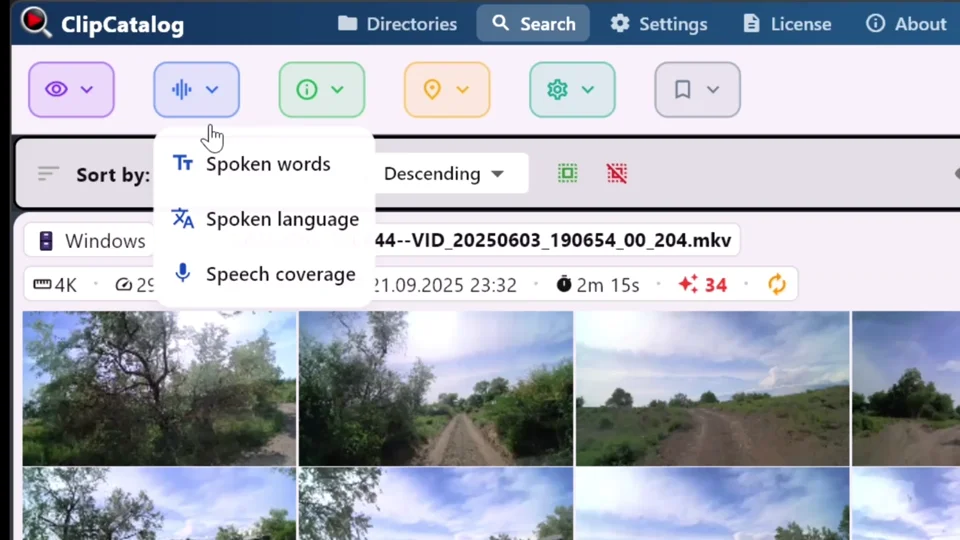
ClipCatalog starts from a different question: how do you find the right moment inside a large video archive? Current product materials emphasize AI analysis of what appears in the video, what is said, who appears, and how the footage behaves, which makes it closer to a retrieval engine than a classic asset browser.

Manual organization and smart collections vs transcript, face, and semantic discovery

Bridge gives users excellent manual structure. Adobe documents XMP metadata editing, templates, hierarchical keywords, labels, ratings, criteria-based search, and smart collections that remain up to date as files change. That is a mature organization model, especially for mixed-media teams that already maintain metadata carefully.

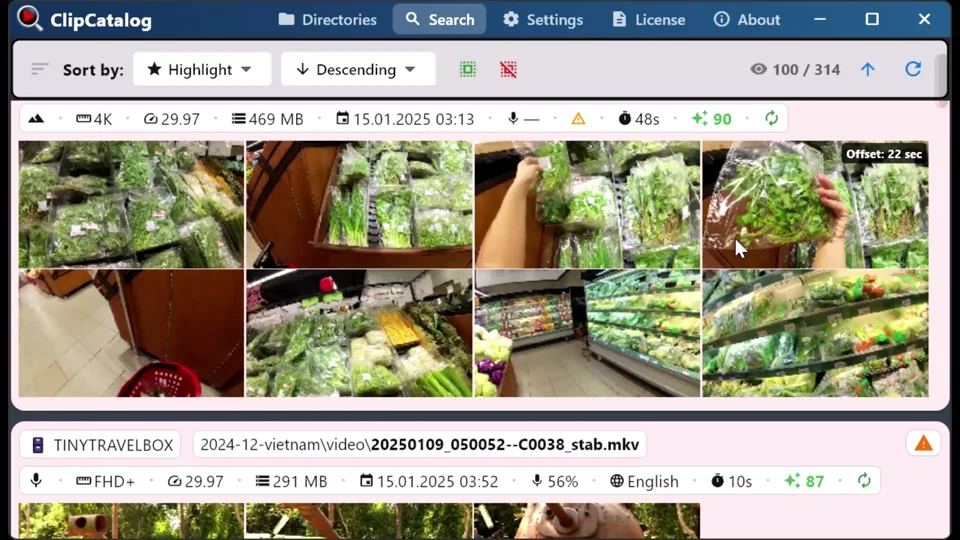
ClipCatalog reduces the amount of manual description you need to do up front. Current product materials describe transcript search, semantic search, face grouping, same-person discovery, footage-type filtering, and highlight ranking. Bridge can create collections across hard drives and help locate missing collection items, but its current public materials do not describe comparable transcript or face-based discovery surfaces.

Adobe ecosystem utility and edit handoff

This is one of the clearest areas where Adobe Bridge may be the more natural fit. Adobe documents Camera Raw access, Photoshop opening, Creative Cloud Libraries, Adobe Stock workflows, Premiere Pro sequence creation from selected clips, and Media Encoder queue or stitch workflows from Bridge.

ClipCatalog is not trying to be a general Adobe workflow hub. Its current materials point toward a narrower but deeper job: finding the clip, validating it quickly, exporting or copying what you need, and getting back to the edit with less manual digging.

Mixed-media prep and camera ingest vs archive-search depth

Bridge has workflow breadth that matters for many creative teams. Adobe documents Photo Downloader import, import-time rename rules, optional DNG conversion, export presets, quick one-off video utilities, and contact-sheet-oriented output. It is also cross-platform and currently marketed as a free download.

ClipCatalog gives up that breadth in exchange for search depth. It is Windows-only and video-first, but current product materials go much further on archive-oriented concerns such as external-drive handling, moved-folder relinking, transcript export, and compound video filtering. Buyers should decide whether their bottleneck is asset prep inside Adobe, or finding footage fast enough in the first place.

Where ClipCatalog stands out

These are the ClipCatalog strengths that look most relevant in an Adobe Bridge comparison, based on current product materials rather than broad marketing claims.

Search inside video, not only around it

ClipCatalog is built to search what is visible, what is said, who appears, and how the footage behaves. That is a different retrieval model from Bridge's current metadata, keyword, and folder-oriented search approach.

Person-based discovery for recurring faces

Current product materials document face grouping, person filters, and a direct workflow for finding more videos with the same person. Adobe Bridge's reviewed public materials do not currently describe a comparable face-based video workflow.

Transcript search and transcript export

ClipCatalog treats spoken words as a first-class search surface. Current materials describe inline transcript viewing plus transcript copy, TXT export, and SRT export for editorial, research, and captioning workflows.

Archive resilience on external drives

If your video archive lives across SSDs, backup drives, and renamed folders, ClipCatalog's current volume tracking, disconnected-drive handling, and moved-folder relinking are unusually relevant.

Video-specific ranking and uncommon filters

Highlight scores, dialogue or voiceover or scenic filtering, technical video filters, and 360-degree awareness reflect retrieval workflows that were not publicly specified in the Adobe Bridge materials reviewed here.

Where Adobe Bridge may be the better choice

A fair comparison should also say where Adobe Bridge appears better aligned to the job. Based on current public materials, these are the clearest cases.

You manage mixed creative assets, not only video

Adobe Bridge is much broader in current public materials. It is designed for images, design files, PDFs, audio, video, and Adobe-native assets, which can make it the more natural hub for mixed-media creative work.

You already work inside the Adobe ecosystem

Camera Raw, Photoshop, Premiere Pro, Media Encoder, Creative Cloud Libraries, Adobe Stock, and Portfolio are all part of Bridge's public workflow story. If your asset manager needs to hand off into Adobe apps constantly, Bridge may be the closer fit.

Manual metadata, keywords, and smart collections are central

Adobe documents deep XMP metadata editing, hierarchical keywords, labels, ratings, metadata templates, and smart collections. If careful manual organization matters more than AI-driven video discovery, Bridge may genuinely be the better choice.

You want camera ingest, raw-photo prep, or quick batch utility

Photo Downloader, DNG conversion on import, Camera Raw access, Workflow Builder, export presets, and contact-sheet workflows make Bridge especially relevant for photographers and mixed photo-video teams.

You need macOS support or a free cross-platform desktop tool

Bridge runs on both Windows and macOS, and Adobe currently markets it as a free download. That changes the evaluation for buyers who need cross-platform access or a lower-cost starting point, while still carrying Adobe ID, activation, and connected-workflow qualifiers.

Frequently asked questions

Is ClipCatalog a good alternative to Adobe Bridge?

It can be, but mostly when your main problem is finding moments inside large video libraries rather than managing mixed creative assets with metadata and Adobe-app handoff. ClipCatalog is the more retrieval-focused fit for Windows video archives; Adobe Bridge is the broader fit for metadata-heavy, mixed-media creative organization.

Is Adobe Bridge free?

Adobe's current Bridge product page says "Download Bridge for Free." Adobe's Help materials also say internet connection, Adobe ID, and acceptance of license terms are required for activation and access to online services, and that some connected workflows, online services, or additional membership charges may apply.

Does Adobe Bridge transcribe video or let you search spoken words?

That was not publicly specified in the current Adobe Bridge materials reviewed for this page. Adobe documents search across filenames, keywords, metadata, filters, and smart collections, but transcript generation and spoken-word search were not described in the reviewed materials.

Can Adobe Bridge find the same person across videos?

That was not publicly specified in the current Adobe Bridge materials reviewed here. Bridge's current public documentation describes video metadata and preview workflows, but not face grouping or person-based video discovery.

Which tool fits better for large local video archives on external drives?

Based on current product materials, ClipCatalog may be the closer fit. Adobe Bridge can browse mounted folders, create collections across hard drives, and help locate missing collection items. ClipCatalog's current product materials go further with volume-aware filters, disconnected-drive handling, and moved-folder relinking built for archive search.

Which product makes more sense for photographers and Adobe Creative Cloud users?

Based on current public materials, Adobe Bridge may be the closer fit. Its public materials are more explicit about Photo Downloader import, Camera Raw access, Photoshop workflows, metadata templates, Creative Cloud Libraries, and Adobe publishing or handoff workflows.

Can Adobe Bridge send selected clips to Premiere Pro or Media Encoder?

Yes. Adobe's current Help materials describe creating a Premiere Pro sequence from selected Bridge videos and adding or stitching selected clips in Adobe Media Encoder.

Which product is stronger for metadata, labels, keywords, and smart collections?

Adobe Bridge, based on current public materials. Its documented XMP metadata tools, hierarchical keywords, labels, ratings, metadata templates, filters, and smart collections are more central to its product identity than they are to ClipCatalog's current video-first retrieval positioning.

Comparison note

This comparison is based on publicly available product information reviewed on March 17, 2026 and on current ClipCatalog product materials. It is intended to help buyers evaluate fit, not to imply affiliation, endorsement, or hands-on testing of Adobe Bridge beyond review of public materials. Adobe, Adobe Bridge, and ClipCatalog are trademarks of their respective owners.

See if ClipCatalog fits your video archive

Download the Windows trial, index a real folder, and compare whether AI-powered video search feels more useful than manual folder, keyword, and metadata workflows across up to 500 videos or 10 hours of footage.

500本の動画を無料で視聴 14日間の返金 単発購入