
ClipCatalog vs Axle AI
Ein sorgfältiger Vergleich für Käufer, die zwischen einem Windows-Desktop-Tool für lokales Video-Retrieval und Axle AI als breiterer Media-Asset-Management-Plattform für Shared Storage, Browser-Review und private Deployments wählen.
Wichtige offizielle Anbieterquellen, die für diese Seite geprüft wurden
Die obigen Links zeigen die wichtigsten öffentlichen Quellen, die für diesen Vergleich verwendet wurden. Produktdetails können sich ändern. Prüfen Sie Preise, Tarifgrenzen und den Funktionsumfang vor dem Kauf noch einmal auf der Live-Website des Anbieters.
- Kostenlose Testversion
- 500 videos / 10 hours of footage
- Lizenzbedingungen
- 2 Aktivierungen + 5 Jahre kostenlose Updates
- Media Asset Management
- Ab USD 2.995
- Axle AI Tags
- Ab USD 200/Monat
- Zusatzkosten
- Private Deployments und AI-Add-ons
Öffentliche Preise hängen vom Paket und Deployment-Modell ab.
Detaillierter Funktionsvergleich
Diese Tabelle zeigt Unterschiede, die eine Kaufentscheidung wirklich beeinflussen. Bei Axle AI sind paketabhängige Einschränkungen wichtig.
| Funktion | ClipCatalog | Axle AI |
|---|---|---|
| Primäre Ausrichtung | AI-gestützte Windows-Desktop-Videokatalogisierung und Retrieval für große lokale Bibliotheken. | Media-Asset-Management- und AI-Suchplattform für Shared-Storage-Video-Workflows. |
| Paketierung und Zugriff | Eine einzelne Windows-Desktop-App, die Ordner und Archive direkt auf dem Rechner indexiert. | Browserorientierte Plattform mit On-Prem-, Private-Cloud-, Cloud- und paketabhängigen Deployment-Optionen. |
| Typischer Käufer | Einzelanwender, Editoren, Archivare und kleine Teams, die schnell den richtigen Clip finden müssen. | Medienteams, Broadcaster, Posthäuser und Organisationen mit zentralen gemeinsam genutzten Bibliotheken. |
| Speicherausrichtung | Für lokale Ordner, externe Laufwerke, Archiv-Volumes und die Wiederherstellung verschobener Ordner gebaut. | Für zentralen Speicher in größerem Maßstab, einschließlich NAS, SAN, Object Storage und LTO-naher Workflows. |
| Datenschutz und AI-Verarbeitung | Local-first-Analyse mit expliziten Face-Processing-Kontrollen und lokaler Löschung von Gesichtsdaten. | Datenschutz hängt vom Deployment ab; On-Prem- und Private-Cloud-Pakete werden als in sich geschlossene AI positioniert. |
| Suche nach KI-Schlagwörtern | Ja. KI-Verschlagwortung und die Suche nach KI-Schlagwörtern sind zentrale Teile der Videosuche. | Ja. Öffentliche Materialien nennen Szenenverständnis, Tagging, OCR sowie Objekt- und Logo-Erkennung. |
| Transkript- und Sprachsuche | Ja. Transkription und Suche nach gesprochenen Worten sind Kernfunktionen. | Ja. Speech-to-Text und durchsuchbare Sprache sind verfügbar, der genaue Umfang hängt aber vom Paket ab. |
| Semantische Suche | Ja. Freitextbasierte semantische Videosuche mit Genauigkeitsstufen und Relevanzsortierung. | Ja. Öffentliche Materialien nennen semantische, Vektor- und kontextuelle Suche, aber keine gleichwertigen Genauigkeitsregler. |
| Gesichtserkennung | Ja. Face-Gruppierung, Personenfilter und ein direkter Workflow für weitere Videos mit derselben Person. | Ja, mit Einschränkungen. Je nach Paket werden Celebrity- oder trainierbare Gesichtserkennung genannt. |
| Ordner- und Archivhandling | Pfad-, Verzeichnis- und Volumenfilter plus Handling getrennter Laufwerke und Relinking verschobener Ordner. | Starke Positionierung für zentralen Speicher, aber vergleichbare Pfadfilter oder Relinking verschobener Ordner wurden öffentlich nicht klar beschrieben. |
| Review und Zusammenarbeit | Desktop-Suche und Wiedergabe mit Fokus auf Retrieval statt auf Browser-Freigaben. | Stärker bei gemeinsamem Browser-Review, Proxy-Wiedergabe, Kommentaren, Freigaben, Berechtigungen und Zusammenarbeit. |
| Integrationen und Automatisierung | Fokus auf Suche, Transkript-Export und Dateiübergabe. | Stärker bei APIs, Premiere-Panels, Automatisierung, Archivintegrationen und Partner-Workflows. |
| Videospezifische Retrieval-Tiefe | Technische Videofilter, Footage-Typ-Filter, Highlight-Ranking sowie TXT- oder SRT-Export. | AI-Suche ist klar, aber gleichwertige Videofilter, Ranking-Tools oder Transkript-Export wurden öffentlich nicht klar spezifiziert. |
Die Hinweise zu Axle AI fassen öffentliche Produktinformationen zusammen. Deployment, Preise, Nutzerzahlen und der genaue AI-Umfang sollten vor dem Kauf in den aktuellen Materialien von Axle AI geprüft werden.
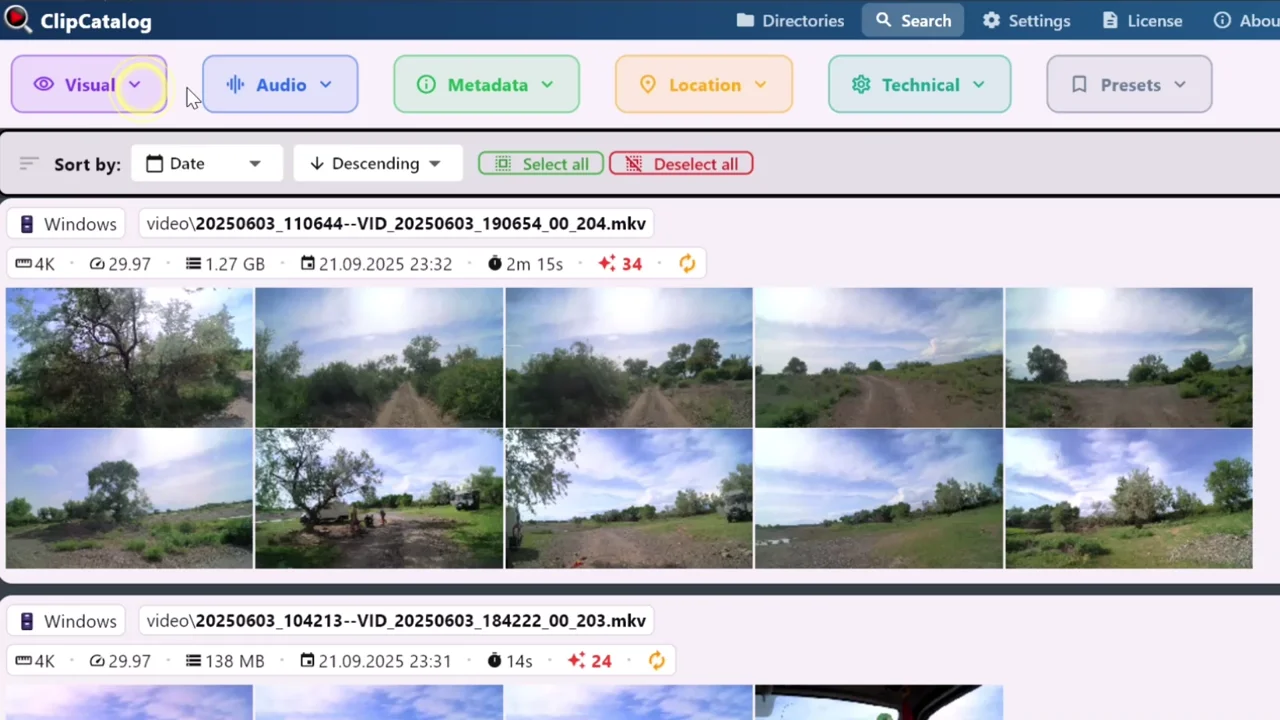
Lokale Videobibliotheken durchsuchen, ohne erst eine gemeinsame Infrastruktur aufzubauen
ClipCatalog indiziert Ordner und Archive direkt auf dem Windows-Rechner, den Sie bereits nutzen, statt eine browserbasierte Bereitstellung auf gemeinsamem Speicher vorauszusetzen.
Gemeinsamer Media-Stack vs. lokales Desktop-Retrieval
ClipCatalog dreht sich um die schnelle Suche nach dem richtigen Shot im lokalen Videoarchiv. Semantische Suche, Transkripte, Personensuche, technische Filter, Pfadfilter und Transkript-Export laufen in einem Windows-Workflow zusammen.
Axle AI zielt auf eine breitere Aufgabe: gemeinsames Medienmanagement rund um zentralen Speicher, Browserzugriff, Berechtigungen, Freigaben und organisatorische Wiederverwendung.
Beide setzen auf private AI, aber auf unterschiedliche Weise
ClipCatalog nutzt ein Local-first-Desktop-Modell mit expliziten Face-Processing-Kontrollen und lokaler Löschung gespeicherter Gesichtsdaten.
Axle AI positioniert On-Prem- und Private-Cloud-Deployments oft als in sich geschlossene AI und bringt dieses Datenschutzversprechen in eine Multi-User-MAM-Umgebung.
Zentraler Speicher vs. rotierende Archiv-Laufwerke
Axle AI ist stärker, wenn Medien bereits auf NAS, SAN, Object Storage, LTO-nahen Archiven oder in der Private Cloud liegen.
ClipCatalog ist stärker, wenn Archive über externe SSDs, Backup-Laufwerke und umbenannte Ordner verteilt sind und Volume-Tracking oder Relinking täglich wichtig sind.
Semantische Suche auf beiden Seiten, aber andere Retrieval-Tiefe
Axle AI bietet klar semantische Suche, Transkription, OCR, Objekterkennung und verwandte AI-Funktionen über mehrere Pakete hinweg.
ClipCatalog sticht dadurch hervor, dass diese Signale mit Personensuche, Pfad- und Volumenfiltern, Footage-Typ-Filtern, Highlight-Ranking und Transkript-Export in einem retrieval-zentrierten Workflow zusammenkommen.
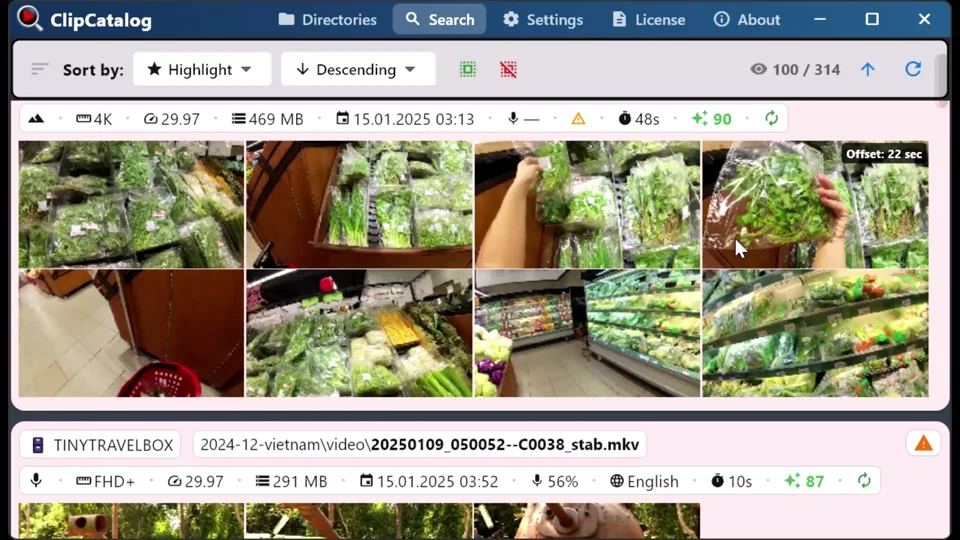
Archivkontext auf externen Laufwerken durchsuchbar halten
ClipCatalog ist für SSDs, Backup-Laufwerke und umbenannte Ordner gebaut, wo Volume-Tracking und Neuverknüpfung wichtiger sind als zentrale Speicherverwaltung. Zum Öffnen der Originaldateien muss das Laufwerk aber wieder verbunden oder der Ordner neu verknüpft werden.
Wo ClipCatalog heraussticht
Das sind die wichtigsten ClipCatalog-Stärken im Vergleich mit Axle AI.
ClipCatalog kombiniert semantische Suche, Transkripte, Gesichter, Metadaten, Pfad- und Volumenfilter, technische Filter und Footage-Typ-Filter in einem Windows-Desktop-Workflow.
Face-Gruppierung, Personenfilter und der direkte Workflow für weitere Videos mit derselben Person sind expliziter als in den öffentlichen Beschreibungen von Axle AI.
Volume-Tracking, Handling getrennter Laufwerke und Relinking verschobener Ordner helfen besonders bei Archiven auf portablen Laufwerken.
ClipCatalog behandelt Transkripte als wiederverwendbare Arbeitsressource mit Kopieren sowie TXT- und SRT-Export.
Wo Axle AI die bessere Wahl sein kann
Das sind die klarsten Situationen, in denen Axle AI besser passen kann.
Axle AI ist klarer für Multi-User-Workflows über zentralen Speicher, Browserzugriff, Review und Wiederverwendung ausgelegt.
Axle AI ist bei großen zentralen Umgebungen und Speicherintegrationen deutlich expliziter.
Browser-Freigaben, granulare Berechtigungen, Premiere-Integration, APIs und Workflow-Automatisierung sind stärkere Axle-AI-Bereiche.
Häufige Fragen
ClipCatalog ist eine Windows-Desktop-App für KI-gestütztes lokales Video-Retrieval; Axle AI ist eine Media-Asset-Management-Plattform mit Fokus auf gemeinsamen Speicher und browserbasiertes Review für Teams. ClipCatalog gewinnt bei Geschwindigkeit für Einzelnutzer mit großen lokalen Archiven; Axle AI gewinnt bei Team-Workflows mit NAS-/SAN-/Cloud-Speicher.
Ja — ClipCatalog ist eine reine Windows-App für KI-gestützte Videosuche, die sich ausschließlich auf lokale Ordner und externe Laufwerke konzentriert. Sie bietet semantische Suche, Gesichtserkennung und Transkriptsuche ohne den Team-Collaboration-Overhead einer MAM-Plattform. 14 Tage kostenlos testen.
Ja, wenn Ihr Hauptbedarf schnelles Desktop-Video-Retrieval statt vollständigem gemeinsamem Media Asset Management ist. ClipCatalog passt für Windows-Nutzer mit großen lokalen Archiven, Axle AI für breitere Team-Workflows.
Axle AI ist die klarere Wahl für NAS-, SAN-, Object-Storage-, LTO- und Private-Cloud-Umgebungen.
Meist ClipCatalog, weil es getrennte Laufwerke, volumenbasierte Filter und Relinking verschobener Ordner explizit adressiert.
Ja. Öffentliche Materialien nennen semantische oder kontextuelle Suche, Transkription, durchsuchbare Sprache und verwandte AI-Analyse, wobei der genaue Umfang vom Paket abhängt.
Nicht immer. Axle AI positioniert On-Prem- und Private-Cloud-Angebote als in sich geschlossen, doch Käufer sollten Hosting und Datenflüsse für ihr Paket genau bestätigen.
Axle AI. Die Plattform ist klarer für gemeinsames Browser-Review, Proxy-Workflows, Berechtigungen, Kommentare und Freigaben gebaut.
Hinweis zum Vergleich
Dieser Vergleich basiert auf öffentlichen Produktinformationen und soll die Eignung bewerten, nicht eine Affiliation, Empfehlung oder Praxistests andeuten. Axle AI und ClipCatalog sind Marken ihrer jeweiligen Inhaber.
Relevante Vergleiche
Wenn Sie diesen Workflow mit anderen Tools vergleichen, starten Sie mit diesen direkten Gegenüberstellungen.
Prüfen Sie, ob ClipCatalog zu Ihrem Videoarchiv passt
Laden Sie die Windows-Testversion herunter, indexieren Sie einen echten Ordner und vergleichen Sie, wie schnell Sie gesprochene Worte, Personen, visuelle Szenen und archivspezifische Clips in Ihrem eigenen Material finden.