
ClipCatalog vs Peakto
Une comparaison rigoureuse pour les acheteurs qui hésitent entre la recherche vidéo orientée Windows de ClipCatalog et le gestionnaire média plus large de Peakto sur macOS.
Principales sources officielles du fournisseur consultées pour cette page
Les liens ci-dessus mettent en avant les principales sources publiques utilisées pour cette comparaison. Les détails du produit peuvent changer. Revérifiez les prix, les limites de formule et le périmètre des fonctionnalités sur le site officiel du fournisseur avant d'acheter.
- Essai gratuit
- 500 vidéos / 10 heures de séquences
- Accès à toute la bibliothèque
- Un e-mail débloque 14 jours, une fois par installation ou e-mail
- Conditions de licence
- 2 activations + 5 ans de mises à jour gratuites
- Professional
- $45/mois
- Annuel
- À partir de $12 / $35 par mois
- 2 ans
- À partir de $10 / $25 par mois
- Enterprise
- Devis personnalisé
Les offres annuelles et 2 ans incluent un essai de 7 jours.
Comparaison détaillée des fonctionnalités
Ce tableau se concentre sur les points qui changent le plus la décision d’achat entre ces deux produits.
| Capacité | ClipCatalog | Peakto |
|---|---|---|
| Orientation principale | Catalogage, indexation et recherche vidéo par IA sur Windows pour de grandes bibliothèques vidéo. | Gestionnaire média macOS qui centralise photos, vidéos, dossiers, catalogues et certains projets d’éditeur. |
| Système d’exploitation | Application de bureau Windows. | Application Mac native pour macOS 12+ avec accès distant à la bibliothèque via navigateur. |
| Focus média | Vidéo d’abord : recherche, révision, transcripts, visages, logique d’archive et filtres techniques. | Gestion média plus large à travers photos et vidéos, avec compatibilité pour dossiers, catalogues et certains environnements de montage. |
| Confidentialité et traitement local | Workflow local-first avec contrôles explicites sur le traitement des visages et suppression locale des données faciales. | Positionné autour de l’analyse IA locale et d’un accès navigateur sans téléverser les médias vers le cloud. |
| Recherche vidéo en langage naturel | Oui. Recherche sémantique avec texte libre, contrôles de précision et tri par pertinence. | Oui. Recherche par prompts sur les frames et recherche en langage naturel pour scènes et passages. |
| Recherche dans les transcripts et dialogues | Oui. Workflow central avec affichage et export. | Oui. Peakto peut générer des transcripts, chercher dans les dialogues et surligner les passages correspondants. |
| Fonctions visage pour la vidéo | Oui. Détection, regroupement, filtres de personnes et recherche de la même personne. | Les documents publics actuels restent centrés sur les photos ; la recherche de visage dans la vidéo est annoncée comme à venir. |
| Disques externes et gestion d’archives | Très solide sur les volumes externes, les alertes de disques déconnectés, les dossiers indisponibles et la reliaison de dossiers déplacés. | Centralise les médias depuis NAS, SSD et disques, et conserve des aperçus quand les originaux sont hors ligne. |
| Accès navigateur et collaboration | Orienté recherche locale sur poste de travail plutôt que revue dans le navigateur. | Propose un accès web ; collaboration, partage invité et rôles varient selon l’offre. |
| Pré-montage et passerelle | Orienté recherche, révision, export de transcripts et accès externe aux fichiers. | Met en avant subclips, marqueurs, bacs et passerelles vers les logiciels de montage, avec vérification conseillée sur le support exact. |
Les remarques sur Peakto résument les informations publiques consultées. Quand la documentation était floue, le tableau le dit explicitement.
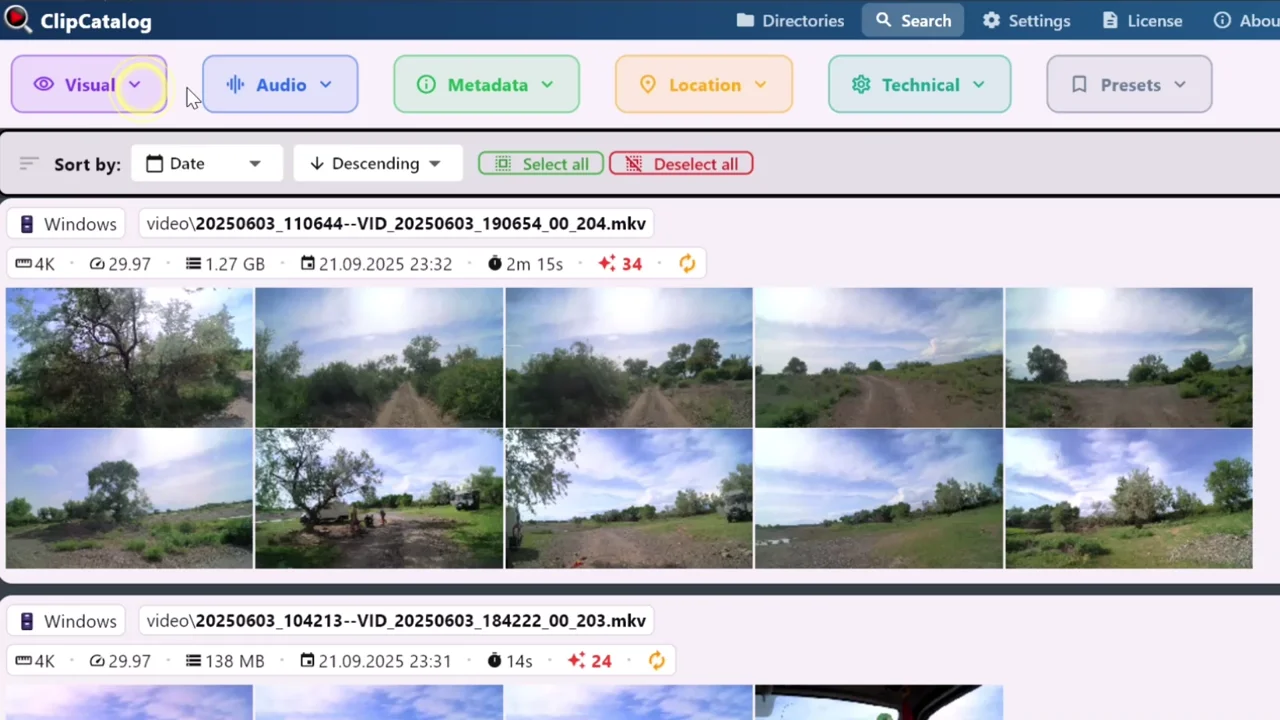
Rechercher dans une archive vidéo Windows depuis un seul endroit
ClipCatalog se concentre sur une recherche vidéo profonde dans de grandes vidéothèques plutôt que sur une organisation plus large de médias mixtes.
Profondeur de recherche vidéo vs gestion média plus large
ClipCatalog est défini comme une bibliothèque vidéo searchable et un système de retrieval. Cela se voit dans la recherche par transcript, par personne, dans les filtres techniques et la gestion d’archives.
Peakto prend aussi en charge la recherche vidéo, mais sa définition produit est plus large et plus proche d’un gestionnaire mixte pour bibliothèques créatives sur Mac.
Workflows d’archives sur Windows vs centralisation native Mac
ClipCatalog est explicite sur les disques déconnectés, les dossiers indisponibles, le suivi de volumes et la reliaison de dossiers déplacés.
Peakto met l’accent sur la centralisation des SSD, disques, NAS et catalogues créatifs, tout en gardant des aperçus disponibles même quand la source originale est hors ligne.
Profondeur de recherche de plans vs accès navigateur et partage
ClipCatalog vise ceux qui doivent réduire rapidement un grand corpus vidéo grâce à des filtres sémantiques, transcripts, visages, chemins, volumes et techniques.
Peakto insiste davantage sur l’accès au contenu par navigateur ainsi que sur la collaboration et le partage invité sur les offres supérieures.
Préparation au montage
Peakto peut être le meilleur choix si vous voulez que votre gestionnaire d’actifs participe au pré-montage avec subclips, marqueurs, bacs et passerelles vers le logiciel de montage.
ClipCatalog est plus fort sur la recherche, la validation, la récupération et l’export de transcripts que sur l’intégration directe avec la station de montage.
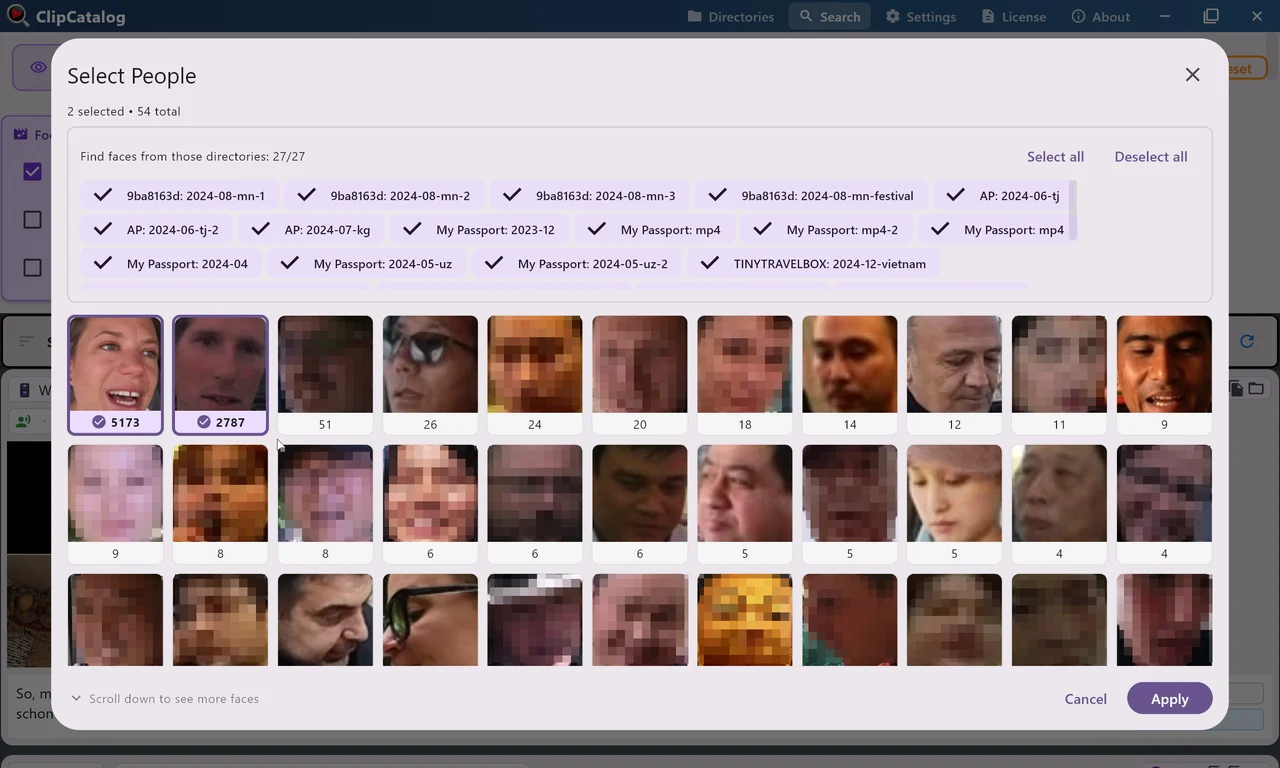
Transformer des visages récurrents en recherche vidéo réutilisable
ClipCatalog regroupe les personnes à travers votre bibliothèque pour que vous puissiez filtrer à nouveau sur la même personne, ce qui reste un différenciateur ici.
Là où ClipCatalog se démarque
Voici les points forts de ClipCatalog les plus importants face à Peakto.
ClipCatalog combine recherche sémantique, recherche dans les transcripts, personnes, métadonnées, filtres techniques et filtres liés au stockage.
ClipCatalog propose déjà la détection des visages dans la vidéo, leur regroupement, des filtres par personne et la recherche de la même personne.
Le suivi des volumes, la gestion des disques déconnectés et la reliaison de dossiers déplacés comptent beaucoup quand les archives tournent sur plusieurs disques.
Les transcripts se consultent dans l’interface, se copient et s’exportent en TXT ou SRT.
Là où Peakto peut être le meilleur choix
Voici les cas les plus clairs où Peakto peut mieux convenir.
Peakto est un produit Mac natif et peut sembler plus naturel si toute l’équipe travaille sur Mac.
Peakto est plus large qu’un simple outil de recherche vidéo et centralise photos, vidéos, dossiers, NAS et certains catalogues créatifs.
Peakto offre un accès distant via navigateur et une orientation plus collaborative que ClipCatalog.
Peakto va plus loin sur les subclips, marqueurs, bacs et le handoff vers les logiciels de montage, même s’il faut vérifier les détails du plan.
Questions fréquentes
Oui, surtout si votre workflow repose sur Windows et que votre problème principal est de retrouver la bonne vidéo dans une grande archive locale.
ClipCatalog. L’application native de Peakto est pour macOS, alors que ClipCatalog est positionné comme un produit desktop Windows.
Les deux valorisent le stockage local, mais ClipCatalog va plus loin sur les disques déconnectés, les filtres par volume, les dossiers indisponibles et la reliaison de dossiers déplacés.
Oui. Peakto peut générer des transcripts, chercher dans les dialogues et surligner les passages correspondants.
Les documents publics actuels restent centrés sur les photos, et la page videographer de Peakto présente la recherche de visage dans la vidéo comme à venir.
Peakto. L’accès navigateur, les rôles de collaborateurs et le partage invité y sont bien plus explicitement positionnés que chez ClipCatalog.
Note de comparaison
Cette comparaison s’appuie sur des informations produit publiques pour aider les acheteurs à évaluer l’adéquation, sans suggérer affiliation, approbation ou test pratique. Peakto et ClipCatalog sont des marques de leurs propriétaires respectifs.
Comparaisons pertinentes
Si vous comparez ce flux de travail à d'autres outils, commencez par ces pages comparatives.
Voyez si ClipCatalog convient à votre archive vidéo
Téléchargez l’essai Windows, indexez un vrai dossier et comparez la vitesse à laquelle vous retrouvez paroles, personnes et scènes visuelles dans votre propre archive.
Conditions de licence et disponibilité des programmes d’installation