ClipCatalog logo ClipCatalog
ES
All comparisons Comparison page

ClipCatalog vs Frame.io

A careful comparison for buyers deciding between a Frame.io alternative for local video archive search and a cloud-first collaboration platform for review, approvals, sharing, Camera to Cloud, and active productions.

This page is based on current ClipCatalog product materials and Frame.io public materials reviewed on March 17, 2026, including Frame.io home, pricing, file-management, review-and-approval, iOS, Camera to Cloud, search, transcription, storage, and help-center pages.
Revisado Revisado por equipo editorial de ClipCatalog el 17 de marzo de 2026.

Principales fuentes oficiales del proveedor revisadas para esta página

Los enlaces anteriores destacan las principales fuentes públicas utilizadas para esta comparativa. Los detalles del producto pueden cambiar, así que vuelve a comprobar los precios, los límites del plan y el alcance de las funciones en el sitio oficial del proveedor antes de comprar.

Detailed feature comparison

This table focuses on the capabilities that most materially change a buying decision between a local video retrieval tool and a cloud review platform. Where Frame.io\'s public materials include plan, permission, beta, or enterprise qualifiers, the row says so directly.

ClipCatalog and Frame.io comparison table
Capability ClipCatalog Frame.io
Primary product orientation AI-powered Windows desktop video cataloging, indexing, and retrieval for large local video libraries. According to current public materials, a cloud-based creative workflow platform for file management, review and approval, workflow management, sharing and presentation, and Camera to Cloud workflows.
Access model and supported clients Windows desktop application. Browser-first on desktop, with official materials also documenting iPhone and iPad apps, an Apple TV app, a Premiere Pro panel, and the Frame.io Transfer desktop app for Mac and PC. Official help materials reviewed here do not list a native Android app.
Typical buyer and workflow Solo creators, editors, archivists, and small teams whose main problem is finding the right footage quickly inside large local archives. Creative teams moving work through upload, review, approvals, client sharing, delivery, and often on-set or Adobe-centered collaboration workflows.
Storage and deployment model Local-first desktop app that indexes folders, drives, and archives directly on the user's machine. Cloud workspace by default. Current help docs say uploaded originals use Frame.io cloud storage, while Enterprise Storage Connect can redirect originals to a customer-managed AWS S3 bucket. Frame.io still stores generated proxies and thumbnails.
Search coverage and archive indexing scope Users choose which local folders and volumes to index, including large archives and external drives. Current official search materials describe account-wide search plus media-intelligence search. Public help documents metadata, transcript, comment, NLP, and semantic search, with plan gating clearest for semantic visual search, which is documented for Team and Enterprise accounts.
Spoken-word search and transcription Yes. Speech transcription and spoken-word search are core search surfaces. Yes. Current feature, pricing, and help materials describe searchable transcripts, click-to-jump transcript navigation, captions, and optional speaker labeling for audio and video.
Transcript export and caption outputs Yes. Transcripts can be copied or exported as TXT or SRT. Yes, with qualifiers. Current help docs describe transcript and caption export as TXT, SRT, and VTT, but export permissions depend on role and the transcript must already exist in the project.
Natural-language and semantic search Yes. Semantic video search is built around free-text descriptions plus strictness controls and relevance sorting. Yes, with qualifiers. Current official help documents metadata-aware NLP search across comments, transcripts, and additional metadata, while semantic visual search for images and video is explicitly documented for Team and Enterprise accounts. Current help also says custom metadata is not yet supported in NLP.
Face recognition and person search Yes. Face detection, face grouping, person filters, and a direct workflow for finding more videos with the same person are documented. Not currently, according to current public help materials. Frame.io's search FAQ says semantic search does not currently support finding specific people with facial recognition, though the vendor says it is under consideration.
Metadata and technical search depth Combines visual labels, transcript terms, people, metadata, path, volume, technical video filters, footage-type filters, and saved presets in one workflow. Strong metadata search story. Current materials describe broad built-in technical and workflow metadata coverage plus custom metadata fields, and search across file attributes such as codec, frame rate, resolution, duration, file size, and upload date. Current search docs say custom metadata is not yet supported in NLP.
Saved searches and reusable search presets Yes. Saved search presets are part of the current workflow. Not currently, according to the current search FAQ. Frame.io says saved searches are not yet supported and search results cannot currently be converted directly into Collections.
Folder, path, and external-drive handling Directory, path, and volume filters are part of the search surface, and current materials emphasize disconnected drives, external volumes, and moved-folder relinking. Public materials describe nested cloud folder trees, preserved folder hierarchy on upload, and the Transfer desktop app. Comparable local path-contains filters, disconnected-drive states, or moved-folder relinking were not publicly specified in the materials reviewed.
Review and playback workflow Thumbnail-heavy browsing, in-app playback, transcript viewing, and direct open-in-folder or external-open actions for retrieval workflows. A major Frame.io strength. Current official materials emphasize frame-accurate comments, comment attachments, comparison viewing, captions, version stacks, browser review, iPhone and iPad review, and Apple TV viewing, with some higher-fidelity playback claims varying by app and plan.
Collaboration, approvals, and secure sharing Current ClipCatalog materials focus on desktop search, review, and retrieval rather than browser-based approvals or client sharing. Yes, with tier qualifiers. Current materials describe comments, internal comments on Team, public and branded shares, passphrases, expirations, download or comment controls, version hiding, watermarking, enterprise secure sharing, DRM, and SSO.
Mobile, on-set, and Camera to Cloud workflows Current product materials focus on desktop search and review rather than cloud-based set-to-post coordination. Frame.io is far more explicit here. Public materials describe iPhone and iPad apps, Apple TV playback, Camera to Cloud workflows, partner camera and device support, and direct flows into Adobe Lightroom plus Premiere-centered review.
AI privacy and control qualifiers Current product materials describe local-first analysis with explicit face-processing controls and local face-data deletion. Current public materials say Adobe does not train models on customer assets, semantic search can be opted out via support, and transcription can be disabled at the account level. Media still lives in cloud storage by default unless an Enterprise customer configures Storage Connect.
Pricing model One-time license per person with 2 activations and lifetime updates included, plus a trial limited to 500 videos or 10 hours. Frame.io publicly offers Free, Pro, Team, and Enterprise plans. As of March 17, 2026, the pricing page listed Pro at USD 15/member/month plus tax and Team at USD 25/member/month plus tax, with annual-billing discounts and Enterprise custom pricing. Storage, member limits, and sharing or security controls vary by plan, so buyers should confirm the live pricing table before purchase.

Frame.io plan entitlements, media-intelligence limits, and security features vary by tier. Some search capabilities are still described by Frame.io as beta, so buyers should confirm live pricing and help-center documentation before purchasing.

This is no longer a simple search-versus-review comparison

Frame.io now publicly documents stronger search than many buyers associate with the product, including transcript search, comment search, metadata-aware NLP search, and semantic visual search on some plans. That means the comparison is not just about whether Frame.io can search; it is about what gets indexed, which plan enables what, and whether the search is meant to serve an active cloud workspace or a long-term archive.

ClipCatalog still starts from a different place. It is positioned as a searchable video library for folders and drives you already own, with retrieval-oriented controls such as path and volume filters, person discovery, footage-type filtering, and video-specific technical narrowing.

Search depth is different from search coverage

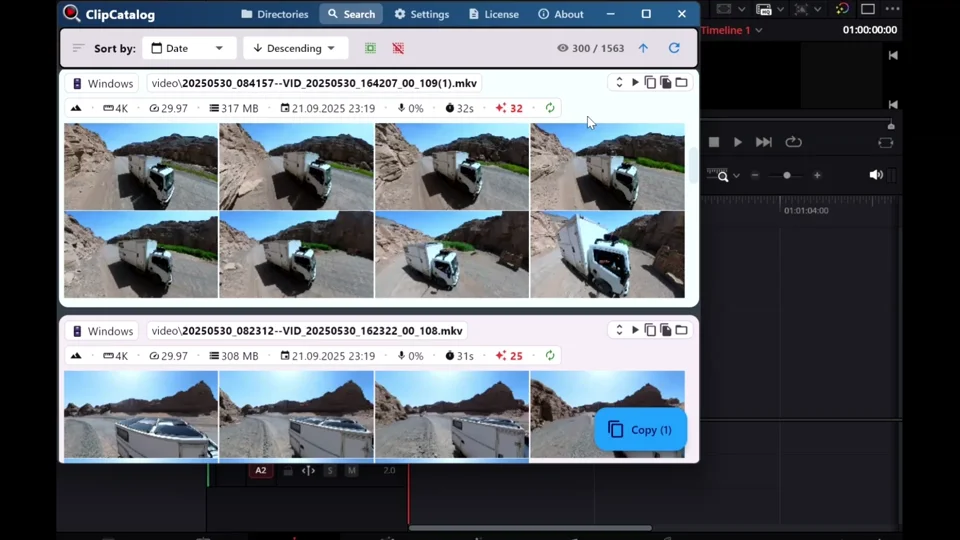
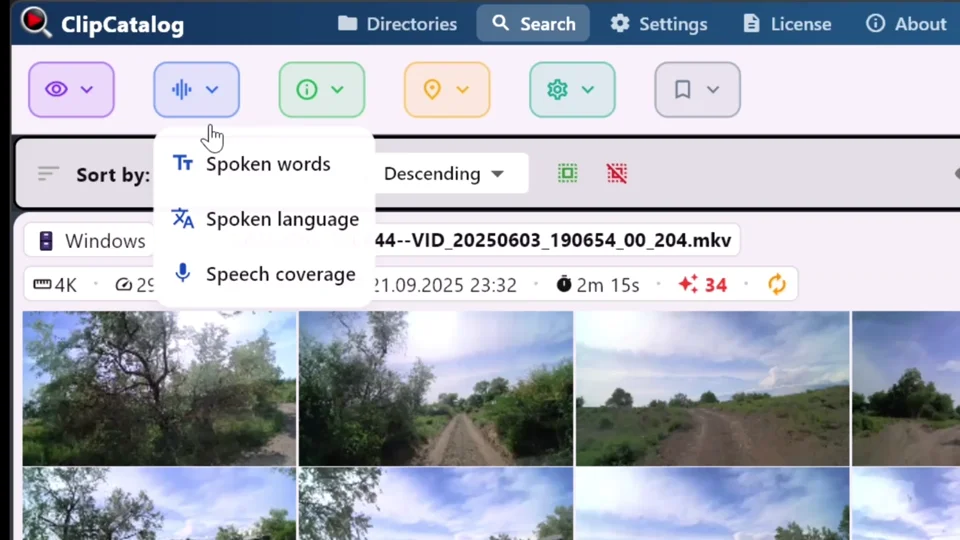
ClipCatalog search is built around local archive depth: semantic descriptions, spoken words, faces, metadata, technical filters, highlight ranking, saved presets, and path-aware retrieval in the same desktop workflow. That is especially useful when the library is large, historical, and spread across multiple local volumes.

Frame.io search is real and improving, but its own materials include important qualifiers. Current public guidance says semantic visual search is plan-limited, saved searches are not yet supported, custom metadata is not yet supported in NLP, and media-intelligence results are capped in the current help docs. For active cloud projects that may be fine. For deep archive discovery, it can change the evaluation.

Cloud review, approvals, and Camera to Cloud change the buying decision

Frame.io is much stronger when the real bottleneck is collaboration. Its public materials emphasize browser review, comments, secure shares, watermarking, mobile viewing, Apple TV playback, and Camera to Cloud flows that bring media from capture into post and stakeholder review quickly.

ClipCatalog is not trying to be that. Its current materials focus on helping a user or small team find the right clip faster on a Windows machine. If the deciding issue is approvals, stakeholder visibility, or set-to-post speed, Frame.io may be the better fit even if ClipCatalog is deeper for archive retrieval itself.

Adobe ecosystem fit versus archive resilience

Frame.io publicly leans into Premiere Pro panels, Workfront connectivity, Lightroom connection, Transfer, and storage or security controls for teams. It also accepts a much wider mix of file types than a video-only desktop retrieval tool. That broader platform story can matter more than search depth if your environment is already cloud-coordinated.

ClipCatalog differentiates in almost the opposite direction: external-drive handling, relocated-folder recovery, transcript export, person-based video discovery, and a library model built around footage that already exists on your own disks. Buyers should decide which day-to-day pain is more expensive: not finding clips, or not coordinating work around them.

Where ClipCatalog stands out

These are the ClipCatalog strengths that look most relevant in a Frame.io comparison, based on current product materials rather than broad marketing claims.

Local archive search without cloud ingest

ClipCatalog is built to index the folders and drives you already have. If your footage library lives on local disks, backup drives, or rotating SSDs, you do not need to re-home the archive into a cloud workspace first.

One retrieval workflow across many video signals

Current ClipCatalog materials combine semantic descriptions, spoken words, person discovery, metadata, path and volume filters, technical filters, and footage-type filters inside one Windows workflow.

Person-based discovery in video

ClipCatalog documents face detection, face grouping, person filters, and a direct workflow for finding more videos with the same person. Current public Frame.io search materials do not yet describe an equivalent face-based workflow.

External-drive and moved-folder resilience

If your library keeps moving between SSDs, backup drives, or renamed folders, ClipCatalog's current volume tracking, disconnected-drive handling, and moved-folder relinking are unusually relevant.

Saved presets, footage-type filters, and highlight ranking

ClipCatalog's current product materials describe reusable search presets, dialogue or voiceover or scenic filtering, and highlight-based ranking. Those retrieval-focused tools were not publicly specified in the Frame.io search materials reviewed here.

Transcript reuse outside the app

ClipCatalog treats transcripts as working assets. Current materials describe copy, TXT export, and SRT export for captioning, editorial prep, research, and handoff.

Where Frame.io may be the better choice

A fair comparison should also say where Frame.io appears better aligned to the job. Based on current public materials, these are the clearest cases.

You need browser review and approvals across many stakeholders

Frame.io is much more clearly built for collaborative review. Its public materials emphasize browser playback, frame-accurate comments, annotations, shares, approvals, and feedback loops that work for clients, producers, and internal teams.

Camera to Cloud or set-to-post speed matters

If your bottleneck starts on set rather than in the archive, Frame.io may be the closer fit. Current materials describe Camera to Cloud workflows, partner device support, and quick movement from capture into review or editing.

You need sharing, watermarking, and enterprise security controls

Passphrases, expirations, download controls, share branding, watermarking, SSO, DRM, and Storage Connect make Frame.io more suitable when governance and controlled external sharing are part of the buying decision.

You live inside the Adobe ecosystem

Frame.io publicly emphasizes Premiere Pro integration, Workfront connectivity, Lightroom connection, Apple-platform review apps, and broader workflow automation. That is a broader collaboration stack than ClipCatalog's current desktop retrieval focus.

You want a cloud workspace for mixed media, not only video retrieval

Frame.io accepts a broad range of video, image, audio, PDF, and Office file types and is positioned as a central cloud workspace for creative teams. If your workflow spans many asset types and many reviewers, Frame.io may genuinely be the better choice.

Frequently asked questions

Is ClipCatalog a good alternative to Frame.io?

It can be, but mainly when your core problem is finding footage inside large local video libraries rather than moving cloud assets through review and approvals. ClipCatalog is the more retrieval-focused fit for Windows archive workflows; Frame.io is the broader fit for collaboration, sharing, and Camera to Cloud production flow.

Which product is better for large local video archives on external drives?

Based on current public materials, ClipCatalog may be the closer fit when the archive lives on external drives. Its current product materials are more explicit about external drives, volume-aware filtering, disconnected folders, and moved-folder relinking. Frame.io may be the closer fit when the library already lives in a cloud workspace or is being actively uploaded into one.

Does Frame.io offer transcript search and transcript export?

Yes. Current official materials describe searchable transcripts, captions, click-to-jump transcript navigation, and transcript or caption export in TXT, SRT, and VTT. Export permissions depend on role and the transcript must already exist in the project.

Does Frame.io offer semantic visual search?

Yes, with qualifiers. Current official help documents semantic visual search for images and video on Team and Enterprise accounts, alongside metadata-aware and transcript or comment-aware search features documented more broadly in current help materials.

Can Frame.io currently find the same person across videos with face recognition?

Not according to the current public search FAQ reviewed for this page. Frame.io says semantic search does not currently support finding specific people with facial recognition, though it says the feature is under consideration.

Which product is stronger for review links, approvals, and client feedback?

Frame.io, based on current public materials. This is one of its clearest strengths: browser review, frame-accurate comments, annotations, branded shares, permission controls, watermarking, and enterprise security options are central to its positioning.

Can ClipCatalog work with moved folders and disconnected external SSDs?

Yes. Current ClipCatalog product materials describe volume tracking, missing-folder warnings, disconnected-drive handling, and relocated-folder relinking.

Which product is a better fit for Camera to Cloud and Premiere-centered team workflows?

Frame.io. Its current public materials are far more explicit about Camera to Cloud, Premiere integration, iPhone and iPad review, Apple TV playback, and Adobe ecosystem connections than ClipCatalog's current desktop search positioning.

Comparison note

This comparison is based on publicly available product information reviewed on March 17, 2026 and on current ClipCatalog product materials. It is intended to help buyers evaluate fit, not to imply affiliation, endorsement, or hands-on testing of Frame.io beyond review of public materials. Frame.io, Adobe, and ClipCatalog are trademarks of their respective owners.

See if ClipCatalog fits your video archive

Download the Windows trial, index a real folder, and compare how quickly you can find spoken words, people, and visual scenes across up to 500 videos or 10 hours of footage.

500 vídeos gratis 14 días de reembolso Compra única